ZLINK
Z-Wave Plug-In Dimmer
PD-100
Light Dimmer Switch
HW: 255 FW: 50.03
ZM5202
6.81.00
0x0315 (789)
0x4744 (18244)
0x3032 (12338)
ZC10-18025997
2018-02-07 22:34:41.772263
N/A
Enhanced 232 Slave
Always On Slave
ZLINK PD-100 is a Z-Wave Plug-In dimmer designed for wireless on-off-dim control of connected dimmable lamps.
ZLINK PD-100 is a Z-Wave Plus certified device with S2 security and SmartStart features. You can now add this device securely and with ease using QR code on the product with compatible gateways supporting S2 and Smart Start. PD-100 communicates with other Z-Wave certified devices and updates your home into a smart home. PD-100 can be used to turn any plug in lamps into a smart lamp with dimmable light bulbs, turning it On, Off, or control dimming wirelessly. Each Z-Wave device also serves as a node to repeat the signal in the network, thus, extending the overall Z-Wave mesh wireless network range. Additional Features: • Power 120 VAC, 60Hz, up to 300 watts • Region US: 908.4, 916 MHz • Works w/ most incandescent, dimmable CFL & LED lights • Plugs into Standard AC outlet • Remotely controls On, Off, or Dim levels • Control lights via schedule • LED backlit manual On/Off button • Second wall AC outlet remains free • Works with any certified gateway supporting Z-Wave
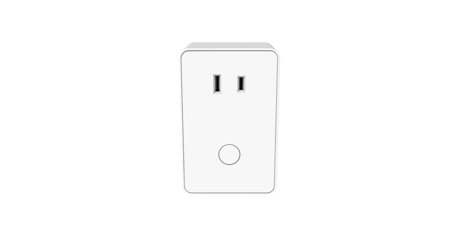
Product Picture


3 - Night Light
The LED indicator will be OFF when the connected light is ON and vice versa. When value =0 the LED indicator will be OFF when the the connected light is ON, and the LED will be ON when the connected light is OFF. If value =1 the LED indicator will be ON when the connected light is ON, and the LED indicator will be OFF when the connected light is OFF. If value =2 the LED indicator will always be OFF regardless of the load statusSize: 1 byte
Default: 0
Minimum: 0
Maximum: 0
Possible values
| From | To | Desription |
|---|---|---|
| 0 | 2 | When value =0 the LED indicator will be OFF when the the connected light is ON, and the LED will be ON when the connected light is OFF. If value =1 the LED indicator will be ON when the connected light is ON, and the LED indicator will be OFF when the connected light is OFF. If value =2 the LED indicator will always be OFF regardless of the load status |
9 - Level
Parameter 9 indicates the number of levels when the lighting when the timer runs out.Size: 1 byte
Default: 1
Minimum: 0
Maximum: 0
Possible values
| From | To | Desription |
|---|---|---|
| 1 | 99 | Parameter 9 indicates the number of levels when the lighting when the timer runs out. |
10 - Timer
Parameter 10 indicates the time duration of each level. The resolution is 10 milliseconds. For example a default value of 3 means the timer runs out every 30 milliseconds.Size: 1 byte
Default: 3
Minimum: 0
Maximum: 0
Possible values
| From | To | Desription |
|---|---|---|
| 1 | 255 | Parameter 10 indicates the time duration of each level. The resolution is 10 milliseconds. For example a default value of 3 means the timer runs out every 30 milliseconds. |
Place your Z-Wave controller in ""Inclusion"" mode. Then tap the button once to initiation Inclusion.
Place your Z-Wave controller in ""Exclusion"" mode. Then tap the button to initiation Exclusion.
1. Unplug the PD-100 from the AC outlet and also unplug the power plugs of the lighting from the module (if plugged in) 2. Press and hold the button on the PD-100 3. Plug the PD-100 back into the AC outlet with the button pressed After 3 seconds, release the button. If you see the button blink, that means that PD-100 has been reset successfully. Please use this procedure only when the network primary controller is missing or otherwise inoperable.
| Type | Value(s) |
|---|