LEEDARSON
NA Smart Plug(Z-Wave)
6A-PL-VAB-A0
On/Off Power Switch
HW: 1 FW: 1.00
ZM5101
6.71.01
0x0300 (768)
0x0200 (512)
0x000B (11)
ZC10-18076184
2018-07-09 22:58:29.308463
N/A
Enhanced 232 Slave
Always On Slave
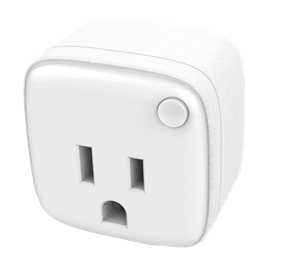
Smart plug is a Z-Wave Switch plugin module specifically used to enable Z-Wave command and control (on/off) of any plug-in tool. It can report wattage consumption or kWh energy usage.
Smart Plug can be included and operated in any Z-Wave network with other Z-Wave certified devices from other manufacturers and/or other applications. All non-battery operated nodes within the network will act as repeaters regardless of vendor to increase reliability of the network. Smart Plug is also a security Z-Wave device and supports the Over The Air (OTA) feature for the product’s firmware upgrade.


1 - Overcurrent protection
Smart Plug keep detecting the load power, once the AC current exceeds 16.5A for more than 4 seconds, smart plug's relay will turn off.Size: 1 byte
Default: 1
Minimum: 0
Maximum: 0
Possible values
| From | To | Desription |
|---|---|---|
| 0 | 0 | The function is disabled |
| 1 | 1 | The function is enabled. |
2 - Setting device status after power failure
Define how the Plug reacts after the power supply is back on.Size: 1 byte
Default: 0
Minimum: 0
Maximum: 0
Possible values
| From | To | Desription |
|---|---|---|
| 0 | 0 | Smart Plug memorizes its state after a power failure. |
| 1 | 1 | Smart Plug does not memorize its state after a power failure. Connected device will be on after the power supply is reconnected. |
| 2 | 2 | Smart Plug does not memorize its state after a power failure. Connected device will be off after the power supply is reconnected. |
3 - Notification when Load status change
mart Plug can send notifications to associated device (Group Lifeline) when the status of smart plug’s load is changed.Size: 1 byte
Default: 1
Minimum: 0
Maximum: 0
Possible values
| From | To | Desription |
|---|---|---|
| 0 | 0 | The function is disabled. |
| 1 | 1 | Send Basic report. |
| 2 | 2 | Send Basic report only when Load status is not changed by Z-WAVE Command. |
4 - LED Load indicator mode selection
Configure LED Display mode to prevent light pollution at night.Size: 1 byte
Default: 0
Minimum: 0
Maximum: 0
Possible values
| From | To | Desription |
|---|---|---|
| 0 | 0 | The LED status follows the load change. |
| 1 | 1 | when operating the load, The LED lights for 5 seconds and then turns off. |
16 - The value here represents minimum change in wattage (in terms of wattage) for a meter report to be sent
When the change value of load power exceeds the setting value, smart plug will send meter report (watt) to associated device (Group Lifeline).Size: 2 bytes
Default: 50
Minimum: 0
Maximum: 0
Possible values
| From | To | Desription |
|---|---|---|
| -32768 | 32767 | Available settings |
| -32768 | -1 | 65535 to 32768 |
| 1 | 32767 | 1 to 32767 |
| 0 | 0 | The function is disabled. |
17 - The value here represents minimum change in wattage percent (in terms of percentage) for a meter report (watt) to be sent
When the change value of the load power exceeds the setting value, smart plug will send meter report to associated device (Group Lifeline).Size: 1 byte
Default: 10
Minimum: 0
Maximum: 0
Possible values
| From | To | Desription |
|---|---|---|
| -128 | 127 | Available settings |
| -128 | -1 | 255% to 128% |
| 1 | 127 | 1% to 127% |
| 0 | 0 | The function is disabled |
100 - Setting the parameters 101~104 to the default states.
Setting the parameters 101~104 to the default states.Size: 1 byte
Default: 85
Minimum: 0
Maximum: 0
Possible values
| From | To | Desription |
|---|---|---|
| 85 | 85 | Available settings |
101 - Setting time for sending meter report (watt)
The interval time of sending meter report (watt) to associated device (Group Lifeline).Size: 4 bytes
Default: 600
Minimum: 0
Maximum: 0
Possible values
| From | To | Desription |
|---|---|---|
| 5 | 2678400 | Available settings |
| 0 | 0 | The function is disabled. |
102 - Setting time for sending meter report (KWh)
The interval of sending meter report (KWh) to association device (Group Lifeline).Size: 4 bytes
Default: 3600
Minimum: 0
Maximum: 0
Possible values
| From | To | Desription |
|---|---|---|
| 5 | 2678400 | Available settings |
| 0 | 0 | The function is disabled. |
103 - Setting time for sending meter report (voltage)
The interval of sending meter report (voltage) to association device (Group Lifeline).Size: 4 bytes
Default: 0
Minimum: 0
Maximum: 0
Possible values
| From | To | Desription |
|---|---|---|
| 5 | 2678400 | Available settings |
| 0 | 0 | The function is disabled |
104 - Setting time for sending meter report (current)
The interval time of sending meter report (current) to associated device (Group Lifeline).Size: 4 bytes
Default: 0
Minimum: 0
Maximum: 0
Possible values
| From | To | Desription |
|---|---|---|
| 5 | 2678400 | Available settings |
| 0 | 0 | The function is disabled |
254 - Enable/disable the configuration command
Lock/unlock all configuration parameters.Size: 1 byte
Default: 0
Minimum: 0
Maximum: 0
Possible values
| From | To | Desription |
|---|---|---|
| 0 | 0 | Unlock. |
| 1 | 1 | Lock. |
To add the product to the Z-Wave network: a. Make sure that the Smart Plug has been connected to the power supply. b. Set the Z-Wave network main controller into inclusion mode. c. Power on. d. The LED will blink fast until the inclusion is completed and then the LED will keep turning on or off. Otherwise, the LED will still blink slowly, in which you need to repeat the process from step b
To remove the product from the Z-Wave network: a. Insert the Smart Plug to power socket, the LED will follow the status (on or off) of its load’s power level. b. Set the Z-Wave network main controller into exclusion mode. c. Short press Button 3 times within 1.5 second. d. The LED will blink fast until the exclusion is completed, then the LED will keep on blinking slowly. Otherwise, the LED will keep on blink fast for 35 seconds and then follow the status (on or off) of its load status.
Reset Smart Plug to factory default: 1. Make sure that the Smart Plug has been connected to the power supply. 2. Press and hold the Button for 5 seconds. 3. If holding time is more than one second, the LED will blink faster and faster. If holding time is more than 5 seconds, the LED will be solid for 3 seconds to indicate that the resetting is successful. Otherwise, repeat step 2. Note: Reset to factory will remove Smart Plug from the Z-Wave network. Use this procedure only in the event that the network primary controller missing or otherwise inoperable.
| Type | Value(s) |
|---|
| Meter type |
|---|
| Electric Meter Consumption |