Aeotec
NanoMote Quad
ZWA003-C
Wall Controller
HW: 1 FW: 1.00
ZM5101
6.71.01
0x0371 (881)
0x0002 (2)
0x0003 (3)
ZC10-18036056
2018-01-25 20:19:26.673574
N/A
Enhanced 232 Slave
Portable Slave
Yes
The NanoMote Quad is a wireless, portable and rechargeable scene switch. It can control a Z-Wave device, such as smart plug, smart dimmer with a Z-Wave gateway.
TheNanoMote Quad is a wireless, portable and rechargeable scene switch. It can control a Z-Wave device, such as smart plug, smart dimmer with a Z-Wave gateway. You can also activate a scene like sleep scene, movie scene and entertainment scene with it.
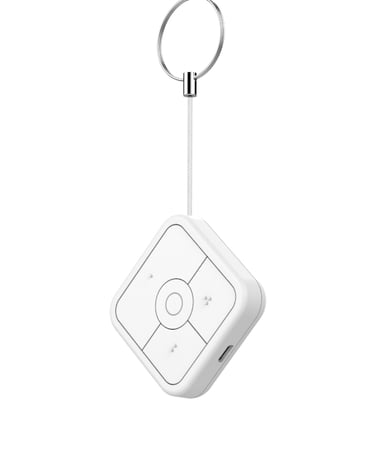
Product Picture


32 - Level of low battery
Define a battery level as the “low battery”.Size: 1 byte
Default: 20
Minimum: 0
Maximum: 0
Possible values
| From | To | Desription |
|---|---|---|
| 10 | 50 | when the value is 10% to 50%,it will send a low battery command. |
41 - Enable send central scene notification.
set of sending central scene notification or notSize: 1 byte
Default: 1
Minimum: 0
Maximum: 0
Possible values
| From | To | Desription |
|---|---|---|
| 0 | 1 | when value is 0, it can not be send scene notification;when the value is 1,it can be send central scene notification. |
42 - Setting the duration value of the command switch multilevel.
Setting the duration value of the command switch multilevel.Size: 1 byte
Default: 255
Minimum: 0
Maximum: 0
Possible values
| From | To | Desription |
|---|---|---|
| -128 | 127 | the higher the value,the long the duration value of the command switch multilevel |
43 - Enable/disable the buzzer alarm when battery is running low.
set the buzzer alarm or not when battery is lowSize: 1 byte
Default: 0
Minimum: 0
Maximum: 0
Possible values
| From | To | Desription |
|---|---|---|
| 0 | 1 | when the value is 0,the product will not allow the buzzer alarm when battery is running low;when the value is 1,the product will allow the buzzer alarm when battery is running low |
Pressing and holding a button for 3 seconds. Led will turn to green, which means Scene Controller has been woken up.
Pressing and holding a button for 20 seconds. Release the button after 20 seconds, LED will keep in yellow for 3 seconds. Scene Controller will be reset to factory defaults if you short press the button within this 3 seconds. Please use this procedure only when the network primary controller is missing or otherwise inoperable.
Included device: 1. Insert the LIR2450 battery. 2. Set the Z-Wave network main controller into learning mode (see Z-Wave network controller operating manual). 3. Pressing and holding a button for 3 seconds. 4. If the inclusion is successful, the LED will blink in green less than for 5 seconds and then keep on for 15 seconds.
To remove the NanoMote Quad from the Z-Wave network: (1) Insert the LIR2450 battery. (2) Set the Z-Wave network main controller into remove mode (see Z-Wave controller operating manual). (3) Triple click the a button, if the exclusion is successful, LED will blink long.
| Type | Value(s) |
|---|