Philio Technology
Flood Multisensor
PAT02-1A
Notification Sensor
HW: 1 FW: 1.14:01.12
SD3502
6.51.06
0x013C (316)
0x0002 (2)
0x001F (31)
ZC10-18036035
2018-03-01 22:49:40.484076
N/A
Enhanced 232 Slave
Reporting Sleeping Slave
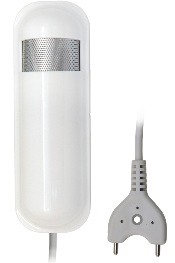
The flood multisensor PAT02 has flood, temperature and humidity, 3 sensors function in one, based on Z-WaveTM technology.
It is the Z-WaveTM plus product, it support the security, OTA... Those newest features of the Z-WaveTM technology. Z-WaveTM is a wireless communication protocol designed for home automation, specifically to remotely control applications in residential and light commercial environments. The technology uses a low-power RF radio embedded or retrofitted into home electronics devices and systems, such as lighting, home access control, entertainment systems and household appliances


1 - Basic Set OFF Level
Setting the BASIC command value. When the flood trigger off(0x00), send the BASIC CC to the group 2.Size: 1 byte
Default: 0
Minimum: 0
Maximum: 0
Possible values
| From | To | Desription |
|---|---|---|
| -128 | 127 | Setting the BASIC command value. When the flood trigger off(0x00), send the BASIC CC to the group 2. |
2 - Basic Set ON Level
Setting the BASIC command value. When the flood trigger on(0xFF), send the BASIC CC to the group 2.Size: 1 byte
Default: -127
Minimum: 0
Maximum: 0
Possible values
| From | To | Desription |
|---|---|---|
| -128 | 127 | Setting the BASIC command value. When the flood trigger on(0xFF), send the BASIC CC to the group 2. |
5 - Operation Mode
Operation mode. Using bit to control. Bit0: Disable the Flood function Bit3: Setting the temperature scale. 0: Fahrenheit, 1:Celsius Bit5: Disable the temperature report after event triggered. (1:Disable, 0:Enable)Size: 1 byte
Default: 0
Minimum: 0
Maximum: 0
Possible values
| From | To | Desription |
|---|---|---|
| 0 | 0 | Bit0: Disable the Flood function. |
| 3 | 3 | Bit3: Setting the temperature scale. 0: Fahrenheit, 1:Celsius |
| 5 | 5 | Bit5: Disable the temperature report after event triggered. (1:Disable, 0:Enable) |
6 - Mult- Sensor Function Switch
Multisensor function switch. Using bit to control. Bit6: Disable the humidity report after event triggered. (1:Disable, 0:Enable)Size: 1 byte
Default: 0
Minimum: 0
Maximum: 0
Possible values
| From | To | Desription |
|---|---|---|
| 6 | 6 | Bit6: Disable the humidity report after event triggered. (1:Disable, 0:Enable) |
7 - Customer Function
Customer function switch, using bit control. Bit3: Disable send out BASIC OFF after the flood event cleared. (1:Disable, 0:Enable) Bit4: Notification Type, 0: Using Notification Report. 1: Using Sensor Binary Report Bit5: Disable Multi CC in auto report. (1:Disable, 0:Enable) Bit6: Disable to report battery state when the device triggered. (1:Disable, 0:Enable)Size: 1 byte
Default: 0
Minimum: 0
Maximum: 0
Possible values
| From | To | Desription |
|---|---|---|
| 3 | 3 | Bit3: Disable send out BASIC OFF after the flood event cleared. (1:Disable, 0:Enable) |
| 4 | 4 | Bit4: Notification Type, 0: Using Notification Report. 1: Using Sensor Binary Report. |
| 5 | 5 | Bit5: Disable Multi CC in auto report. (1:Disable, 0:Enable) |
| 6 | 6 | Bit6: Disable to report battery state when the device triggered. (1:Disable, 0:Enable) |
10 - Auto Report Battery Time
The interval time for auto report the battery level. 0 means turn off auto report. The default value is 12. The tick time can setting by the configuration No.20.Size: 1 byte
Default: 12
Minimum: 0
Maximum: 0
Possible values
| From | To | Desription |
|---|---|---|
| 0 | 127 | The interval time for auto report the battery level. 0 means turn off auto report. The default value is 12. The tick time can setting by the configuration No.20. |
13 - Auto Report Temperatur e Time
The interval time for auto report the temperature. 0 means turn off auto report. The default value is 12. The tick time can setting by the configuration No.20.Size: 1 byte
Default: 12
Minimum: 0
Maximum: 0
Possible values
| From | To | Desription |
|---|---|---|
| 0 | 127 | The interval time for auto report the temperature. 0 means turn off auto report. The default value is 12. The tick time can setting by the configuration No.20. |
14 - Auto Report Humidity Time
The interval time for auto report the humidity. 0 means turn off auto report. The default value is 12. The tick time can setting by the configuration No.20.Size: 1 byte
Default: 12
Minimum: 0
Maximum: 0
Possible values
| From | To | Desription |
|---|---|---|
| 0 | 127 | The interval time for auto report the humidity. 0 means turn off auto report. The default value is 12. The tick time can setting by the configuration No.20. |
15 - Auto Report Flood Time
The interval time for auto report the flood state. 0 means turn off auto report. The default value is 12. The tick time can setting by the configuration No.20.Size: 1 byte
Default: 12
Minimum: 0
Maximum: 0
Possible values
| From | To | Desription |
|---|---|---|
| 0 | 127 | The interval time for auto report the flood state. 0 means turn off auto report. The default value is 12. The tick time can setting by the configuration No.20. |
20 - Auto Report Tick Interval
The interval time for auto report each tick. Setting this configuration will effect configuration No.10, No.13, No.14 and No.15. Units of one minute. Caution1: Setting to 0 means turn off all auto report function. Caution2: The value is unsigned byteSize: 1 byte
Default: 30
Minimum: 0
Maximum: 0
Possible values
| From | To | Desription |
|---|---|---|
| -128 | 127 | The interval time for auto report each tick. Setting this configuration will effect configuration No.10, No.13, No.14 and No.15. Units of one minute. |
21 - Temperature Differential Report
The temperature differential to report. 0 means turn off this function. The unit is Fahrenheit. Enable this function the device will detect every 10 seconds. And when the temperature is over 140 degree Fahrenheit, it will continue report.Size: 1 byte
Default: 1
Minimum: 0
Maximum: 0
Possible values
| From | To | Desription |
|---|---|---|
| 0 | 127 | The temperature differential to report. 0 means turn off this function. The unit is Fahrenheit. Enable this function the device will detect every 10 seconds. And when the temperature is over 140 degree Fahrenheit, it will continue report. |
23 - Humidity Differential Report
The humidity differential to report. 0 means turn off this function. The unit is percentage. Enable this function the device will detect every 10 seconds.Size: 1 byte
Default: 5
Minimum: 0
Maximum: 0
Possible values
| From | To | Desription |
|---|---|---|
| 0 | 60 | The humidity differential to report. 0 means turn off this function. The unit is percentage. Enable this function the device will detect every 10 seconds. |
1. Have Z-WaveTM Controller entered inclusion mode. 2. Pressing the tamper key three times within 1.5 seconds to enter the inclusion mode. 3. After add successful, the device will wake to receive the setting command from Z-WaveTM Controller about 20 seconds.
1. Have Z-WaveTM Controller entered exclusion mode. 2. Pressing tamper key three times within 1.5 seconds to enter the exclusion mode. Node ID has been excluded.
After the device adding to the network, it will wake-up once per day in default. When it wake-up it will broadcast the “Wake Up Notification” message to the network, and wake-up 10 seconds for receive the setting commands. The wake-up interval minimum setting is 30 minutes, and maximum setting is 120 hours. And the interval step is 30 minutes. Press the tamper key once. The device will wake-up 10 seconds.
Notice: Use this procedure only in the event that the primary controller is lost or otherwise inoperable. 1. Pressing tamper key four times within 1.5 seconds and do not release the tamper key in the 4th pressed, and the LED will light ON. 2. After 3 seconds the LED will turn OFF, after that within 2 seconds, release the tamper key. If successful, the LED will light ON one second. Otherwise, the LED will flash once. 3. IDs are excluded and all settings will reset to factory default.
| Type | Value(s) |
|---|
| Group | Type |
|---|---|
| Water Alarm | (Refer to parameters): State idle |
| Home Security | (Refer to parameters): State idle |
| Sensor type |
|---|
| Air Temperature |
| Humidity |