Popp & Co.
Z-Wave Metering Plug Smart Start
POPE700397
On/Off Power Switch
HW: 1 FW: 3.01
ZM5101
6.81.00
0x0154 (340)
0x0003 (3)
0x000A (10)
ZC10-18026015
2018-02-14 18:08:56.522313
N/A
Enhanced 232 Slave
Always On Slave
The IP 44Wall Plug Switch Outdoor can be placed between a wall outlet for Schuko plugs and electric devices, plugged in by cord.
The Wall Plug Switch Outdoor can be placed between a wall outlet for Schuko plugs (plug type F) and electric devices, plugged in by cord. It can switch all loads up to 3500 W. The plug switch is IP 44 rated and can therefore be used both in dry as well as humid environments in- and outdoor. Switching is controlled by the local button or wirelessly. The use of the local button and the behavior oon wireless commands can be configured using configuration parameters. Whn detached from the control of local leads the button on the device can be used to trigger scenes in a central gateway. Single click and double click are distinguished. The device is also measuring the mains voltage supply reporting mains voltage and mains frequency. Addtionally the powr consumption of the attached load is monitored as well. All metering values an be requested from the central controller and will be reported unsolicited if configured.
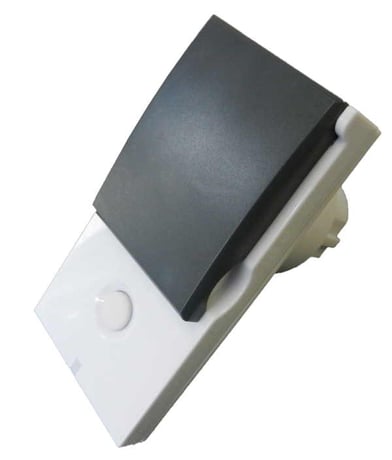
Product Picture


1 - LED Operation Mode
Defines when the LED shall shine and howSize: 1 byte
Default: 1
Minimum: 0
Maximum: 0
Possible values
| From | To | Desription |
|---|---|---|
| 0 | 0 | LED off, only blinks on traffic |
| 1 | 1 | Defined by Parameter 21 and 22 |
2 - Auto-off
Defines if and after which time the device shall turn off without any user interactionSize: 2 bytes
Default: 0
Minimum: 0
Maximum: 0
Possible values
| From | To | Desription |
|---|---|---|
| 0 | 0 | no auto-off |
| 1 | 65535 | seconds |
3 - Switching behavior when receiving wireless OFF
Size: 1 byte
Default: 0
Minimum: 0
Maximum: 0
Possible values
| From | To | Desription |
|---|---|---|
| 0 | 0 | Switches off |
| 1 | 1 | Ignores Off command |
| 2 | 2 | Switches on |
| 3 | 3 | Switches on, when receiving off command and current state is off |
4 - Button Mode
This parameter defines if the local button shall control (switch) the load or it is only used to send out scene control commands to the central controller.Size: 1 byte
Default: 0
Minimum: 0
Maximum: 0
Possible values
| From | To | Desription |
|---|---|---|
| 0 | 0 | Controls Load + Controls Scenes |
| 1 | 1 | Scene Control Only |
5 - Status after Power Failure
Defines the switching status after a power failure or unpluggingSize: 1 byte
Default: 1
Minimum: 0
Maximum: 0
Possible values
| From | To | Desription |
|---|---|---|
| 0 | 0 | Always off |
| 1 | 1 | Return to last switching state |
21 - LED Color on OFF state
Defines the behavior of the LED when the load is switched offSize: 1 byte
Default: 0
Minimum: 0
Maximum: 0
Possible values
| From | To | Desription |
|---|---|---|
| 0 | 0 | Off |
| 1 | 1 | Red |
| 2 | 2 | Green |
22 - LED Color on ON state
Defines the behavior of the LED when the load is switched onSize: 1 byte
Default: 2
Minimum: 0
Maximum: 0
Possible values
| From | To | Desription |
|---|---|---|
| 0 | 0 | Off |
| 1 | 1 | Red |
| 2 | 2 | Green |
23 - Voltage Report Threshold
Report the voltage when the voltage has changed by more then X * 1 V. When disabled the device will report every 10 minutes regardless of current voltage.Size: 1 byte
Default: 100
Minimum: 0
Maximum: 0
Possible values
| From | To | Desription |
|---|---|---|
| 0 | 0 | Disabled |
| 1 | 250 | Volt |
24 - Current Reporting Threshold
Report the current when the current has changed by more then X *0,01 A. When disabled the device will report every 10 minutes regardless of current change.Size: 1 byte
Default: 10
Minimum: 0
Maximum: 0
Possible values
| From | To | Desription |
|---|---|---|
| 0 | 0 | Disabled |
| 1 | 255 | * 0,01 A |
25 - Power Reporting Threshold
Report the power when the power has changed by more then X Watt. When disabled the device will report every 10 minutes regardless of power consumption change.Size: 1 byte
Default: 50
Minimum: 0
Maximum: 0
Possible values
| From | To | Desription |
|---|---|---|
| 0 | 0 | Disabled |
| 1 | 255 | W |
26 - Soft Circuit Breaker Threshold
When the power draw exceeds the value set in this parameter for a time set in parameter 28 the soft ciruit breaker will disconnect the load.Size: 2 bytes
Default: 3600
Minimum: 0
Maximum: 0
Possible values
| From | To | Desription |
|---|---|---|
| 0 | 0 | Disabled |
| 1 | 3600 | W |
27 - Soft Circuit Breaker Recovery Time
Once the soft circuit breaker tipps and the load is disconnected the load will be automatically reconneced after X seconds. When disabled the load must be repowered manually or with wireless command.Size: 1 byte
Default: 0
Minimum: 0
Maximum: 0
Possible values
| From | To | Desription |
|---|---|---|
| 0 | 0 | Never |
| 1 | 255 | seconds |
28 - Soft Circuit Breaker Delay Time
This delay time defines how fast the soft circuit breaker wil react when the threshold power is exceeded. The power is cut off only if the power draw remains over the threshold level for the defines time.Size: 1 byte
Default: 10
Minimum: 0
Maximum: 0
Possible values
| From | To | Desription |
|---|---|---|
| 0 | 255 | * 0,1 sec |
Tripple Click the button
Tripple Click the button
This device allows reset without any involvement of a Z-Wave controller. This procedure should only be used when the primary controller is inoperable. Push and hold the button for 10 seconds. After 5 seconds the LED on the button will blink fast.
| Type | Value(s) |
|---|
| Sensor type |
|---|
| Voltage |
| Meter type |
|---|
| Electric Meter Consumption |