Simon
HUB iO
10003041-13X
Central Controller
HW: 1 FW: 4.24:82.73:69.48
ZM5202
6.51.07
0x0267 (615)
0x000A (10)
0x0000 (0)
ZC10-18026017
2018-02-14 19:16:54.676857
N/A
Static Controller
Central Static Controller
Hub iO is not only a flush mounted socket. It is also a Z-Wave static controller designed to be the main controller of Z-Wave network. It can work as Access point when internet is not available or as Client when user already has internet at home.
HUB iO is the Main controller of your Simon 100 iO Home. It allows you manage your entire Z-Wave network and add new features to your life making it more confortable. Use it through your Simon 100 APP in order to manage features and configurations of your switches and sockets, no matter if you are at home or not.
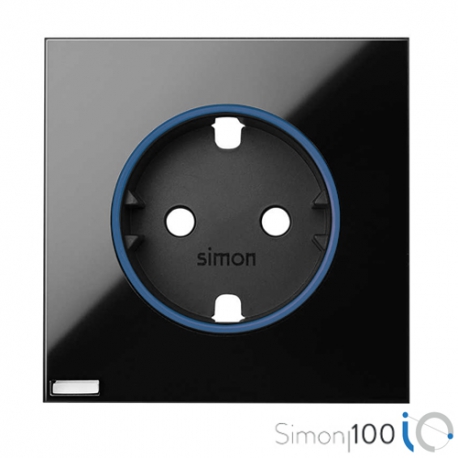
Product Picture


1 - Association LED
Turns ON the Central LEDSize: 1 byte
Default: 0
Minimum: 0
Maximum: 0
Possible values
| From | To | Desription |
|---|---|---|
| 0 | 0 | Turns off the center LED |
| 1 | 255 | Turn on the center LED |
2 - Custom consumption limit
Limits the máximum load that can be powered by the socket of HUB iO.Size: 2 bytes
Default: 0
Minimum: 0
Maximum: 0
Possible values
| From | To | Desription |
|---|---|---|
| 0 | 0 | Disables custom consumption limit |
| 1 | 3680 | Sets the power in Watts that is supported (once the load is over, it is disconnected). |
3 - Beacon
Sets the LEDs lighting intensity.Size: 1 byte
Default: 0
Minimum: 0
Maximum: 0
Possible values
| From | To | Desription |
|---|---|---|
| 0 | 0 | Disables the beacon function. |
| 1 | 99 | Sets the intensity of the beacon LEDs. |
10 - Delay ON
Delays the load activation after an ON request. Values must be SET in HEX formatSize: 1 byte
Default: 0
Minimum: 0
Maximum: 0
Possible values
| From | To | Desription |
|---|---|---|
| 0 | 0 | Disables timing |
| 1 | 127 | Sets a timing with a range of (1-127sec) |
| 128 | 254 | Sets a timing with range of (1-127min) |
11 - Activation Time
Sets the time that Load will be activated after it is switch ON. Values must be SET in HEX formatSize: 1 byte
Default: 0
Minimum: 0
Maximum: 0
Possible values
| From | To | Desription |
|---|---|---|
| 0 | 0 | Disables timing |
| 128 | 254 | Sets a timing with range of (1-127min) |
| 1 | 127 | Sets a timing with range of (1-127sec) |
12 - Behavior of LED in Repose
Sets LED1 informing about socket load state.Size: 1 byte
Default: 255
Minimum: 0
Maximum: 0
Possible values
| From | To | Desription |
|---|---|---|
| 0 | 0 | LED1 remains OFF and only informs of load state during 5 sec. after pressing the button. |
| 1 | 255 | LED1 always shows the load state |
13 - Lock Input
Locks the HUB iO pushbutton.Size: 1 byte
Default: 0
Minimum: 0
Maximum: 0
Possible values
| From | To | Desription |
|---|---|---|
| 0 | 0 | Enables the pushbutton to control the load |
| 1 | 255 | Disables the action of the pushbutton on the load |
15 - Reset Default
Write only parameter with 2 possible values: 0x9867 -> Allows remove the device from the network without performing any action on HUB iO. Parameters, Groups and Z-Wave status are restored to the default values. 0x4312 -> Allows set all device configuration values to default the exception of Long Pulse Lock configuration.Size: 1 byte
Default: 0
Minimum: 0
Maximum: 0
Possible values
| From | To | Desription |
|---|---|---|
| 39015 | 39015 | Performs a Reset devault |
| 17170 | 17170 | Performs configuration default values process |
16 - Delay OFF
Delays the load deactivation after an OFF request. Values must be SET in HEX formatSize: 1 byte
Default: 0
Minimum: 0
Maximum: 0
Possible values
| From | To | Desription |
|---|---|---|
| 0 | 0 | Disables timing |
| 1 | 127 | Sets a timing with range of (1-127sec) |
| 128 | 254 | Sets a timing with range of (1-127min) |
17 - PostReset State
Defines the load state when HUB iO is poweredSize: 1 byte
Default: 255
Minimum: 0
Maximum: 0
Possible values
| From | To | Desription |
|---|---|---|
| 0 | 0 | After a reset the load starts Off |
| 1 | 255 | After a reset the load recovers the last value |
19 - Pulse Action
Defines the action to be performed when pushbutton is short pressedSize: 1 byte
Default: 0
Minimum: 0
Maximum: 0
Possible values
| From | To | Desription |
|---|---|---|
| 0 | 0 | TOGGLE, A short press switches the |
| 1 | 1 | ON. A short press activates the load |
| 2 | 2 | OFF. A short press deactivates the load |
20 - Identify
Enables a fast blinking of central LEDSize: 1 byte
Default: 0
Minimum: 0
Maximum: 0
Possible values
| From | To | Desription |
|---|---|---|
| 255 | 255 | The central LED flashes for 5 seconds at a frequency of 0.1s |
21 - Loas State
Allows to know the load state and valueSize: 2 bytes
Default: 0
Minimum: 0
Maximum: 0
Possible values
| From | To | Desription |
|---|---|---|
| 0 | 0 | Load is OFF |
| 511 | 511 | Load is ON |
27 - Lock Hold Press
Locks any press hold acción .Size: 1 byte
Default: 0
Minimum: 0
Maximum: 0
Possible values
| From | To | Desription |
|---|---|---|
| 0 | 0 | Hold press works as expected |
| 1 | 255 | Blocks HOLD press actions from 2 to 30s and hold press of 30s sets de HUb in learning proces but not resets it. |
If HUB iO is linked to APP Simon 100 --> using the APP according Simon 100 Guide instructions. Otherwise pressing pushbutton for 2s<t<10s.
Pressing pushbutton t>30s. Or removing HUB iO using the APP. If HUB iO is the primary controller for your network, resetting it will result in the nodes in your network being orphaned and it will be necessary after the reset to exclude and re-include all of the nodes in the network. If HUB iO is being used as a secondary controller in the network, use this procedure to reset this controller only in the event that the network primary controller is missing or otherwise inoperable.
Using the APP according Simon 100 Guide instructions. There are 2 options: 1.- USING APP: In order to perform this action go to MENU > iO > Installation Data > Advanced Settings > Replicate controller or Update HUB. HUB iO will join to Learn mode in order to be added in other Z-Wave Controller. NOTE: (This option is only available if none device has been added to HUB iO network or if HUB iO is not the Main controller (SIS) of the network.) 2.- USING Local button If your Simon 100 iO APP is not linked with Simon 100 HUB iO you can perform this action press left button during 3 seconds. NOTE: This option is only available if HUB iO is not linked with Simon 100 iO APP.
Using the APP according Simon 100 Guide instructions. There are 2 options: 1.- USING APP: In order to perform this action go to MENU > iO > Installation Data > Advanced Settings > Replicate controller or Update HUB. HUB iO will join to Learn mode in order to be added in other Z-Wave Controller. NOTE: (This option is only available if none device has been added to HUB iO network or if HUB iO is not the Main controller (SIS) of the network.) 2.- USING Local button If your Simon 100 iO APP is not linked with Simon 100 HUB iO you can perform this action press left button during 3 seconds. NOTE: This option is only available if HUB iO is not linked with Simon 100 iO APP.
| Type | Value(s) |
|---|
| Meter type |
|---|
| Electric Meter Consumption |