AMADAS
AMADAS Smart Door Lock
ADSL-1001
Door Lock - Keypad
HW: 1 FW: 1.18:01.02
ZM5101
6.51.10
0x029F (671)
0x0003 (3)
0x0001 (1)
ZC10-18026009
2018-02-13 07:02:27.685819
N/A
Enhanced 232 Slave
Listening Sleeping Slave
Yes
AMADAS is the world's first fully integrated smart door lock solution including a dedicated app, left/right handed lever, PIN code, swipe-to-open, wire-free DIY installation and emergency recharging solar panel in a solid stainless steel casing.
AMADAS offers various smart functions via smartphone app including smart activity log/management, smart security detecting door open, smart temperature sensor, etc. AMADAS is a super simple DIY smart lock that can be installed on almost all types of doors in any thickness, in-door/outdoor, and any materials - wooden, chassis, steel doors. It is offered in tubular and mortise lock types with high adjustability compatible with various door backset length. With a low power motor structure, it only requires two AA batteries, unlike other locks which require four to eight batteries. Even when batteries run out, it works 100% thanks to an emergency recharge with a built-in solar cell via smartphone LED flashlight. The smart innovative lever design prevents water condensation caused by a temperature change that other electronic locks experience quite often. AMADAS lever direction can change easily to fit both right or left hand configured doors.
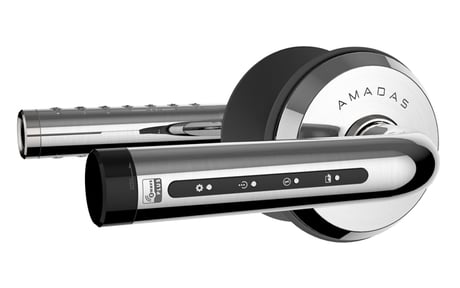
Product Picture
- Z-Wave inclusion i. Press “Z-Wave Settings” button in the inner side for 3 seconds. (toggle status) ii. Then “Blue LED” will turn on. iii. When the inclusion is complete, the led is turned off and the beep sounds. Please wait. * Beep : Success (Beep), Fail (Beep~) * The inclusion results can be found in the controller or in your app.
- Z-Wave exclusion i. Press “Z-Wave Settings” button in the inner side for 3 seconds. (toggle status) ii. Then “Blue LED” will turn on. iii. When the exclusion is completed, the led is turned off and the beep sounds. Please wait. * Beep : Success (Beep Beep), Fail (Beep~) * The exclusion results can be found in the controller or in your app.
- Through the Z-Wave network generates an order, the product will receive the wakeup call and starts to operate - The product will receive the wakeup call when the buttons on the outer lever are touched (pushed) to open the door. - The product will receive the wakeup call when the buttons on the inner lever are pushed for doorlock setting.
- Factory default setting i. Press “Settings, Input” button in the inner side for 3 seconds. ii. Press “④ - Reset” button in the outer side. iii. Enter “1004” and press the “*” button. * All door lock setting information is initialized. - Z-Wave device reset locally i. Press “Z-Wave Settings” button in the inner side 3 times within 1.5 seconds. ii. Then “White LED” will turn on. iii. When the “network reset locally” is complete, the led is turned off. Please wait. * Beep : Success (Ring), Fail (Beep~) * Z-Wave network information is initialized. * Please use this procedure only when the network primary controller is missing or otherwise inoperable.
| Type | Value(s) |
|---|
| Group | Type |
|---|---|
| Access Control | (Refer to parameters): State idle |
| Power Management | (Refer to parameters): State idle |
| Sensor type |
|---|
| Air Temperature |
| General Purpose |