LEEDARSON
Door/Window Sensor
7A-SS-VE-H0
Notification Sensor
HW: 32 FW: 1.08
ZM5101
6.71.01
0x0300 (768)
0x0200 (512)
0x0008 (8)
ZC10-18036058
2018-03-12 16:37:59.018669
N/A
Enhanced 232 Slave
Reporting Sleeping Slave
Yes
This sensor uses the Z-Wave communication module to connect with Z-Wave Gateway.
The LEEDARSON Door/Window Sensor is a wireless sensor that is powered by a CR2 battery. The door/window sensor lets you know when a door or window is opened, or closed, and can trigger different actions in response to that open action or close action. This sensor uses the Z-Wave communication module to connect with Z-Wave Gateway. This device can be adapted to use in the EU(868.42Mhz) and US. The door/window sensor supports the Over The Air (OTA) feature for the product’s firmware upgrade. If you want your Door/Window Sensor to be a security device that uses secure/encrypted messages to communicate in a Z-Wave network, then a security enabled Z-Wave controller/gateway is needed.
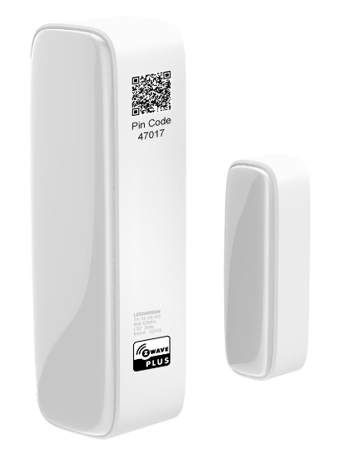
Product Picture


10 - Level of low battery
This parameter defines a battery level as the “low battery”.Size: 1 byte
Default: 10
Minimum: 0
Maximum: 0
Possible values
| From | To | Desription |
|---|---|---|
| 0 | 50 | % |
14 - Enable/Disable BASIC SET command
Door/Window Sensor can send BASIC SET command to nodes associated with group 2Size: 1 byte
Default: 0
Minimum: 0
Maximum: 0
Possible values
| From | To | Desription |
|---|---|---|
| 0 | 0 | Disable |
| 1 | 1 | Enable |
15 - Value of the BASIC SET
Door/Window Sensor can reverse its value of BASIC SET when the magnet is triggered.Size: 1 byte
Default: 0
Minimum: 0
Maximum: 0
Possible values
| From | To | Desription |
|---|---|---|
| 0 | 0 | Send BASIC SET VALUE = 255 to nodes associated with group 2 when door/window is opened. Send BASIC SET VALUE = 0 to nodes associated with group 2 when door/window is closed. |
| 1 | 1 | Send BASIC SET VALUE = 0 to nodes associated with group 2 when door/window is opened. Send BASIC SET VALUE = 255 to nodes associated with group 2 when door/window is closed. |
254 - Enable/disable the configuration command
Lock/unlock all configuration parameters.Size: 1 byte
Default: 0
Minimum: 0
Maximum: 0
Possible values
| From | To | Desription |
|---|---|---|
| 0 | 0 | Unlock |
| 1 | 1 | Lock |
Add for inclusion: 1). Insert the battery. 2). Set the Z-Wave network main controller into learning mode. 3). Triggering this action button. 4). If the add for inclusion is successful, the LED will blink fast and then keep on 3 seconds. Otherwise, the LED will blink 25 seconds and then turn off, in which case you need to repeat the process from step
Remove for exclusion; 1. Insert the CR battery. 2. Set the Z-Wave network main controller into exclusion mode. 3. Triggering this action button. If the remove for exclusion is successful, the LED will blink fast and turn off. Otherwise, the LED will keep solid for 2 seconds and then turn off, in which case you need to repeat the process from step 2.
1. Short press 3 time. 2. LED will blink one time; sending wake up notification cc
LED will blink fast for 5 seconds and then keep solid for 3 seconds, after that Door/Window Sensor will send “Device_Reset_Locally” to the main controller and exclude from the Z-Wave network. Please use this procedure only when the network primary controller is missing or otherwise inoperable.
| Type | Value(s) |
|---|
| Group | Type |
|---|---|
| Access Control | (Refer to parameters): State idle |
| Home Security | (Refer to parameters): State idle |
| Sensor type |
|---|
| General Purpose |