SE Devices
Standalone Relay 1-Pole
AR1P
On/Off Power Switch
HW: 30 FW: 3.00:03.00
ZM5202
6.71.01
0x024F (591)
0x0003 (3)
0x1013 (4115)
ZC10-18046093
2018-02-21 19:41:59.934966
N/A
Enhanced 232 Slave
Always On Slave
Z-Wave controllable Standalone 1-Pole Relay (3000W) designed to be concealed in wall boxes.
The Standalone 1-Pole Relay is exclusively Z-Wave controllable, and designed to handle loads up to 3000W and be concealed inside Wall Boxes. The Relay can be used to switch both Heat Sources and Light fixtures. The product also contains a fail-safe mechanism which will switch the relay ON and OFF at fixed intervals, in case communication from a controlling device is lost. The Relay measures the immediate and accumulated power consumption of an attached load, which is reported at fixed intervals.
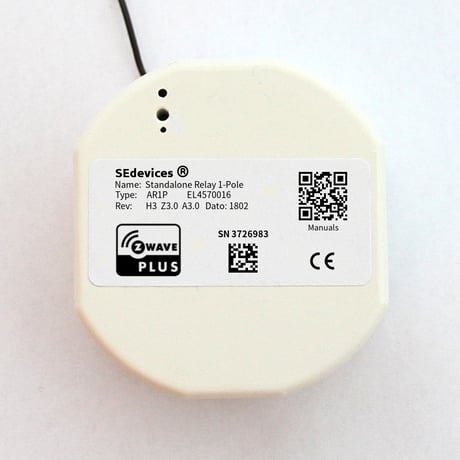
Product Picture


1 - Hardware Combination Identifier
READ-ONLY: Byte which uniquely describes the combination of form factor and functionality for the current SE Devices unit. Always return 19 for this device.Size: 1 byte
Default: 19
Minimum: 0
Maximum: 0
Possible values
| From | To | Desription |
|---|---|---|
| 19 | 19 | Hardware Combination Identifier |
4 - Safety Activate Delay
Safety Mode is activated after the configured number of seconds has elapsed. It will start by turning OFF the Back Unit when activated. A 0 value Disables Safety Mode. The MAX limit is 32767 seconds (9 hours, 6 minutes and 7 seconds)Size: 2 bytes
Default: 0
Minimum: 0
Maximum: 0
Possible values
| From | To | Desription |
|---|---|---|
| 0 | 32767 | Safety Activation Delay |
5 - Safety OFF Period
The number of seconds to stay in OFF mode when Safety is activated. The Back unit turns ON when the timer have elapsed. If value is 0, the Back Unit will not turn back ON. The MAX limit is 32767 seconds (9 hours, 6 minutes and 7 seconds)Size: 2 bytes
Default: 600
Minimum: 0
Maximum: 0
Possible values
| From | To | Desription |
|---|---|---|
| 0 | 32767 | Safety OFF Period |
6 - Safety ON Period
The number of seconds to stay in ON mode when Safety is activated. The Back Unit turns back OFF when the timer have elapsed (and continues to turn ON and OFF alternately). If value is 0, the Back Unit WILL NOT turn ON at all. The MAX limit is 32767 seconds (9 hours, 6 minutes and 7 seconds)Size: 2 bytes
Default: 300
Minimum: 0
Maximum: 0
Possible values
| From | To | Desription |
|---|---|---|
| 0 | 32767 | Safety ON Period |
16 - Functionaltiy Identifier
READ-ONLY: Provides an Identifier for the local device functionality, which is the same across all devices in the SEdevices product range. Always return 6 for 1-Pole RelaysSize: 1 byte
Default: 6
Minimum: 0
Maximum: 0
Possible values
| From | To | Desription |
|---|---|---|
| 6 | 6 | Functionaltiy Identifier |
To add the device to a Z-Wave network, the Z-Wave Controller must first be set into Add (Learn) mode. Then use a paperclip or a small pointy tool to push and hold the button in the button hole for approximately a second. The device LED will blink twice to indicate that it sends information to the Controller.
To remove the device from a Z-Wave network, the Z-Wave Controller must first be set into Remove (Learn) mode. Then use a paperclip or a small pointy tool to push and hold the button in the button hole for approximately a second. The device LED will blink twice to indicate that it sends information to the Controller.
WARNING! Executing a Factory Reset on a device may make it stop working as wanted and WILL remove it from the Z-Wave network. Please DO NOT execute this procedure unless it’s absolutely necessary. Press and Hold the Add/Remove button for about 15 seconds - until LED indicator starts blinking. Then release the button. The device will now be factory reset and removed from the Z-Wave network. The button is located about 10 mm down in the middle of the three holes on the front. A thin tool (a very small screwdriver, a toothpick, a paper clip or similar) is needed to access the button.
| Type | Value(s) |
|---|
| Sensor type |
|---|
| Power |
| Voltage |
| Current |
| Meter type |
|---|
| Electric Meter Consumption |