Aeotec
LED Bulb 6:Multi-Colour
ZWA002-A
Light Dimmer Switch
HW: 1 FW: 1.13
ZM5101
6.51.09
0x0371 (881)
0x0103 (259)
0x0002 (2)
ZC10-18036069
2018-03-23 21:59:11.15402
N/A
Enhanced 232 Slave
Always On Slave
RGBW: dimmable from 5% to 100%, tunable from 1800K to 6500K, and 16 million colors
✓ Standard form factor and appearance of the light bulb with 800 lm output ✓ RGBW: dimmable from 5% to 100%, tunable from 1800K to 6500K, and 16 million colors ✓ Possible to be included in groups, scenes, or schedules ✓ Suitable for indoor lighting: Corridors, Bedroom, Living Room, etc.
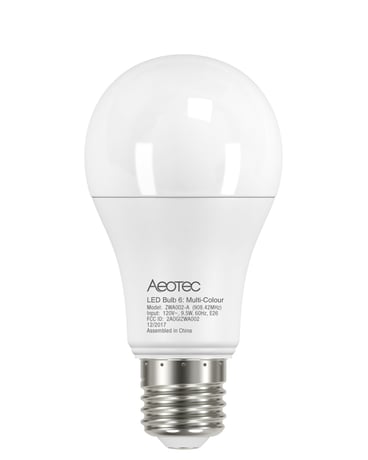
Product Picture


1 - User custom mode for LED animations.
User custom mode for LED animations. 0 = Disable custom mode. 1= Blink Colors in order mode. 2=Randomized blink color modeSize: 1 byte
Default: 0
Minimum: 0
Maximum: 0
Possible values
| From | To | Desription |
|---|---|---|
| 0 | 0 | Disable custom mode |
| 1 | 1 | Blink Colors in order mode. |
| 2 | 2 | Randomized blink color mode |
2 - Enable/Disable Strobe over Custom Color.
Enable/Disable Strobe over Custom Color. 0 = Disable. 1 = Enable. Others = Ignore.Size: 1 byte
Default: 0
Minimum: 0
Maximum: 0
Possible values
| From | To | Desription |
|---|---|---|
| 0 | 0 | Disable Strobe over Custom Color. |
| 1 | 1 | Enable Strobe over Custom Color. |
3 - Set the rate of change to next color in Custom Mode.
Set the rate of change to next color in Custom Mode. Value1 ~ Value4: Value Range = 5 - 8640000 (50 - 86400000ms)Size: 1 byte
Default: 50
Minimum: 0
Maximum: 0
Possible values
| From | To | Desription |
|---|---|---|
| 5 | 8640000 | Set the specified rate of change to next color in Custom Mode. |
4 - Set color that LED Bulb blinks in (Blink Mode)
Set color that LED Bulb blinks in (Blink Mode) Value range =0x01-0xFFSize: 1 byte
Default: 1
Minimum: 0
Maximum: 0
Possible values
| From | To | Desription |
|---|---|---|
| 0 | 255 | Set color that LED Bulb blinks in (Blink Mode) |
16 - Ramp rate when dimming using Multilevel Switch V1 CC in 100ms
Ramp rate when dimming using Multilevel Switch V1 CC in 100ms Value range = 0x00 -0x64Size: 1 byte
Default: 20
Minimum: 0
Maximum: 0
Possible values
| From | To | Desription |
|---|---|---|
| 0 | 100 | Specifying the ramp rate when dimming using Multilevel Switch V1 CC in 100ms |
80 - Enable to send notifications to associated devices (Group 1) when the state of LED Bulb is changed.
Enable to send notifications to associated devices (Group 1) when the state of LED Bulb is changed. 0 = Nothing. 1= Basic CC report.Size: 1 byte
Default: 1
Minimum: 0
Maximum: 0
Possible values
| From | To | Desription |
|---|---|---|
| 0 | 0 | Nothing |
| 1 | 1 | Send basic report to associated devices when the state of the LED Bulb is changed |
81 - The user can configure the parameter to adjust the color component Warm White.
The user can configure the parameter to adjust the color component Warm White. Value range =Warm White(0x0A8C(2700k) ~ 0x1387 (4999k))Size: 2 bytes
Default: 2700
Minimum: 0
Maximum: 0
Possible values
| From | To | Desription |
|---|---|---|
| 2700 | 4999 | Value range =Warm White(0x0A8C(2700k) ~ 0x1387 (4999k)) |
82 - The user can configure the parameter to adjust the color component Cold White.
The user can configure the parameter to adjust the color component Cold White. Value rang = Cold White (0x1388 (5000k) ~ 0x1964 (6500k))Size: 2 bytes
Default: 6500
Minimum: 0
Maximum: 0
Possible values
| From | To | Desription |
|---|---|---|
| 5000 | 6500 | Value rang = Cold White (0x1388 (5000k) ~ 0x1964 (6500k)) |
Add for inclusion 1. Ensure the led bulb has been excluded outside the network. 2. Triggered by OFF ->ON (between 0.5-2 seconds each time) 3. LED solid yellow Color (0xFFFF00) during the pairing(Timeout is 10 seconds). Failure: Blinks between 100% White and Red 0x0000FF color for 3 seconds (at a rate of 200ms per flash), Once 3 seconds have passed, the LED should return to a Warm White LED at 100% Success: Blinks between 100% White and Green 0x00FF00 color for 3 seconds (at a rate of 200ms per flash). Once 3 seconds have passed, the LED should return to a Warm White LED at 100%.
Remove for exclusion 1. Assuming led bulb was added to controller. 2. Triggered by OFF -> ON -> OFF -> ON -> OFF -> ON (between 0.5-2 seconds each time). 3. LED Solid Purple/Violet Color (0xEE82EE) during the unpairing process. (Timeout is 10 seconds). Failure: Blinks between 100% White and Red 0x0000FF color for 3 seconds (at a rate of 200ms per flash), Once 3 seconds have passed, the LED should return to the last color ( memory status(color cc set)) of LED Bulb. Success: Blinks between 100% White and Blue 0x0000FF color for 3 seconds (at a rate of 200ms per flash). Once 3 seconds have passed, the LED should return to a Warm White LED at 100%.
Reset the Device. 1. Assuming led bulb was added to controller and was power on. 2. RGBW bulb re-power 6 times (between 0.5-2 seconds each time). Note: ON -> OFF -> ON -> OFF -> ON -> OFF -> ON -> OFF -> ON -> OFF -> ON -> OFF -> ON 3. If the 6th power on, the led bulb change to Yellow color(into pairing process ), which means that the reset factory settings are successf. Using this action in case of the primary controller is missing or inoperable.
| Type | Value(s) |
|---|