FAKRO
ZWS12
ZWS12 RU
Window Covering - Pos/End Aware
HW: 25 FW: 1.01:01.01
ZM5202
6.61.00
0x0085 (133)
0x0002 (2)
0x0011 (17)
ZC10-18036065
2018-03-23 18:32:43.694522
N/A
Enhanced 232 Slave
Always On Slave
FAKRO ZWS12 chain actuator is fully compatible white Z-Wave Plus protocol. Is dedicated for roof window operating. The maximum chain reach is 24cm. Motor is equipped with encoder and secure transmission.
FAKRO ZWS12 chain motor thanks to their small dimensions and suitable force output are ideal for roof window operating, being fully compatible with the Z-Wave Plus system. The motors can be applied in both centre pivot and top hung and pivot roof windows as well as windows of non-standard dimensions. The chain has 2 output speed and reach 24cm. The ZWS12 motor is equipped with encoder and two limit switches: limit switch at maximum chain travel position, overload limit in both directions (used mainly when closing the window). This product can be operated in any Z-Wave network with other Z-Wave certified devices from other manufacturers. ZWS12 also can be controlled manually by button and closed by rain sensor and timer. There are four association groups in actuator ZWS12: Life Line – group for position reporting actuator after each a stoppage and alarm reporting Basic Repeat – group used to transfer the received basic commands to the devices included in this group. Multilevel Repeat – group used to transfer the received multilevel commands to the devices included in this group. Basic Rain – group used to transfer the received commands from actuator & rain detector to the devices included in this group. Z-Wave Plus Secure Enabled Product This device is a security enabled Z-Wave Plus product that is able to use encrypted Z-Wave Plus messages to communicate to other security enabled Z-Wave Plus products. Technical Parameters: Chain reach: 240 mm Output power : 9 W Rated current: 0.72 A Standby current: 0.03 A Chain pushing force: 250 N Closing force: 200 N Current limit: YES Power voltage: 15V DC Power cable: 2 x 0.75 mm2 (0,4 m)
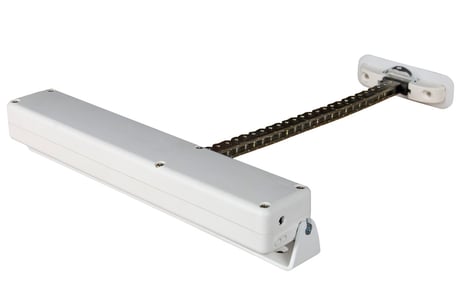
Product Picture


7 - Motor speed I
This parameter change motor speedSize: 1 byte
Default: 2
Minimum: 0
Maximum: 0
Possible values
| From | To | Desription |
|---|---|---|
| 1 | 4 | 1- the lowest speed, 4 - the higest speed, 2- default |
8 - Motor speed II (rain sensor)
This parameter change motor speed when rain sensor turned on servomotorSize: 1 byte
Default: 2
Minimum: 0
Maximum: 0
Possible values
| From | To | Desription |
|---|---|---|
| 1 | 4 | 1- the lowest speed, 4 - the higest speed, 2- default |
12 - Callibrate
This parameter on/off callibration functionSize: 1 byte
Default: 1
Minimum: 0
Maximum: 0
Possible values
| From | To | Desription |
|---|---|---|
| 1 | 2 | 1- calibrated, 2 – discalibrated |
13 - Last saved position
This parameter set servomotor in previous position after using Basic Mode operationSize: 1 byte
Default: 1
Minimum: 0
Maximum: 0
Possible values
| From | To | Desription |
|---|---|---|
| 1 | 2 | 1 – FF go to Max, 2 – FF go to previous position |
15 - Close after time
This parameter close servomotor after set time. The time is counting in minutesSize: 1 byte
Default: 0
Minimum: 0
Maximum: 0
Possible values
| From | To | Desription |
|---|---|---|
| 0 | 120 | 0-120 minutes |
Autoinclusion - This feature allow you to add hard to reach devices to Z-Wave network. 3-times ON and OFF the power actuator (OFF-ON-OFFON-OFF-ON) causes the introduction of actuator to Autoinclusion mode. Please note that the procedure has been started the time between on and off can not exceed 20s. Autoinclusion mode is activated for a maximum of 10 minutes. During this time, we can add an actuator to any Z-Wave controller running in the Include procedure. Include - This function allow you to add actuator to the network Z-Wave. Follow the procedure adding device to the network Z-Wave according to user manual supplied with the product. Then, press the programming button P on the actuator for 1 second.
Exclude - This function allow you to remove actuator from the network Z-Wave. Follow the procedure removing device from the network Z-Wave according to user manual supplied with the product. Then, press the programming button P on the actuator for 1 second. Function removes information only about network Z-Wave.
Device Reset Locally – This function allows you to reset the Z-Wave network without the use of Z-Wave controller. Press 5 times the programming button P fast, the actuator was removed from the Z-Wave network, restore the default parameters, name and locations. Please use this procedure only when the network primary controller is missing or otherwise inoperable.
Autoinclusion - This feature allow you to add hard to reach devices to Z-Wave network. 3-times ON and OFF the power actuator (OFF-ON-OFFON-OFF-ON) causes the introduction of actuator to Autoinclusion mode. Please note that the procedure has been started the time between on and off can not exceed 20s. Autoinclusion mode is activated for a maximum of 10 minutes. During this time, we can add an actuator to any Z-Wave controller running in the Include procedure.
| Type | Value(s) |
|---|
| Group | Type |
|---|---|
| Water Alarm | (Refer to parameters): State idle |
| Power Management | (Refer to parameters): State idle |
| Sensor type |
|---|
| Rain Rate |