FAKRO
AMZ Solar
AMZ Solar AU
Window Covering - Pos/End Aware
HW: 31 FW: 1.01:01.01
ZM5202
6.61.00
0x0085 (133)
0x0005 (5)
0x0012 (18)
ZC10-18036066
2018-03-23 21:57:06.09494
N/A
Enhanced 232 Slave
Listening Sleeping Slave
FAKRO AMZ Solar is the external awning blind, fully compatible with the Z-Wave Plus protocol. It is dedicated for FAKRO roof windows. The awning blind is powered by solar panel.
FAKRO AMZ Solar awning blind is a perfect combination of comfort of use and effective protection from heat. Due to the fact that the awning blind absorbs solar radiation before it reaches the glazing and emits the heat to the outside of the room, it constitutes much better protectction from tiresome heat in the sunny days than internal accessories. At the same time, it allows the ingress of natural light and ensures visual contact with the environment. FAKRO AMZ Solar is equipped with the algorithm which allows to operate the awning blind depending on the insolation level. It is also equipped with the Z-Wave remote control. In an emergency, the awning blind can be controlled by a service button located on the awning blind. The solar awning blind is powered by 12VDC battery pack built-in in the blind’s cases powered by the solar panel. The AMZ Solar awning blind has three protections: - Maximum extension (encoder maximum position) - Completely rolled up (encoder minimum position) - Current limiting protecting the awning blind against damage and user against accidental injury resulting from the contact with moving elements of the awning blind. There are four association groups in FAKRO AMZ Solar awning blind: 1. Life Line – group for reporting a position of the awning blind after each stoppage and alarm reporting (overcurrent, damage encoders). A maximum 1 device can be in this group. 2. Basic Repeat – group used to transfer received basic commands to devices included in this group. A maximum 5 devices can be in this group. 3. Multilevel Repeat – group used to transfer received multilevel commands to devices included in this group. A maximum 5 devices can be in this group. 4. Basic Control – group used to transfer received commands from the AMZ Solar (A, S mode) to devices included in this group. A maximum 5 devices can be in this group. Technical Parameters: Power voltage: 12V DC Rated current: 1,4 A Current limit: YES Speed: 23 r.p.m Temperature of usage: (-10 deg C) do (65 deg C) Supplying cable: 2 x 0,75 mm2
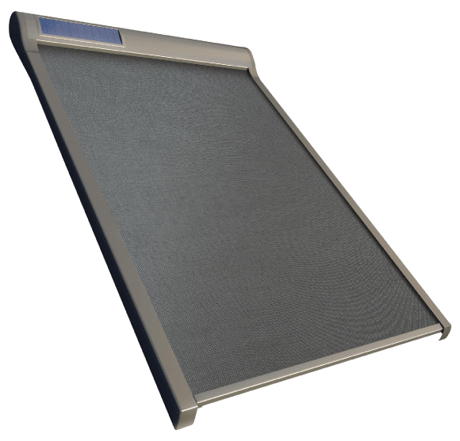
Product Picture


1 - Mode Control
The awning blind mode operate: 0 – manual - control with the use of the remote control 1 – semiautomatic - automatic closing and with the use of the remote control 2 – automatic -automatic opening and closing and with the use of the remote controlSize: 1 byte
Default: 0
Minimum: 0
Maximum: 2
Possible values
| From | To | Desription |
|---|---|---|
| 0 | 2 | 0 - manual, 1 – semiautomatic, 2 – automatic |
2 - Season select
Season of using awning blind 1 – summer 2 – winterSize: 1 byte
Default: 1
Minimum: 1
Maximum: 2
Possible values
| From | To | Desription |
|---|---|---|
| 1 | 2 | 1 – summer, 2 – winter |
3 - Timer
The time after which the awning blind will be open or close (depend on the season)Size: 1 byte
Default: 3
Minimum: 1
Maximum: 30
Possible values
| From | To | Desription |
|---|---|---|
| 1 | 30 | 1 to 30 minutes |
4 - Sensitivity
Level of sun sensitivity at which the awning blind will open or close.Size: 1 byte
Default: 60
Minimum: 3
Maximum: 100
Possible values
| From | To | Desription |
|---|---|---|
| 3 | 100 | 3 to 100 procent |
12 - Calibrate
Value 1 – calibrated Value 2 – discalibrated – to enter the calibration mode must first time discalibrate and then calibrate.Size: 1 byte
Default: 1
Minimum: 1
Maximum: 2
Possible values
| From | To | Desription |
|---|---|---|
| 1 | 2 | 1-calibrate, 2-discalibrate |
13 - The End position
1 – FF go to maximum position 2 – FF go to previous positionSize: 1 byte
Default: 1
Minimum: 1
Maximum: 2
Possible values
| From | To | Desription |
|---|---|---|
| 1 | 2 | 1 – FF is maximum position, 2 – FF is previous position |
Include - This function allow you to add awning blind to the network Z-Wave. Follow the procedur adding device to the network Z-Wave according to user manual supplied with the product. Then, press the programming button P on the awning blind for 1 second. Autoinclusion - This feature allow you to add hard to reach devices to Z-Wave network. 3-times ON and OFF the power awning blind (OFF-ON-OFF-ON-OFF-ON) causes the introduction of awning blind to Autoinclusion mode. Please note that the procedure has been started the time between on and off can not exceed 20s. Autoinclusion mode is activated for a maximum of 10 minutes. During this time, we can add an awning to any Z-Wave controller running in the Include procedure.
Exclude - This function allow you to remove awning blind from the network Z-Wave. Follow the procedur removing device from the network Z-Wave according to user manual supplied with the product. Then, press the programming button P on the awning blind for 1 second. Function removes information only about newtork Z-Wave.
Device Reset Locally – This function allows you to reset the Z-Wave network without the use of Z-Wave controller. Press 5 times the programming button P fast, the awning blind was removed from the Z-Wave network, restore the default parameters, name and locations. Please use this procedure only when the network primary controller is missing or otherwise inoperable.
Parameter Reset Locally – Press fast 3 times P button on the Awning Blind. Function removes information about parameters.
| Type | Value(s) |
|---|
| Group | Type |
|---|---|
| Power Management | (Refer to parameters): State idle |
| System | (Refer to parameters): State idle |