MCO Home
Heating Thermostat
MH7H-WH/EH
Thermostat - HVAC
HW: 255 FW: 3.01
ZM5202
6.71.01
0x015F (351)
0x0702 (1794)
0x5102 (20738)
ZC10-18046084
2018-04-17 23:45:00.460457
N/A
Enhanced 232 Slave
Always On Slave
MCOHome Water / Electrical Heating Thermostat MH7H is a Z-Wave Plus enabled device for indoor temperature control.
MH7H-WH is mainly applied to control wall mounted boiler, water valve/pump etc. , while MH7H-EH is for electrical heating system.The device is of high reliability and practicability, which can be included and operated in any Z-Wave network with other Z-Wave certified devices from any other manufacturers. All non-battery operated nodes within the network will act as repeaters regardless of vendor to increase reliability of the network. Features: Capacitive touch buttons Tempered glass panel, PC alloy enclosure Precise temperature calibration function Attractive appearance Clear display, easy to operate Specification: Power Supply:AC85-260V, 50/60HZ Output: MH7H-WH ≤5A ; MH7H-EH≤ 16A Self Consumption:≤1W External Temp. Sensor(optional): NTC R25℃=15KΩ B25℃/50℃=3550K Working Environment:0-50℃; 0-90% RH(Non- condensation) Temperature Setting:5-37 ℃(41-99℉)(Adjustable) Dimension:86* 86*15mm Hole Pitch:60-61mm
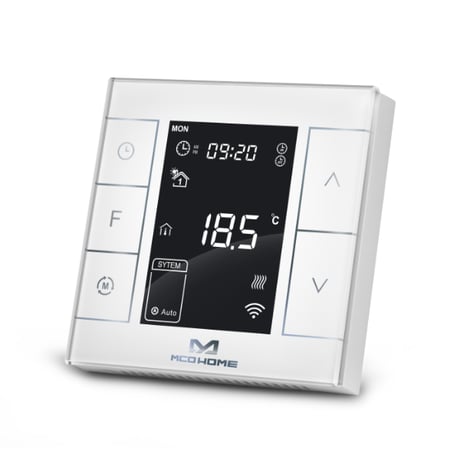
Product Picture
In normal working interface, press & hold S4 to enter interface for adding or removing of Z-Wave network. Before device added into network, “- - -” will display on the screen. Then press S4 once, device will enter learning mode to get a node ID. If adding is succeed, a node ID will display on the screen in a few seconds. A node ID can always inform us whether the device is in the network or not. After adding, turn off the device and then turn it on. Now the device is ready to be operated by controller/ gateway in Z-Wave network.
In normal working interface, press & hold S4 to enter interface for adding or removing of Z-Wave network. Before device removed from network, a Node ID will display on the screen. Then press S4 once. If removing is succeed, “- - -”will display on the screen in a few seconds. A node ID can always inform us whether the device is in the network or not.When removed, the device will restore its factory setting.
A parameter P18 in the secret menu can be used to restore factory setting locally. Please use this procedure only when the network primary controller is missing or otherwise inoperable. ; And a parameter FF can be used to restore the factory setting via Z-Wave.
| Type | Value(s) |
|---|
| Sensor type |
|---|
| Humidity |
| Water Temperature |
| Target Temperature |