Yale
Yale Assure Lock for Andersen Patio Doors with Bluetooth
YRM476-ZW2
Door Lock - Keypad
HW: 255 FW: 1.78:29.00
ZM5101
6.51.07
0x0129 (297)
0x8014 (32788)
0x1604 (5636)
ZC10-18056103
2018-05-01 21:24:59.155345
N/A
Enhanced 232 Slave
Listening Sleeping Slave
Yes
Yale Assure Lock for Andersen Patio Doors with Bluetooth
Yale Assure Lock® is a secure, keyless lock developed by Yale exclusively available with Andersen Patio Doors (E-Series and A-Series hinged patio doors). Monitor, lock and unlock from anywhere with your Yale Assure Lock featuring Andersen’s VeriLock™ sensor technology and with Z-Wave integrate into a compatible home automation or security system. Includes Bluetooth® technology for keyless unlocking.
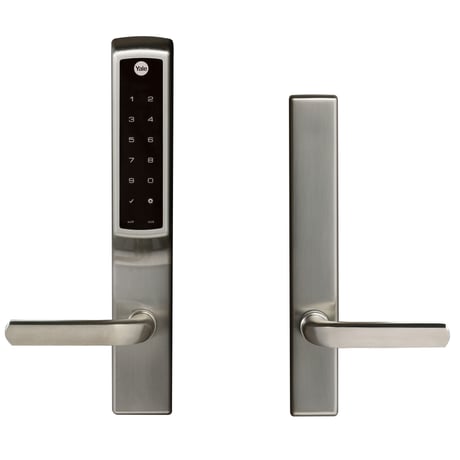
Product Picture


1 - Silent Mode on/off
Level control, 1, 2, 3 default is 1. Levels are 1 and 3 for models with no spoken prompts default is 1 or highSize: 1 byte
Default: 1
Minimum: 0
Maximum: 0
Possible values
| From | To | Desription |
|---|---|---|
| 1 | 3 | Level |
2 - Auto Relock On/Off
0x00 = OFF, 0xFF = ON default is 0x00 or OFFSize: 1 byte
Default: 0
Minimum: 0
Maximum: 0
Possible values
| From | To | Desription |
|---|---|---|
| -128 | -128 | Auto Relock On |
| 0 | 0 | Auto Relock Off |
3 - Auto Relock Time
10 to 180 seconds default is 5 secondsSize: 1 byte
Default: 30
Minimum: 0
Maximum: 0
Possible values
| From | To | Desription |
|---|---|---|
| 10 | 127 | Seconds |
4 - Wrong Code Entry Limit
3 to 10 default is 5 timesSize: 1 byte
Default: 5
Minimum: 0
Maximum: 0
Possible values
| From | To | Desription |
|---|---|---|
| 3 | 10 | Times |
5 - Language
Set the lock language. Default is 1= EnglishSize: 1 byte
Default: 1
Minimum: 0
Maximum: 0
Possible values
| From | To | Desription |
|---|---|---|
| 1 | 1 | English Language |
| 2 | 2 | Spanish Language |
| 3 | 3 | French Language |
7 - Shut Down Time (after wrong code entries)
10 to 127 seconds default is 60 secondsSize: 1 byte
Default: 60
Minimum: 0
Maximum: 0
Possible values
| From | To | Desription |
|---|---|---|
| 10 | 127 | Seconds |
8 - Operating Mode
This sets the operating mode for the lock.Size: 1 byte
Default: 0
Minimum: 0
Maximum: 0
Possible values
| From | To | Desription |
|---|---|---|
| 0 | 0 | Normal Mode (Default) |
| 1 | 1 | Vacation Mode (Keypad Locked Out) |
| 2 | 2 | Privacy Mode (Keypad Locked, RF Unlock Functional) |
11 - One Touch Locking
0x00 = OFF, 0xFF = ON default is 0xFF or ON.Size: 1 byte
Default: 0
Minimum: 0
Maximum: 0
Possible values
| From | To | Desription |
|---|---|---|
| -128 | -128 | One Touch Locking On |
| 0 | 0 | One Touch Locking Off |
12 - Privacy Button
0x00 = OFF, 0xFF = ON default is 0x00 or OFFSize: 1 byte
Default: 0
Minimum: 0
Maximum: 0
Possible values
| From | To | Desription |
|---|---|---|
| -128 | -128 | Privacy Button On |
| 0 | 0 | Privacy Button Off |
15 - Reset to Factory Defaults
01 = Lock will execute Reset To Factory. 02 = Reserved for future use (Lock will currently execute Reset To Factory same as 01). No default value Please use this procedure only when the network primary controller is missing or otherwise inoperableSize: 1 byte
Default: 0
Minimum: 0
Maximum: 0
Possible values
| From | To | Desription |
|---|---|---|
| -128 | -128 | Reset to Factory On |
| 0 | 0 | Reset to Factory Off |
18 - Door Propped Timer
10 to 127 second. This value is represented as seconds X 10. (ie a value of 4 would mean a door propped timer of 40 seconds) Set to 0x00 to disable Door Propped Alarm. Default = 0x00 (off)Size: 1 byte
Default: 0
Minimum: 0
Maximum: 0
Possible values
| From | To | Desription |
|---|---|---|
| 20 | 127 | Seconds |
19 - DPS Alarm
0x00 = OFF, 0xFF = ON Default is 0x00 or off. Used to enable/disable door condition alarms for locks that support a door position sensor. Any lock that does not support DPS will always report 0x00.Size: 1 byte
Default: 0
Minimum: 0
Maximum: 0
Possible values
| From | To | Desription |
|---|---|---|
| -128 | -128 | DPS Alarm On |
| 0 | 0 | DPS Alarm Off |
1. Enter the 4-8 digit master PIN code followed by the gear key. 2. Press the 7 key followed by the gear key. 3. Press the 1 key followed by the gear key.
1. Enter the 4-8 digit master PIN code followed by the gear key. 2. Press the 7 key followed by the gear key. 3. Press the 3 key followed by the gear key.
Please use this procedure only when the network primary controller is missing or otherwise inoperable. When resetting the lock, all user codes,including the Master code*, are deleted. All programming features are reset to the original default settings. 1. Remove the battery cover and batteries. 2. Remove the interior lock to access the reset button. 3. The reset button is located above the cable connectors. PCB 4. Re-insert 3 batteries and hold the reset button for 3 seconds. 5. While still holding the reset button, insert the 4th battery, and hold the reset button for an additional 3 seconds. 6. Release the reset button. 7. Re-install the interior lock onto the door.Upon reset, Master Code creation is the PIN only option available and must be performed prior to any other programming of the lock. For best results, the lock should be installed on the door when resetting the lock to factory default. If the process was done and the lock was not installed on the door, review the Re-Handing instructions listed in Hardware Troubleshooting.
| Type | Value(s) |
|---|
| Group | Type |
|---|---|
| Access Control | (Refer to parameters): State idle |
| Power Management | (Refer to parameters): State idle |
| Sensor type |
|---|
| General Purpose |