Jasco
2 Button Hub/Panel Remote
37792 / ZW5307
Wall Controller
HW: 255 FW: 5.18
ZM5202
6.71.01
0x0063 (99)
0x4843 (18499)
0x3133 (12595)
ZC10-18056118
2018-05-24 04:53:45.037701
N/A
Enhanced 232 Slave
Reporting Sleeping Slave
Yes
Custom lighting control is at your fingertips with the Jasco Z-Wave 2-Button Portable Hub Remote.
Custom lighting control is at your fingertips with the Jasco Z-Wave 2-Button Portable Hub Remote. This versatile remote communicates with your hub to activate up to 6 unique, lighting scenes. Once the remote is connected to your existing network, you can begin programming the lights to personalize your indoor space. The wireless lighting control has an overall signal range of up to 150 feet and is compatible with any device that works with your hub. Enjoy a variety of placement options for your lighting control – utilize the included hardware and magnetic bracket for wall mounting, detach the remote for instant portability or pair the remote with a separate stand for convenient tabletop use. The hub remote also functions on a scalable system, giving you the freedom to start with one remote and add as many as you need. Take control of your lights with the Z-Wave 2 Button Portable Hub Remote.
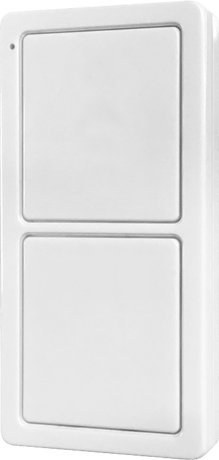
Product Picture


21 - Adjust Refresh
Adjust RefreshSize: 1 byte
Default: 0
Minimum: 0
Maximum: 0
Possible values
| From | To | Desription |
|---|---|---|
| 0 | 0 | 10 Seconds |
| 1 | 55 | Seconds |
1. Press and hold Button 1 for 3 seconds. 2. The LED will flash two (2) times.
Returning your remote to factory defaults 1. Press and release Button 1 ten times quickly. All button presses must be within 6 seconds. 2. The LED will flash five (5) times when completed successfully. NOTE: This should only be used in the event your network's primary controller/hub is missing or otherwise inoperable.
Adding your remote to a Z-Wave network 1. Follow the instructions for your Z-Wave certified hub to add a device to the Z-Wave network. 2. Once the hub is ready to add your device, press and hold Button 1 for 3 seconds. 3. The LED will flash two (2) times when the remote sends add notification (NIF). NOTE: Some Hubs will require an additional step for secure inclusion, when prompted scan the QR code on the back of the remote, or type in the 5-digit pin code located on the back of the remote.
Removing your remote from a Z-Wave network 1. Follow the instructions for your Z-Wave certified hub to remove a device from the Z-Wave network. 2. Once the hub is ready to remove your device, press and hold Button 1 for 3 seconds. 3. The LED will flash two (2) times when the remote sends remove notification (NIF).
| Type | Value(s) |
|---|