Coolcam
Water Leakage Detector
NAS-WS02ZU
Notification Sensor
HW: 32 FW: 2.133
ZM5202
6.81.00
0x0258 (600)
0x0200 (512)
0x1025 (4133)
ZC10-18076181
2018-07-03 06:37:11.825716
N/A
Routing Slave
Reporting Sleeping Slave
Yes
Water Leakage Detector is an intelligent security equipment that can transmit the Z-Wave network which has particular frequency. Different countries or areas, the radio frequency of Z-Wave is different.
In the Z-Wave network communications, water sensor can work with any Z-Wave main controller. In the Z-Wave network communications, water sensor can send messages to the Z-Wave main controller, and realize association with other devices through the Z-Wave network. In the communication with the Z-Wave main controller, the water sensor can send messages to the Z-Wave main controller, but it can not receive messages from the Z-Wave main controller. When the water sensor is triggered, the LED light keeps on and the buzzer will make sound. The water sensor sends messages to the Z-Wave main controller at the same time, the Z-Wave main controller will display the current status of water sensor. Water sensor is battery powered, is small and can be installed easily.
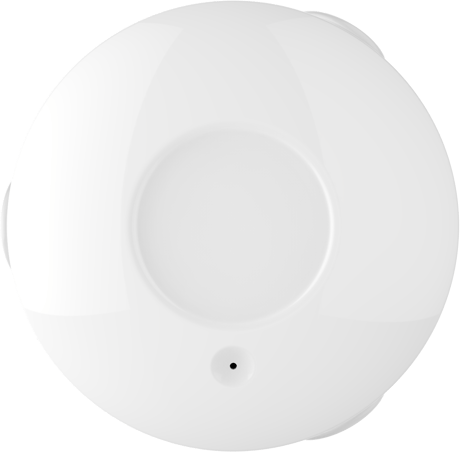
Product Picture


1 - Alarm Duration Time
This configuration can be used to adjust the time for beep and LED turned on when water leakage is detected. If this configuration is set to ‘0’, the beep and LED will be turn on always until water leakage is not detected.Size: 1 byte
Default: 120
Minimum: 0
Maximum: 0
Possible values
| From | To | Desription |
|---|---|---|
| 0 | 120 | Minute |
2 - Alarm Interval Time
This configuration defines beep on /off interval time when water leakage is detected.Size: 1 byte
Default: 60
Minimum: 0
Maximum: 0
Possible values
| From | To | Desription |
|---|---|---|
| 5 | 120 | Second |
3 - First Alarm On Time Duration
This configuration defines beep on duration first time when water leakage is detected.Size: 1 byte
Default: 60
Minimum: 0
Maximum: 0
Possible values
| From | To | Desription |
|---|---|---|
| 10 | 120 | Second |
4 - Alarm on Time Duration
This configuration defines beep on duration after fist beep on when water leakage is detected.Size: 1 byte
Default: 5
Minimum: 0
Maximum: 0
Possible values
| From | To | Desription |
|---|---|---|
| 5 | 120 | Second |
5 - Water Leakage Detected Disable
This configuration sets to ‘0’ will disable the water leakage detected function.Size: 1 byte
Default: 1
Minimum: 0
Maximum: 0
Possible values
| From | To | Desription |
|---|---|---|
| 0 | 1 | Available Settings |
6 - Beep Alarm Disable
This configuration sets to ‘0’ will disable the beep alarm on when device detects water leakage event.Size: 1 byte
Default: 1
Minimum: 0
Maximum: 0
Possible values
| From | To | Desription |
|---|---|---|
| 0 | 1 | Available Settings |
7 - Led Light Alarm Disable
This configuration sets to ‘0’ will disable the Led indicating when device detects a water leakage event.Size: 1 byte
Default: 1
Minimum: 0
Maximum: 0
Possible values
| From | To | Desription |
|---|---|---|
| 0 | 1 | Available Settings |
8 - Basic Set Level
This configuration sets the level for device sending BASIC_SET to nodes that associated in group 2 when device detects a water leakage event. [0] – Off, BASIC_SET = 0x00, all nodes associated in group 2 will be off. [1 … 99] – On. BASIC_SET = [Setting Value]. [100] – On, BASIC_SET = 0xFF.Size: 1 byte
Default: 100
Minimum: 0
Maximum: 0
Possible values
| From | To | Desription |
|---|---|---|
| 0 | 100 | Available Settings |
10 - Battery Report Periodically Enable
This parameter sets to ‘1’ will enable reporting battery periodically. The period time is defined by configuration parameter 11. If this value set to ‘0’, battery report will be executed in two cases listed as below. 1, Device is power up. 2, Battery life is falling 100, 16 and 0Size: 1 byte
Default: 0
Minimum: 0
Maximum: 0
Possible values
| From | To | Desription |
|---|---|---|
| 0 | 1 | Available Settings |
11 - Battery Report Interval
This parameter is defined the interval time for battery report. This value is larger, the battery life is longer. Unit: Minute.Size: 2 bytes
Default: 480
Minimum: 0
Maximum: 0
Possible values
| From | To | Desription |
|---|---|---|
| 0 | 1 | Available Settings |
| 1 | 1080 | Minute |
1,Power up the device. 2, Set Z-Wave™ Controller into inclusion mode 3, Press the button 3 times within 1s to enter inclusion mode. 4,The device will be recognized and automatically included into Z-Wave™ Network.
1, Power up the device. 2,Set Z-Wave™ Controller into exclusion mode 3, Press the button 3 times within 1s to enter exclusion mode
Press the button briefly,Led will blink once.
1,Power up the device. 2, Press and hold the button for 10s until led light is on, then release the button. Please use this procedure only when the network primary controller is missing or otherwise inoperable
Product Test Mode 1,Press and hold the button. 2,Power on the device, device will enter factory product test mode
| Type | Value(s) |
|---|
| Group | Type |
|---|---|
| Water Alarm | (Refer to parameters): State idle |
| Water Valve | (Refer to parameters): State idle |
| Sensor type |
|---|
| Water Flow |