GE
Direct-Wire Outdoor Smart Switch (40 Amp)
14285/ZW4007
On/Off Power Switch
HW: 255 FW: 5.53
ZM5202
6.81.01
0x0063 (99)
0x4F44 (20292)
0x3032 (12338)
ZC10-18056123
2018-05-25 18:51:19.456276
N/A
Enhanced 232 Slave
Always On Slave
When added to a Z-Wave network, this direct-wire switch enables wireless control of on/off functions for large load applications.
Transform any home into a smart home with the GE 40 Amp Z-Wave Direct-Wire Indoor/Outdoor Smart Switch. When added to a Z-Wave network, the heavy duty switch enables wireless control of on/off functions for large load, hard-wired applications such as waters heaters, landscape lighting, spas, pool pumps and heaters. The Smart Switch can be used indoors or outdoors and features an easy access wire connection block, front mounted LED lights indicating power and on/off status, and an override switch to turn connected devices on or off manually. The Smart Switch is housed in a lockable, tamper-resistant case to ensure settings and wiring are secure. The rugged, weather-resistant design will keep out dirt and debris while being suitable for use in extreme weather conditions. The GE Z-Wave Direct-Wire Outdoor Smart Switch is also equipped with state-of-the-art energy monitoring capability, allowing you to monitor watts and kilowatt hours, helping you keep your energy costs to a minimum. Take control of your home lighting and large load devices with GE Z-Wave Smart Lighting Controls!
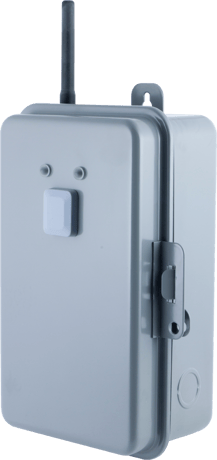
Product Picture


1 - Product State after Power Reset
State of the product after power lossSize: 1 byte
Default: 0
Minimum: 0
Maximum: 0
Possible values
| From | To | Desription |
|---|---|---|
| 0 | 0 | Return to last state |
| 1 | 1 | Return to off |
| 2 | 2 | Return to on |
2 - Energy Report Mode
Reporting modeSize: 1 byte
Default: 0
Minimum: 0
Maximum: 0
Possible values
| From | To | Desription |
|---|---|---|
| 0 | 0 | Once monthly |
| 1 | 1 | Device reports based on Parameter 3 setting (Every 5-60 minutes) |
| 2 | 2 | Once daily |
3 - Energy Report Frequency
Reporting frequencySize: 1 byte
Default: 0
Minimum: 0
Maximum: 0
Possible values
| From | To | Desription |
|---|---|---|
| 5 | 60 | 5 minutes (default) - 60 minutes (max) |
19 - Alternate Exclusion
Allows installer to include the device into a Z-Wave network using an alternate button press methodSize: 1 byte
Default: 0
Minimum: 0
Maximum: 0
Possible values
| From | To | Desription |
|---|---|---|
| 0 | 0 | Default |
| 1 | 1 | Alternate Exclusion (3 button presses) |
1. Follow the instructions for your Z-Wave certified controller to add a device to the Z-Wave network. 2. Once the controller is ready to add your device, press and release the programming button to add it to the network. If prompted by the controller to enter the S2 security code, refer to the QR code/security number on the back of the box, or the QR code label on the product. 3. Once your controller has confirmed that the device has been added, refresh the Z-Wave network to optimize performance.
1. Follow the instructions for your Z-Wave certified controller to remove a device from the Z-Wave network. 2. Once the controller is ready to remove your device press and release the programming button to remove it from the network.
1. Place the device into ON mode (upper position of Operating Mode Switch) 2. Press and hold the programming button. 3. While holding programming button, place device into OFF mode (middle position of Operating Mode Switch). 4. While holding programming button, place device back into ON mode (upper position of Operating Mode Switch). 5. After three (3) seconds, release programming button. Green LED will flash 3 times when completed successfully. Note: This should only be used in the event your network’s primary controller is missing or otherwise inoperable.
| Type | Value(s) |
|---|
| Meter type |
|---|
| Electric Meter Consumption |