Zooz
Z-Wave Plus Motion Sensor
ZSE18
Notification Sensor
HW: 1 FW: 1.00
ZM5101
6.71.01
0x027A (634)
0x0201 (513)
0x0006 (6)
ZC10-18066135
2018-06-05 21:29:19.239014
N/A
Enhanced 232 Slave
Reporting Sleeping Slave
Yes
Use this motion sensor to monitor any space discreetly and securely. It features a magnetic base for precise positioning.
PRODUCT FEATURES: - Fast, reliable motion detection - Built-in vibration sensor - Latest S2 security protocol and AES-128 signal encryption - 2 alternative power sources: battery or micro USB - Auto-inclusion for instant set-up - Visual range test tool - Magnetic mount for quick and flexible installation - Adjustable LED indicator - Low battery alerts - Z-Wave Plus with improved 500 chip for faster and safer wireless communication
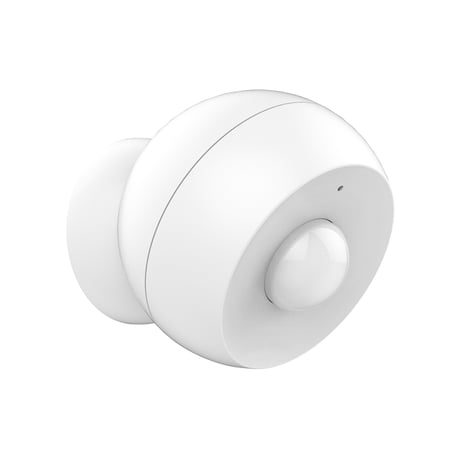
Product Picture


12 - PIR Sensitivity
Use it to adjust PIR sensor sensitivity.Size: 1 byte
Default: 4
Minimum: 0
Maximum: 0
Possible values
| From | To | Desription |
|---|---|---|
| 1 | 8 | 1 = low sensitivity and 8 = high sensitivity |
| 0 | 0 |
14 - BASIC SET for Group 2
Use it to enable or disable BASIC SET reports when motion is triggered for Group 2 of associated devices.Size: 1 byte
Default: 0
Minimum: 0
Maximum: 0
Possible values
| From | To | Desription |
|---|---|---|
| 0 | 0 | Disabled |
| 1 | 1 | Enabled |
15 - BASIC SET for Group 2 Reversed Values
Use it to reverse values sent in BASIC SET reports when motion is triggered for Group 2 of associated devices.Size: 1 byte
Default: 0
Minimum: 0
Maximum: 0
Possible values
| From | To | Desription |
|---|---|---|
| 0 | 0 | BASIC SET value 255 is sent when motion is triggered, BASIC SET value 0 is sent when motion times out |
| 1 | 1 | BASIC SET value 0 is sent when motion is triggered, BASIC SET value 255 is sent when motion times out. |
17 - Vibration Sensor
Use it to disable the vibration sensor.Size: 1 byte
Default: 1
Minimum: 0
Maximum: 0
Possible values
| From | To | Desription |
|---|---|---|
| 0 | 0 | vibration sensor is disabled |
| 1 | 1 | vibration sensor is enabled |
18 - Motion Retrigger Interval
Use it to set trigger interval - the time when motion is reported again after initial trigger.Size: 2 bytes
Default: 27
Minimum: 0
Maximum: 0
Possible values
| From | To | Desription |
|---|---|---|
| 3 | 65535 | 3 stands for 6 seconds and 65535 stands for 65538 seconds (add 3 seconds to each value number). |
20 - LED Indicator
Use it to disable the LED indicator.Size: 1 byte
Default: 1
Minimum: 0
Maximum: 0
Possible values
| From | To | Desription |
|---|---|---|
| 0 | 0 | LED Indicator is disabled |
| 1 | 1 | LED Indicator is enabled |
32 - Low Battery Reports
Use it to set battery level for low battery reports.Size: 1 byte
Default: 10
Minimum: 0
Maximum: 0
Possible values
| From | To | Desription |
|---|---|---|
| 10 | 50 | 10 stands for 10% battery left and 50 stands for 50% battery left |
AUTO-INCLUSION: Initiate inclusion in the Z-Wave interface. Activating the battery will automatically put the sensor into inclusion mode. If it’s not added within 30 seconds, try resetting it and including it manually. MANUAL INCLUSION: 1. Bring the sensor within direct range of your Z-Wave gateway (hub). 2. Put the Z-Wave hub into inclusion mode. 3. Press and release the Z-Wave button 3 times quickly. The LED indicator will start blinking fast and turn solid for a second to confirm inclusion. 3. A new motion sensor will appear in your device list.
1. Bring the sensor within direct range of your Z-Wave gateway controller (hub). 2. Put the Z-Wave hub into exclusion mode. 3. Press and release the Z-Wave button on the sensor 3 times as quickly as possible. 4. Your hub will confirm exclusion and the device will disappear from your controller's device list.
MANUAL WAKE-UP Press and HOLD the Z-Wave button for 5 seconds to wake the device up. The LED will start flashing.
If your primary controller is missing or inoperable, you may need to reset the device to factory settings. To complete the reset process manually, press and HOLD the Z-Wave button on the sensor for at least 20 seconds. The LED indicator will flash, stay solid, and then turn off to confirm factory reset. NOTE: All previously recorded activity and custom settings will be erased from the device’s memory.
| Type | Value(s) |
|---|
| Group | Type |
|---|---|
| Home Security | (Refer to parameters): State idle |