Connectair
Connectair Module
7440-MC-FS
Thermostat - HVAC
HW: 255 FW: 1.02:01.00
ZM5202
6.71.03
0x0369 (873)
0x0100 (256)
0x0101 (257)
ZC10-18066148
2018-06-13 19:23:37.861712
N/A
Enhanced 232 Slave
Always On Slave
Connects Convectair's compatible heaters to the Connectair ecosystem, in complete simplicity. The Connectair Module is currently compatible with ConvectAir's Allegro II models.
Control your Convectair heating With the Connectair Module integrated into your Convectair heater, adjust the comfort of your home according to your schedule and lifestyle, all at a distance and at all times. Once included in the ecosystem, the Connectair app and Controller allow you to control and make changes to your heating mode. Set your heaters to Comfort, Eco, Frost-protection or Standby mode, and then adjust the temperature setting as needed. It is also possible to locally change the set temperature of your heater by using the + and - buttons directly on the Connectair Module. Convectair compatible heaters The Connectair Module is currently compatible with Allegro II models. The Apéro (240V only) can also receive the information of the Module if it is connected by pilot wire to an Allegro II having the Module included. An open and flexible ecosystem The Connectair Module uses Z-Wave Plus technology, the most widely used wireless communication system in the world of connected objects. It is through this protocol that the Module communicates with the Connectair Controller. Secure Z-Wave Plus, the protocol used by Connectair is highly secure to protect communication between connected devices and the Controller. Moreover, Connectair uses the latest version of the Z-Wave library, the most secure on the market. The Connectair Module is equipped with a manual switch to prevent anyone from remotely shutting down the Convectair heaters. When turned on, this switch blocks the Standby mode. Inclusion The inclusion steps for the Module are simple and intuitive. In three clicks, your Module will be ready to be included into the ecosystem. Once included in the ecosystem, your heater will be controllable like the rest of the connected devices and subject to ecosystem features such as the scenarios. The Convectair warranty • 2 years against all manufacturing defects Due to our commitment to research and development, we reserve the right to change specifications without notice.
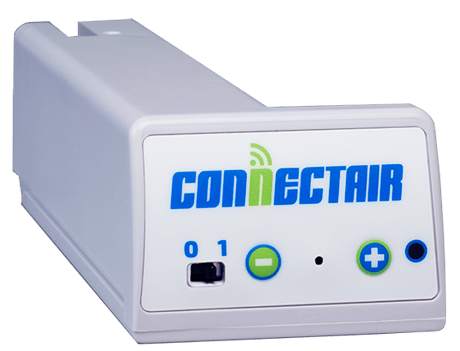
Product Picture
Start the adding process on the controller side Once started, start the adding process on the Connectair module by pressing 3 times the Z-Wave button, located between the plus and the minus button, using the included tool. When added, the LED will turn off
Start the removing process on the controller side Once started, put the device in ""learn mode"" by pressing 3 times on the Z-Wave button, located between the plus and the minus button, using the included tool. When removed, the LED will turn on
Please use this procedure only when the network primary controller is missing or otherwise inoperable Hold the Z-Wave button for about ten seconds If it was included, the LED will turn back on when reset is done
| Type | Value(s) |
|---|