Yale Locks & Hardware
nexTouch Sectional Mortise Push Button Keypad Lock with cylinder with deadbolt
NTM615-ZW2
Door Lock - Keypad
HW: 255 FW: 1.78:22.00
ZM5101
6.51.07
0x0129 (297)
0x8007 (32775)
0x0A00 (2560)
ZC10-18066159
2018-06-15 23:20:16.440273
N/A
Enhanced 232 Slave
Listening Sleeping Slave
Yes
Expanding the Yale nexTouch™ product line for even more applications, the new nexTouch Sectional Mortise Keypad Lock provides robust security for a wide range of commercial and multi-family buildings.
Expanding the Yale nexTouch™ product line for even more applications, the new nexTouch Sectional Mortise Keypad Lock provides robust security for a wide range of commercial and multi-family buildings. Just like the original cylindrical nexTouch lock, it is ANSI/BHMA Grade 1 certified and offered in capacitive touchscreen or pushbutton keypad versions. With just the addition of a Z-Wave Plus module, you can add this lock to compatible smart home and alarm systems. Other standard features include voice-guided programming, privacy mode with Door Position Switch, 9V battery backup, support of up to 100 unique user codes, and more.
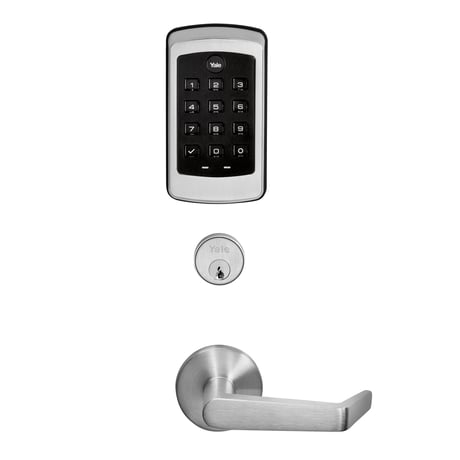
Product Picture


1 - Silent Mode on/off
Level control, 1, 2, 3 default is 1. Levels are 1 and 3 for models with no spoken prompts default is 1 or highSize: 1 byte
Default: 1
Minimum: 0
Maximum: 0
Possible values
| From | To | Desription |
|---|---|---|
| 1 | 3 | Level |
2 - Auto Relock On/Off
0x00 = OFF, 0xFF = ON default is 0x00 or OFFSize: 1 byte
Default: 0
Minimum: 0
Maximum: 0
Possible values
| From | To | Desription |
|---|---|---|
| -128 | -128 | Auto Relock On |
| 0 | 0 | Auto Relock Off |
3 - Auto Relock Time
10 to 127 seconds default is 5 secondsSize: 1 byte
Default: 5
Minimum: 0
Maximum: 0
Possible values
| From | To | Desription |
|---|---|---|
| 10 | 127 | Seconds |
4 - Wrong Code Entry Limit
3 to 10 default is 5 timesSize: 1 byte
Default: 5
Minimum: 0
Maximum: 0
Possible values
| From | To | Desription |
|---|---|---|
| 3 | 10 | Times |
5 - Language
Set the lock language. Default is 1= EnglishSize: 1 byte
Default: 1
Minimum: 0
Maximum: 0
Possible values
| From | To | Desription |
|---|---|---|
| 1 | 1 | English Language |
| 2 | 2 | Spanish Language |
| 3 | 3 | French Language |
7 - Shut Down Time (after wrong code entries)
10 to 127 seconds default is 60 secondsSize: 1 byte
Default: 60
Minimum: 0
Maximum: 0
Possible values
| From | To | Desription |
|---|---|---|
| 10 | 127 | Seconds |
8 - Operating Mode
This sets the operating mode for the lock.Size: 1 byte
Default: 0
Minimum: 0
Maximum: 0
Possible values
| From | To | Desription |
|---|---|---|
| 0 | 0 | Normal Mode (Default) |
| 1 | 1 | Vacation Mode (Keypad Locked Out) |
| 2 | 2 | Privacy Mode (Keypad Locked, RF Unlock Functional) |
11 - One Touch Locking
0x00 = OFF, 0xFF = ON default is 0xFF or ON.Size: 1 byte
Default: 0
Minimum: 0
Maximum: 0
Possible values
| From | To | Desription |
|---|---|---|
| -128 | -128 | One Touch Locking On |
| 0 | 0 | One Touch Locking Off |
12 - Privacy Button
0x00 = OFF, 0xFF = ON default is 0x00 or OFFSize: 1 byte
Default: 0
Minimum: 0
Maximum: 0
Possible values
| From | To | Desription |
|---|---|---|
| -128 | -128 | Privacy Button On |
| 0 | 0 | Privacy Button Off |
15 - Reset to Factory Defaults
01 = Lock will execute Reset To Factory. 02 = Reserved for future use (Lock will currently execute Reset To Factory same as 01). No default value Please use this procedure only when the network primary controller is missing or otherwise inoperableSize: 1 byte
Default: 0
Minimum: 0
Maximum: 0
Possible values
| From | To | Desription |
|---|---|---|
| -128 | -128 | Reset to Factory On |
| 0 | 0 | Reset to Factory Off |
18 - Door Propped Timer
10 to 127 second. This value is represented as seconds X 10. (ie a value of 4 would mean a door propped timer of 40 seconds) Set to 0x00 to disable Door Propped Alarm. Default = 0x00 (off)Size: 1 byte
Default: 0
Minimum: 0
Maximum: 0
Possible values
| From | To | Desription |
|---|---|---|
| 20 | 127 | Seconds |
19 - DPS Alarm
0x00 = OFF, 0xFF = ON Default is 0x00 or off. Used to enable/disable door condition alarms for locks that support a door position sensor. Any lock that does not support DPS will always report 0x00.Size: 1 byte
Default: 0
Minimum: 0
Maximum: 0
Possible values
| From | To | Desription |
|---|---|---|
| -128 | -128 | DPS Alarm On |
| 0 | 0 | DPS Alarm Off |
20 - Deadbolt Installed
0x00 = NO deadbolt , 0xFF = YES deadbolt Read only parameter. Some locks contain optional deadbolt hardware. This parameter is used to determine if one is installed.Size: 1 byte
Default: 0
Minimum: 0
Maximum: 0
Possible values
| From | To | Desription |
|---|---|---|
| -128 | -128 | Deadbolt No |
| 0 | 0 | Deadbolt Yes |
21 - Eco Mode On/Off
0x00 = OFF, 0xFF = ON default is 0x00 or OFF If supported switches lock to lower power mode of operation with reduced sound and led brightness.Size: 1 byte
Default: 0
Minimum: 0
Maximum: 0
Possible values
| From | To | Desription |
|---|---|---|
| -128 | -128 | Eco Mode On |
| 0 | 0 | Eco Mode Off |
22 - Privacy Mode with Deadbolt
0x00 = OFF, 0xFF = ON default is 0x00 or OFF If enabled then extending the deadbolt will put the lock into Privacy Mode.Size: 1 byte
Default: 0
Minimum: 0
Maximum: 0
Possible values
| From | To | Desription |
|---|---|---|
| -128 | -128 | Privacy Mode On |
| 0 | 0 | Privacy Mode Off |
23 - Lock Body Alarms Mask
Each bit controls one alarm. 1 = alarm enabled, 0 = alarm disabled. 0xFF = All Alarms on, Default is 0xFF. Bit 0: DPS Alarm (AX) (Duplicate of parameter 19. Values should be tied together) Bit 1: Deadbolt Alarm Bit 2: Lever Rotated (Rx)Size: 1 byte
Default: 0
Minimum: 0
Maximum: 0
Possible values
| From | To | Desription |
|---|---|---|
| 0 | 0 | DPS Alarm |
| 1 | 1 | Deadbolt Alarm |
| 2 | 2 | Lever Rotated |
1. Enter the 4-8 digit master PIN code followed by the gear key. 2. Press the 7 key followed by the gear key. 3. Press the 1 key followed by the gear key.
1. Enter the 4-8 digit master PIN code followed by the gear key. 2. Press the 7 key followed by the gear key. 3. Press the 3 key followed by the gear key.
Touch any button
Please use this procedure only when the network primary controller is missing or otherwise inoperable. 1. Remove the inside lever with the lever removal tool. 2. Remove battery cover using hex wrench provided with lock. 3. Remove four (4) AA batteries. 4. Remove the 10-32 x 3/4"" pan head screw from the center of the battery housing into the barrel nut of the outside assembly. 5. Remove inside escutcheon. Cables may stay connected. 6. Reinstall batteries 7. On the back of the PC board, push and hold the Reset Button with the lever removal tool for 3 seconds. 8. While continuing the press the reset button, temporarily remove one AA battery. 9. Reinstall the battery 10. Release reset button and wait 15 seconds. Speaker will announce ""Welcome to Yale"" 11. Reassemble escutcheon
| Type | Value(s) |
|---|
| Group | Type |
|---|---|
| Access Control | (Refer to parameters): State idle |
| Power Management | (Refer to parameters): State idle |