Vision
Outdoor Siren
ZM1621BR-5
Siren
HW: 3 FW: 24.07:05.01
ZM5202
6.51.10
0x0109 (265)
0x2005 (8197)
0x0518 (1304)
ZC10-18086202
2018-06-29 18:28:59.563758
N/A
Enhanced 232 Slave
Listening Sleeping Slave
Wireless siren will sound a loud siren and flash a strobe light when an alarm message or alert is received on any Z-Wave™ enabled network.
Features: *Loud audible alarm>115dB@30cm *LED strobe lighting *Low battery detection *Siren for Battery Back-Up *100ft line of sight *LED Status Indicator *Operating temp: -15oC~60oC *Working Voltage: 6V *Dimensions: 116*77*40mm
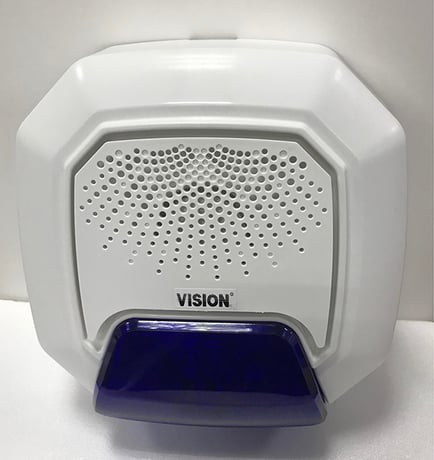
Product Picture


1 - Siren/Strobe mode
User can change value from 0 to 2 to turn either Siren sound, Strobe light, or both when triggered.Size: 1 byte
Default: 0
Minimum: 0
Maximum: 0
Possible values
| From | To | Desription |
|---|---|---|
| 0 | 0 | All Enable - Default |
| 1 | 1 | Siren Only |
| 2 | 2 | Strobe Only |
2 - Alarm Auto Stop Time
User can change the duration of siren time when triggered.Size: 1 byte
Default: 0
Minimum: 0
Maximum: 0
Possible values
| From | To | Desription |
|---|---|---|
| 0 | 0 | 30 seconds - Default |
| 1 | 1 | 60 seconds |
| 2 | 2 | 120 seconds |
| 3 | 3 | Will Not Automatically Stop |
For “Inclusion” in (adding to) a network: Put the Z-Wave™ Interface Controller into “inclusion” mode, and following its instruction to add the ZM 1621 to your controller. To get in the “inclusion” mode, get magnet of the bracket to touch the reed switch on the ZM1621 and separate at once to be included. After setting, the LED Light should go off, if not, please try again. (After sending one time’s Z-Wave NIF and not be included then it will send NWI for auto inclusion. The LED light will flash again if the siren has not been included or the LED light will go off after inclusion.)
For “Exclusion” in (removing from) a network: Put the Z-Wave™ Interface Controller into “exclusion” mode, and following its instruction to remove the ZM 1621 from your controller. ZM1621-5 will send NWE if the exclusion could not be done successfully. Note: a. LED light will flash continuously in Exclusion condition. b. All user and network settings will be cleared and the device reset to factory defaults when the device is excluded.
removing the back cover of the ZM1621 to get into “Awake” mode
ZM 1621 will reset to factory default when the device has been excluded. (Please use this procedure only in the event that your network primary controllers is missing or otherwise inoperable!)
1. Support OTA firmware update from controller 2. Support Explorer Frame function
| Type | Value(s) |
|---|
| Group | Type |
|---|---|
| Emergency Alarm | (Refer to parameters): State idle |