MCO Home
Micro Dimmer
MH-P220
Light Dimmer Switch
HW: 255 FW: 3.02
ZM5202
6.71.03
0x015F (351)
0x220A (8714)
0x5101 (20737)
ZC10-18086201
2018-07-20 15:33:29.084665
N/A
Enhanced 232 Slave
Always On Slave
Micro Dimmer is a Z-Wave Plus enabled in-wall module which can be wired with a wall switch panel for dimming purpose.
This in-wall module is with compact design as well as stable performance, which can suit for any of the installation box and various operation situation. It supports basic command class, and also can act as repeater regardless of vendor to increase reliability of the network.
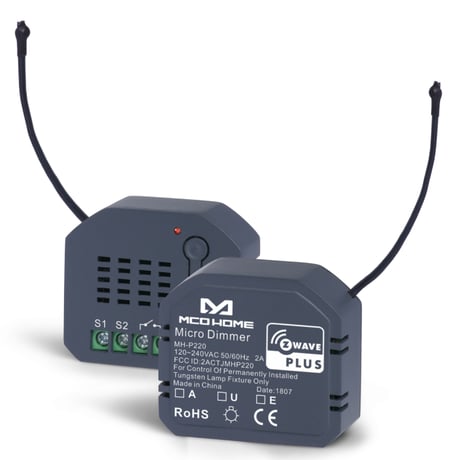
Product Picture


1 - Dimmer state saved or not when power down
0x00 not saved,Dimmer will be off when powered again 0x01 saved,Dimmer will keep the same state when powered againSize: 1 byte
Default: 1
Minimum: 0
Maximum: 0
Possible values
| From | To | Desription |
|---|---|---|
| 0 | 1 | 0: not saved,Dimmer will be off when powered again; 1: saved,Dimmer will keep the same state when powered again |
2 - External switch type
0x00 Button (Momentary buttons ) 0x01 Toggle (2-state Switches ) 0x02 Roller blinds switch: S1 Dim up ,S2 Dim downSize: 1 byte
Default: 0
Minimum: 0
Maximum: 0
Possible values
| From | To | Desription |
|---|---|---|
| 0 | 2 | 0: Button (Momentary buttons ) ; 1: Toggle (2-state Switches ) ; 2: Roller blinds switch: S1 Dim up ,S2 Dim down |
3 - 2-state Switches
0x00 for the toggle Dimmer without specified on/off position 0x01 for the toggle Dimmer with specified on/off positionSize: 1 byte
Default: 0
Minimum: 0
Maximum: 0
Possible values
| From | To | Desription |
|---|---|---|
| 0 | 1 | 0: for the toggle Dimmer without specified on/off position; 1: for the toggle Dimmer with specified on/off position |
5 - Minimum brightness level
1~98 percentage brightness levelSize: 1 byte
Default: 5
Minimum: 0
Maximum: 0
Possible values
| From | To | Desription |
|---|---|---|
| 1 | 98 | 1~98 percentage brightness level |
6 - Maximum brightness level
2~99 percentage brightness levelSize: 1 byte
Default: 99
Minimum: 0
Maximum: 0
Possible values
| From | To | Desription |
|---|---|---|
| 2 | 99 | 2~99 percentage brightness level |
7 - Single dimming step time(Manual)
Max 5.11s, in 10ms stepsSize: 2 bytes
Default: 3
Minimum: 0
Maximum: 0
Possible values
| From | To | Desription |
|---|---|---|
| 0 | 511 | Max 5.11s, in 10ms steps |
8 - Single dimming step size(Manual)
1~99 percentage value (modification isn’t recommended)Size: 1 byte
Default: 1
Minimum: 0
Maximum: 0
Possible values
| From | To | Desription |
|---|---|---|
| 1 | 99 | 1~99 percentage value |
9 - Single dimming step time (Auto)
Max 5.11s, in 10ms stepsSize: 2 bytes
Default: 1
Minimum: 0
Maximum: 0
Possible values
| From | To | Desription |
|---|---|---|
| 0 | 511 | Max 5.11s, in 10ms steps |
10 - Single dimming step size (Auto)
1~99 percentage value (modification isn’t recommended)Size: 1 byte
Default: 1
Minimum: 0
Maximum: 0
Possible values
| From | To | Desription |
|---|---|---|
| 1 | 99 | 1~99 percentage value |
13 - One click of S1
0x00 switch between Off and last saved brightness level 1~99 percentage value switch between Off and the set valueSize: 1 byte
Default: 0
Minimum: 0
Maximum: 0
Possible values
| From | To | Desription |
|---|---|---|
| 0 | 99 | 0 :switch between Off and last saved brightness level; 1~99: percentage value switch between Off and the set value |
255 - Factory setting
0x55 restore factory setting (Write only)Size: 1 byte
Default: 0
Minimum: 0
Maximum: 0
Possible values
| From | To | Desription |
|---|---|---|
| 0 | 85 | 0-84: no operation: 85: factory setting restoring |
Add the device into Z-Wave network: 1. Set controller into ADD mode. Follow the instructions provided by the controller/gateway manufacturer. 2. Press the momentary button on the device 3 times, or the connected external button S1 3 times in quick succession. Note: If the ADD is successful, the INDICATION LED will blink 6 times. If not, INDICATION LED will be solid on or off depending on switch’s state.
Remove the device from Z-Wave network: 1. Set controller into REMOVE mode. Follow the instructions provided by the controller/gateway manufacturer. 2. Press the momentary button on the device 3 times, or the connected external button S1 3 times in quick succession. Note: If the REMOVE is successful, the INDICATION LED will blink 6 times. If not, INDICATION LED will be solid on or off depending on switch’s state.
Restoring Factory Settings: The default configuration can be restored by: Sending commands through controller/gateway (the command classes which support this function is Configuration Command Class). The parameter are as follows: Parameter Number 0xFF Size 1 BYTE Default value N/A Configuration value 0x55 Set 0xFF as 0x55 will restore Factory Settings. Or press the inner button on the module 10 times in quick succession.Please use this procedure only when the network primary controller is missing or otherwise inoperable.
| Type | Value(s) |
|---|