QUBINO
Smart Meter
ZMNHTD1
Whole Home Meter - Simple
HW: 65 FW: 7.08:108.00
ZM5202
6.71.03
0x0159 (345)
0x0007 (7)
0x0052 (82)
ZC10-18086203
2018-08-07 22:42:41.788312
N/A
Enhanced 232 Slave
Always On Slave
The Qubino Smart Meter is an extremely versatile and powerful Z-Wave device for measuring energy in a single-phase electrical power network of up to 65A. A built-in microprocessor calculates energy, power and power factor from the measured signals. It is designed to be mounted on a DIN rail.
The Qubino Smart Meter can be used in residential, industrial and utility applications. It measures energy directly in 2-wire networks by means of fast sampling of voltage and current signals. It calculates energy, power and power factor from the measured signals. You can control the device through the Z-Wave network. The Qubino Smart Meter can operate across a wide temperature range, from a chilly -15˚C to a scorching 55˚C (5˚F–131˚F). Every device also acts as a repeater in order to improve the range and stability of the Z-Wave network.
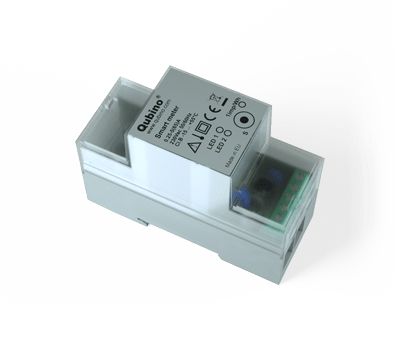
Product Picture


40 - Reporting Watts on power change
• Default value 10 • 0 – reporting disabled • 1-100 = 1% - 100% reporting enabled. Power is reported only when actual power in Watts (in real time changes for more than set percentage comparing to previous actual power in Watts, step is 1%. NOTE: when power is changed for more than percent value in this parameter -> the device is reporting also: • A (Current) (if the value has changed) • V (Voltage) (if the value has changed) • Power Factor (if the value has changed) • kvar (Reactive power) (if the value has changed) • kWh (Energy – Active power accumulated Import) (if the value has changed) • kWh (Energy – Active power accumulated Export) (if the value has changed) • kVAh (Energy – Apparent power accumulated) (if the value has changed) • kvarh (Energy – Reactive power accumulated) (if the value has changed) To avoid unintended reporting (electric disturbances, noise, etc..) the measured power less than 5W is not reported.Size: 1 byte
Default: 10
Minimum: 0
Maximum: 100
Possible values
| From | To | Desription |
|---|---|---|
| 0 | 0 | reporting disabled |
| 1 | 100 | 1% - 100% reporting enabled. Power is reported only when actual power in Watts (in real time changes for more than set percentage comparing to previous actual power in Watts, step is 1%. |
42 - Reporting on time interval
• Default value 600 (10 minutes) • 0-599 = reporting disabled • 600 - 32535 = 600 seconds - 32535 seconds. Reporting enabled. Report is send with the time interval set by entered value. NOTE: The device is reporting the following values: • W (Active Power) (if the value has changed) • A (Current) (if the value has changed) • V (Voltage) (if the value has changed) • Power Factor (if the value has changed) • kvar (Reactive power) (if the value has changed) • kWh (Energy – Active power accumulated Import) (if the value has changed) • kWh (Energy – Active power accumulated Export) (if the value has changed) • kVAh (Energy – Apparent power accumulated) (if the value has changed) • kvarh (Energy – Reactive power accumulated) (if the value has changed)Size: 2 bytes
Default: 600
Minimum: 0
Maximum: 32535
Possible values
| From | To | Desription |
|---|---|---|
| 0 | 599 | reporting disabled |
| 600 | 32532 | Reporting enabled. Report is send with the time interval set by entered value. |
45 - Reset Power counters
• Default value 0 • 0 – no function • 1 – reset counter 1 –kWh import • 2 – reset counter 2 – kvarh • 4 – reset counter 3 – kVAh • 8 – reset counter 4 – kWh export • 15 – reset ALL countersSize: 1 byte
Default: 0
Minimum: 0
Maximum: 15
Possible values
| From | To | Desription |
|---|---|---|
| 0 | 0 | no function |
| 1 | 1 | reset counter 1 –kWh import |
| 2 | 2 | reset counter 2 – kvarh |
| 4 | 4 | reset counter 3 – kVAh |
| 8 | 8 | reset counter 4 – kWh export |
| 15 | 15 | reset ALL counters |
AUTOMATICALLY ADDING THE DEVICE TO A Z-WAVE NETWORK (AUTO INCLUSION) 1. Enable add/remove mode on your Z-Wave gateway (hub) 2. Automatic selection of secure/unsecure inclusion 3. The device can be automatically added to a Z-Wave network during the first 2 minutes 4. Connect the device to the power supply 5. Auto-inclusion will be initiated within 5 seconds of connection to the power supply and the device will automatically enrol in your network ⓘ NOTE: For S2 inclusion please check chapter – »16. Z-Wave Security«. MANUALLY ADDING THE DEVICE TO A Z-WAVE NETWORK (MANUAL INCLUSION) 1. Connect the device to the power supply 2. Enable add/remove mode on your Z-Wave gateway (hub) 2. Toggle the Service button S between 0.2 and 6 seconds 3. A new multi-channel device will appear on your dashboard
REMOVAL FROM A Z-WAVE NETWORK (Z-WAVE EXCLUSION) 1. Connect the device to the power supply 2. Make sure the device is within direct range of your Z-Wave gateway (hub) or use a hand-held Z-Wave remote to perform exclusion 3. Enable add/remove mode on your Z-Wave gateway (hub) 4. Press and hold the S service button between 0.2 and 6 seconds 5. The device will be removed from your network but custom configuration parameters will not be erased
FACTORY RESET 1. Connect the device to the power supply 2. Press and hold the S service button between 6 seconds and 20 seconds 3. Device will be removed from you network ⓘ By resetting the device, all custom parameters previously set on the device will return to their default values, and the owner ID will be deleted. Use this reset procedure only when the main gateway (hub) is missing or otherwise inoperable.
| Type | Value(s) |
|---|
| Meter type |
|---|
| Electric Meter Consumption |