COQON
Energy Consumption Monitor Energiemonitor Z-Wave, 230V Model Number
EMHTZ001
Sub Energy Meter
HW: 0 FW: 1.03
ZM5101
6.71.01
0x0140 (320)
0x0803 (2051)
0x1003 (4099)
ZC10-18086207
2018-08-12 20:11:16.096821
N/A
Enhanced 232 Slave
Always On Slave
Power monitor to measure and register the power consumption of individual circuits. Measurement per circuit. The power monitor helps you to represent, reduce and optimize the power consumption in subareas of your everyday life.
The power monitor measures and registers power consumption to help users understand their energy consumption. The measurement takes place per circuit. This information may be useful for those who want to reduce their energy consumption or use energy-efficient behavior. They provide insights into areas in their home where more energy is consumed than in others. Product Compliance: This product meets the essential requirements of (RED) 2014/53 / EU and 2011/65 / EU. The full text of the EU Declaration of Conformity can be found on www.coqon.de. Technical specifications: Model no. EMHTZ001 Mains voltage 230V, 50 Hz Ambient temperature 0-45 ° C Dimensions 100x100x31mm Radio language Z-Wave Plus
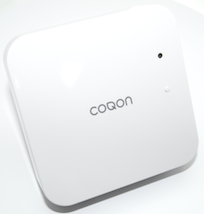
Product Picture


2 - Energy detection mode
Energy detection modeSize: 1 byte
Default: 0
Minimum: 0
Maximum: 0
Possible values
| From | To | Desription |
|---|---|---|
| 0 | 0 | 0 = Report Power, Energy absolute value. |
| 1 | 1 | 1 = Report positive / negative power, report the algebraic sum energy. |
| 2 | 2 | 2 = Report positive / negative power, only report energy positive part (consuming electricity). |
| 3 | 3 | 3 = Report positive / negative power, only report energy negative part (generating electricity). |
3 - selective reporting
Enable selective reporting only when power change reaches a certain threshold or percentage set in parameters 4-11 below. This is used to reduce the network traffic.Size: 1 byte
Default: 1
Minimum: 0
Maximum: 0
Possible values
| From | To | Desription |
|---|---|---|
| 0 | 0 | 0 = disable |
| 1 | 1 | 1 = Enable |
4 - Wattage threshold change
Threshold change in wattage to induce an automatic report (Whole EM)Size: 2 bytes
Default: 50
Minimum: 0
Maximum: 0
Possible values
| From | To | Desription |
|---|---|---|
| 0 | 30000 | Valid values 0-30000 |
5 - Clamp 1
Threshold change in wattage to induce an automatic report (Clamp 1)Size: 2 bytes
Default: 50
Minimum: 0
Maximum: 0
Possible values
| From | To | Desription |
|---|---|---|
| 0 | 30000 | Valid values 0-30000 |
6 - Clamp 2
Threshold change in wattage to induce an automatic report (Clamp 2)Size: 2 bytes
Default: 50
Minimum: 0
Maximum: 0
Possible values
| From | To | Desription |
|---|---|---|
| 0 | 30000 | Valid values 0-30000 |
7 - Clamp 3
Threshold change in wattage to induce an automatic report (Clamp 3)Size: 2 bytes
Default: 50
Minimum: 0
Maximum: 0
Possible values
| From | To | Desription |
|---|---|---|
| 0 | 30000 | Valid values 0-30000 |
8 - Clamp 4
Threshold change in wattage to induce an automatic report (Clamp 4)Size: 2 bytes
Default: 50
Minimum: 0
Maximum: 0
Possible values
| From | To | Desription |
|---|---|---|
| 0 | 30000 | Valid values 0-30000 |
9 - Wattage percentage change
Percentage change in wattage to induce an automatic report (wohle EM)Size: 1 byte
Default: 10
Minimum: 0
Maximum: 0
Possible values
| From | To | Desription |
|---|---|---|
| 0 | 100 | Valid values 0-100 |
10 - Clamp 1
Percentage change in wattage to induce an automatic report (Clamp 1)Size: 1 byte
Default: 10
Minimum: 0
Maximum: 0
Possible values
| From | To | Desription |
|---|---|---|
| 0 | 100 | Valid values 0-100 |
11 - Clamp 2
Percentage change in wattage to induce an automatic report (Clamp 2)Size: 1 byte
Default: 10
Minimum: 0
Maximum: 0
Possible values
| From | To | Desription |
|---|---|---|
| 0 | 100 | Valid values 0-100 |
12 - Clamp 3
Percentage change in wattage to induce an automatic report (Clamp 3)Size: 1 byte
Default: 10
Minimum: 0
Maximum: 0
Possible values
| From | To | Desription |
|---|---|---|
| 0 | 100 | Valid values 0-100 |
13 - Clamp 4
Percentage change in wattage to induce an automatic report (Clamp 4)Size: 1 byte
Default: 10
Minimum: 0
Maximum: 0
Possible values
| From | To | Desription |
|---|---|---|
| 0 | 100 | Valid values 0-100 |
101 - Auto report KWh
Auto report KWhSize: 1 byte
Default: 1
Minimum: 0
Maximum: 0
Possible values
| From | To | Desription |
|---|---|---|
| 0 | 31 | Valid values 0 - 31, Bit 0: Whole EM, Bit 1: Clamp 1, Bit 2: Clamp 2, Bit 3: Clamp 3, Bit 4: Clamp 4 |
102 - Auto report W
Auto report WSize: 1 byte
Default: 1
Minimum: 0
Maximum: 0
Possible values
| From | To | Desription |
|---|---|---|
| 0 | 31 | Valid values 0 - 31, Bit 0: Whole EM, Bit 1: Clamp 1, Bit 2: Clamp 2, Bit 3: Clamp 3, Bit 4: Clamp 4 |
103 - Auto report V
Auto report VSize: 1 byte
Default: 0
Minimum: 0
Maximum: 0
Possible values
| From | To | Desription |
|---|---|---|
| 0 | 31 | Valid values 0 - 31, Bit 0: Whole EM, Bit 1: Clamp 1, Bit 2: Clamp 2, Bit 3: Clamp 3, Bit 4: Clamp 4 |
104 - Auto report A
Auto report ASize: 1 byte
Default: 0
Minimum: 0
Maximum: 0
Possible values
| From | To | Desription |
|---|---|---|
| 0 | 31 | Valid values 0 - 31, Bit 0: Whole EM, Bit 1: Clamp 1, Bit 2: Clamp 2, Bit 3: Clamp 3, Bit 4: Clamp 4 |
105 - Auto report kVar
Auto report kVarSize: 1 byte
Default: 0
Minimum: 0
Maximum: 0
Possible values
| From | To | Desription |
|---|---|---|
| 0 | 31 | Valid values 0 - 31, Bit 0: Whole EM, Bit 1: Clamp 1, Bit 2: Clamp 2, Bit 3: Clamp 3, Bit 4: Clamp 4 |
111 - Time interval Auto report kWh
The Time interval of Auto report kWhSize: 4 bytes
Default: 0
Minimum: 0
Maximum: 0
Possible values
| From | To | Desription |
|---|---|---|
| 0 | 1 | Valid values 0x1E-0x7FFFFFFF |
112 - Time interval Auto report W
The Time interval of Auto report WSize: 4 bytes
Default: 0
Minimum: 0
Maximum: 0
Possible values
| From | To | Desription |
|---|---|---|
| 0 | 1 | Valid values 0x1E-0x7FFFFFFF |
113 - Time interval Auto report V
The Time interval of Auto report VSize: 1 byte
Default: 0
Minimum: 0
Maximum: 0
Possible values
| From | To | Desription |
|---|---|---|
| 0 | 1 | Valid values 0x1E-0x7FFFFFFF |
114 - Time interval Auto report A
The Time interval of Auto report ASize: 1 byte
Default: 0
Minimum: 0
Maximum: 0
Possible values
| From | To | Desription |
|---|---|---|
| 0 | 1 | Valid values 0x1E-0x7FFFFFFF |
115 - Time interval Auto report kVar
The Time interval of Auto report kVarSize: 1 byte
Default: 0
Minimum: 0
Maximum: 0
Possible values
| From | To | Desription |
|---|---|---|
| 0 | 1 | Valid values 0x1E-0x7FFFFFFF |
1. Start the COQON App 2. Select ""Device"" then ""Settings"" and tap on ""+"" to add your Electric Monitor 3. Select ""Add new COQON device"" 4. Follow the steps in the App
1. Start the COQON App 2. Select ""Device"" then ""Settings"" and tap on the device to remove Electric Monitor 3. Tap on the the trash can icon 4. Follow the steps in the App
To reset the device to factory default press and hold the function button for 10 seconds. Note: Please use this procedure ony when the network primary controller is missing or otherwise inoperabe!
| Type | Value(s) |
|---|
| Meter type |
|---|
| Electric Meter Consumption |