HomeSeer
Flex Sensor
HS-FS100+
Notification Sensor
HW: 255 FW: 5.09
ZM5101
6.71.01
0x000C (12)
0x0202 (514)
0x0001 (1)
ZC10-18086215
2018-08-28 19:07:09.10613
N/A
Enhanced 232 Slave
Reporting Sleeping Slave
Yes
HS-FS100+ (“Flex Sensor”) is a multifunction module that includes a temperature sensor, controllable buzzer and a port to connect optional external light or water sensors.
HS-FS100+ (“Flex Sensor”) is a multifunction module that includes a temperature sensor, controllable buzzer and a port to connect optional external light or water sensors. It is designed to work with a variety of Z-Wave certified home controllers to launch automation events or scenes. - Use to trigger events based on changes in temperature - Use the built-in buzzer as an audible notification that triggers when things happen in your home - Use with optional light sensor to trigger events when indicator lights on applications turn on or off - Use with optional water sensor to trigger events when water is detected
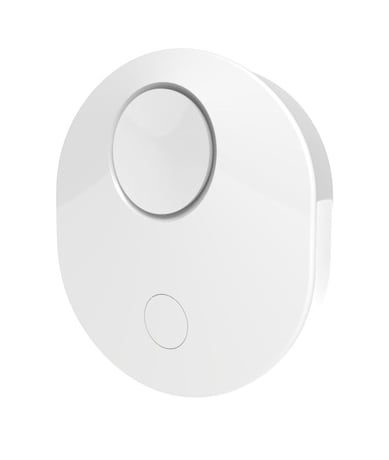
Product Picture


1 - Sets light sensitivity
Operation with the Light Sensor cable on USB power, sensitivity can be changed using parameter 1. 0 = High Sensitivity 1 = Medium Sensitivity 2 = Low SensitivitySize: 1 byte
Default: 2
Minimum: 0
Maximum: 2
Possible values
| From | To | Desription |
|---|---|---|
| 0 | 2 | 0 = High Sensitivity 1 = Medium Sensitivity 2 = Low Sensitivity |
2 - Water detection beep frequency
Parameter 2 is for the beep interval when on battery power and on USB power during the time water is detected. 0= every 10 minutes 1= every 5 minutes 2= every 30 minutesSize: 1 byte
Default: 0
Minimum: 0
Maximum: 2
Possible values
| From | To | Desription |
|---|---|---|
| 0 | 2 | Parameter 2 is for the beep interval when on battery power and on line power during the time water is detected. 0= every 10 minutes 1= every 5 minutes 2= every 30 minutes |
3 - Temperature reporting interval
Parameter 3 defines the temperature interval of reporting to the controller on line power in seconds, the default value is 60.Size: 1 byte
Default: 60
Minimum: 30
Maximum: 255
Possible values
| From | To | Desription |
|---|---|---|
| 30 | 255 | Parameter 3 defines the temperature interval of reporting to the controller on line power in seconds, the default value is 60. |
4 - Notification buzzer
The buzzer may be disabled when detecting water on line power or battery, using parameter 4, the default value is set to enabled.Size: 1 byte
Default: 1
Minimum: 0
Maximum: 1
Possible values
| From | To | Desription |
|---|---|---|
| 0 | 1 | The buzzer may be disabled when detecting water on line power or battery, using parameter 4, the default value is set to enabled. |
5 - Light detection delay
Set delay to avoid continuous notifications when detecting flashing LED’s. Flex Sensor will not send notification until flashing LED status changes. 0-20 seconds Value of 0 = no delay Note: Use only when detecting flashing LED’sSize: 1 byte
Default: 0
Minimum: 0
Maximum: 20
Possible values
| From | To | Desription |
|---|---|---|
| 0 | 20 | Set delay to avoid continuous notifications when detecting flashing LED’s. Flex Sensor will not send notification until flashing LED status changes. 0-20 seconds Value of 0 = no delay Note: Use only when detecting flashing LED’s |
Inclusion: Add the device into your network by a Z-Wave certified controller. HS-FS100+ supports the latest S2 security offered by Z-Wave certified controllers. If your controller supports S2, please refer to the user guide of the controller for detailed instructions on adding devices to the network. The device can be added using the traditional method for Z-Wave as follows: 1. Place your controller into Inclusion (Add) mode by following the controller manufacturer's instructions. 2. When the controller is ready, single click the button of HS-FS100+. The controller should indicate that the new device was added successfully. If the controller shows it failed, repeat the procedure.
Exclusion: Remove the device from your network by a Z-Wave certified controller. HS-FS100+ supports the latest S2 security offered by Z-Wave certified controllers. If your controller supports S2, please refer to the user guide of the controller for detailed instructions on removing devices from the network. The device can be removed using the traditional method for Z-Wave as follows: 1. Place your controller into Exclusion mode by following the controller manufacturer's instructions. 2. When the controller is ready, single click the button of HS-FS100+. The controller should indicate that the device was removed successfully. If the controller shows it failed, repeat the procedure.
When on battery power, the unit will stay awake for 5 minutes when the button is pressed to complete inclusion process. Once included, the unit will wake up every 60 seconds and detect for water or light depending on which cable is plugged into it. Also, the unit will wake up every hour to report temperature to the controller.
Use this procedure to reset Flex Sensor to factory settings when the Z-Wave controller is missing or otherwise inoperable. Press and hold the Z-Wave button on the sensor body for 10 seconds. If successful, the LED will flash 5 times.
| Type | Value(s) |
|---|
| Group | Type |
|---|---|
| Water Alarm | (Refer to parameters): State idle |
| Light sensor |
|
| Sensor type |
|---|
| Air Temperature |
| Illuminance |
| Moisture |