Heatit controls
Heatit Z-TRM2fx
Z-TRM2fx
Thermostat - HVAC
HW: 2 FW: 3.03:03.02
ZM5101
6.71.03
0x019B (411)
0x0003 (3)
0x0202 (514)
ZC10-18116305
2018-11-13 07:55:36.161941
N/A
Enhanced 232 Slave
Always On Slave
Heatit Z-TRM2fx is an electronic thermostat for electrical floor heating. The thermostat has a built-in Z-Wave chip that can be connected with Home Automation systems like Fibaro, Futurehome, Smarthings, Homeseer, Zipato etc.
Heatit Z-TRM2fx is equipped with a single pole switch and it fits most System 55 frames (Elko RS16, Schneider Exxact, Gira, Jung etc.). The thermostat can withstand a load of max 13A /2900W at 230V. At higher loads the thermostat must control a contactor. The thermostat may be connected to two wired external sensors. The thermostat has the capacity of up to 8 associations (relays, wall plugs etc.). The thermostat is designed for electrical heating. FEATURES Floor sensor External room sensor Temperature limiter Weekly program/setback via gateway or pilot wire Multilevel sensor command class Firmware updates (OTA) Power metering LED-diode Can be used in connection with different NTC-sensors Lock mode/child lock Calibration 8 associations Supports encryption mode: S0, S2 Authenticated Class, S2 Unauthenticated Class
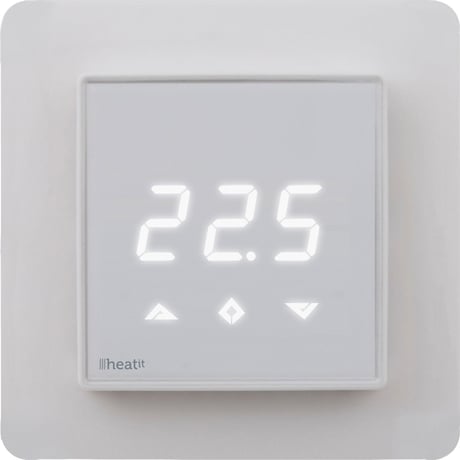
Product Picture


1 - Operation Mode
0 Off. (Default) 1 Heating mode 2 Cooling mode (not implemented) 11 Energy saving heating modeSize: 1 byte
Default: 0
Minimum: 0
Maximum: 0
Possible values
| From | To | Desription |
|---|---|---|
| 0 | 0 | Off. (Default) |
| 1 | 0 | Heating mode |
| 2 | 0 | Cooling mode (not implemented) |
| 11 | 0 | Energy saving heating mode |
2 - Sensor mode
0 F-mode, floor sensor mode. (Default) 3 A2-mode, external room sensor modeSize: 1 byte
Default: 0
Minimum: 0
Maximum: 0
Possible values
| From | To | Desription |
|---|---|---|
| 0 | 0 | F-mode, floor sensor mode. (Default) |
| 3 | 0 | A2-mode, external room sensor mode |
3 - Floor sensor type
0 10K NTC. (Default) 1 12K NTC 2 15K NTC 3 22K NTC 4 33K NTC 5 47K NTCSize: 1 byte
Default: 0
Minimum: 0
Maximum: 0
Possible values
| From | To | Desription |
|---|---|---|
| 0 | 0 | 10K NTC. (Default) |
| 1 | 0 | 12K NTC |
| 2 | 0 | 15K NTC |
| 3 | 0 | 22K NTC |
| 4 | 0 | 33K NTC |
| 5 | 0 | 47K NTC |
4 - Temperature control hysteresis (DIFF I)
3 - 30 0.3°C – 3.0°C. Default is 5 (0.5°C)Size: 1 byte
Default: 5
Minimum: 0
Maximum: 0
Possible values
| From | To | Desription |
|---|---|---|
| 3 | 30 | 0.3C – 3.0C. Default is 5 (0.5C) |
5 - Floor minimum temperature limit (FLo)
50 - 400 5.0°C – 40.0°C. Default is 50 (5.0°C)Size: 2 bytes
Default: 50
Minimum: 0
Maximum: 0
Possible values
| From | To | Desription |
|---|---|---|
| 50 | 400 | 5.0C – 40.0C. Default is 50 (5.0C) |
6 - Floor maximum temperature limit (FHi)
50 - 400 5.0°C – 40.0°C. Default is 400 (40.0°C)Size: 2 bytes
Default: 400
Minimum: 0
Maximum: 0
Possible values
| From | To | Desription |
|---|---|---|
| 50 | 400 | 5.0C – 40.0C. Default is 400 (40.0C) |
7 - Air (A2) minimum temperature limit (ALo)
50 - 400 5.0°C – 40.0°C. Default is 50 (5.0°C)Size: 2 bytes
Default: 50
Minimum: 0
Maximum: 0
Possible values
| From | To | Desription |
|---|---|---|
| 50 | 400 | 5.0C – 40.0C. Default is 50 (5.0C) |
8 - Air (A2) maximum temperature limit (AHi)
50 - 400 5.0°C – 40.0°C. Default is 400 (40.0°C)Size: 2 bytes
Default: 400
Minimum: 0
Maximum: 0
Possible values
| From | To | Desription |
|---|---|---|
| 50 | 400 | 5.0C – 40.0C. Default is 400 (40.0C) |
9 - Heating mode setpoint (CO)
50 - 400 5.0°C – 40.0°C. Default is 210 (21.0°C)Size: 2 bytes
Default: 210
Minimum: 0
Maximum: 0
Possible values
| From | To | Desription |
|---|---|---|
| 3 | 30 | 0.3C – 3.0C. Default is 5 (0.5C) |
| 50 | 400 | 5.0C – 40.0C. Default is 210 (21.0C) |
10 - Energy saving mode setpoint (ECO)
50 - 400 5.0°C – 40.0°C. Default is 180 (18.0°C)Size: 2 bytes
Default: 180
Minimum: 0
Maximum: 0
Possible values
| From | To | Desription |
|---|---|---|
| 50 | 400 | 5.0C – 40.0C. Default is 180 (18.0C) |
11 - Cooling setpoint (COOL)
50 - 400 5.0°C – 40.0°C. Default is 210 (21.0°C)Size: 2 bytes
Default: 210
Minimum: 0
Maximum: 0
Possible values
| From | To | Desription |
|---|---|---|
| 50 | 400 | 5.0C – 40.0C. Default is 210 (21.0C) |
12 - Floor sensor calibration
NB. To set a negative value, use 255 and subtract the desired value. -40 - 40 -4.0°C – 4.0°C. Default is 0 (0.0°C)Size: 1 byte
Default: 0
Minimum: 0
Maximum: 0
Possible values
| From | To | Desription |
|---|---|---|
| -40 | 40 | -4.0C – 4.0C. Default is 0 (0.0C) |
13 - External sensor calibration
NB. To set a negative value, use 255 and subtract the desired value. -40 - 40 -4.0°C – 4.0°C. Default is 0 (0.0°C)Size: 1 byte
Default: 0
Minimum: 0
Maximum: 0
Possible values
| From | To | Desription |
|---|---|---|
| -40 | 40 | -4.0C – 4.0C. Default is 0 (0.0C) |
14 - Temperature display
Selects which temperature is shown in the display. 0 Display setpoint temperature (Default) 1 Display measured temperatureSize: 1 byte
Default: 0
Minimum: 0
Maximum: 0
Possible values
| From | To | Desription |
|---|---|---|
| 0 | 0 | Display setpoint temperature (Default) |
| 1 | 0 | Display setpoint temperature (Default) |
15 - Button brightness – dimmed state
Configure the brightness of the buttons, in dimmed state. 0 - 100 0 – 100% (Default 50%)Size: 1 byte
Default: 50
Minimum: 0
Maximum: 0
Possible values
| From | To | Desription |
|---|---|---|
| 0 | 100 | 0 – 100% (Default 50%) |
16 - Button brightness – active state
Configure the brightness of the buttons, in active state. 0 - 100 0 – 100% (Default 100%)Size: 1 byte
Default: 100
Minimum: 0
Maximum: 0
Possible values
| From | To | Desription |
|---|---|---|
| 0 | 100 | 0 – 100% (Default 100%) |
17 - Display brightness – dimmed state
Configure the brightness of the display, in dimmed state. 0 - 100 0 – 100% (Default 50%)Size: 1 byte
Default: 50
Minimum: 0
Maximum: 0
Possible values
| From | To | Desription |
|---|---|---|
| 0 | 100 | 0 – 100% (Default 50%) |
18 - Display brightness – active state
Configure the brightness of the display, in active state. 0 - 100 0 – 100% (Default 100%)Size: 1 byte
Default: 100
Minimum: 0
Maximum: 0
Possible values
| From | To | Desription |
|---|---|---|
| 0 | 100 | 0 – 100% (Default 100%) |
19 - Temperature report interval
Time interval between consecutive temperature reports. Temperature reports can be also sent as a result of polling. 0 Reporting of temperatures disabled 30 - 32767 30 seconds – 32767 seconds. Default is 60 secondsSize: 2 bytes
Default: 60
Minimum: 0
Maximum: 0
Possible values
| From | To | Desription |
|---|---|---|
| 0 | 0 | Reporting of temperatures disabled |
| 30 | 32767 | 30 seconds – 32767 seconds. Default is 60 seconds |
20 - Temperature report hysteresis
The temperature report will be sent if there is a difference in temperature value from the previous value reported, defined in this parameter (hysteresis). Temperature reports can be also sent as a result of polling. 1 - 100 0.1°C – 10.0°C. Default is 10 (1.0°C)Size: 1 byte
Default: 10
Minimum: 0
Maximum: 0
Possible values
| From | To | Desription |
|---|---|---|
| 1 | 100 | 0.1C – 10.0C. Default is 10 (1.0C) |
21 - Meter report interval
Time interval between consecutive meter reports. Meter reports can be also sent as a result of polling. 0 Reporting of metering values is disabled 30 - 32767 30 seconds – 32767 seconds. Default is 60 secondsSize: 2 bytes
Default: 60
Minimum: 0
Maximum: 0
Possible values
| From | To | Desription |
|---|---|---|
| 0 | 0 | Reporting of metering values is disabled |
| 30 | 32767 | 30 seconds – 32767 seconds. Default is 60 seconds |
22 - Meter report delta value
Delta value in kWh between consecutive meter reports. Meter reports can be also sent as a result of polling. 0 - 127 A delta value of 0 – 12.7 kWh will result in a metering report. Default is 10 (1.0 kWh)Size: 1 byte
Default: 10
Minimum: 0
Maximum: 0
Possible values
| From | To | Desription |
|---|---|---|
| 0 | 127 | A delta value of 0 – 12.7 kWh will result in a metering report. Default is 10 (1.0 kWh) |
Adding the device: To add the thermostat to your home automation gateway, press Center (confirm) for 10 seconds. The display will show OFF. Press Right (down) 4 times till you see Con in the display. Now start add device in your home automation software. Start adding mode by pressing Center (confirm) button for approximately 2 seconds. The icon will appear in the display. Adding Mode is indicated in the display by some “circling” LED segments in the display until the timeout occurs after 20 seconds or the module has been added in the network. Confirmation will show Inc/EcL in the display. If adding fails, Err (error) will appear.
Removing the device: To remove the thermostat to your home automation gateway, press Center (confirm) for 10 seconds. The display will show OFF. Press Right (down) 4 times till you see Con in the display. Now start remove device in your home automation software. Start removing mode by pressing Center (confirm) button for approximately 2 seconds. The icon will appear in the display. Removing Mode is indicated in the display by some “circling” LED segments in the display until the timeout occurs after 20 seconds or the module has been removed in the network. Confirmation will show Inc/EcL in the display. If removing fails, Err (error) will appear.
By pressing buttons Right and Center (down and confirm) for 20 seconds, the thermostat will perform a complete factory reset. NB! Please use this procedure only when the primary controller/ gateway is missing or otherwise inoperable.
| Type | Value(s) |
|---|
| Group | Type |
|---|---|
| Heat Alarm | (Refer to parameters): State idle |
| Sensor type |
|---|
| Air Temperature |
| Voltage |
| Water Temperature |
| Target Temperature |
| Meter type |
|---|
| Electric Meter Consumption |