Coolcam
Siren
NAS-AB02ZE
Siren
HW: 96 FW: 2.17
ZM5202
6.81.01
0x0258 (600)
0x0200 (512)
0x1028 (4136)
ZC10-18096227
2018-09-05 00:43:55.313327
N/A
Routing Slave
Listening Sleeping Slave
Yes
This device is an audible and visual alarm with 10 different sounds and it is based on Z-Wave™ Plus technology.
This product can be included and operated in any Z-Wave™ network with other Z-Wave™ certified devices from other manufacturers and/or other applications. All non-battery operated nodes within the network will act as repeaters regardless of vendor to increase reliability of the network.
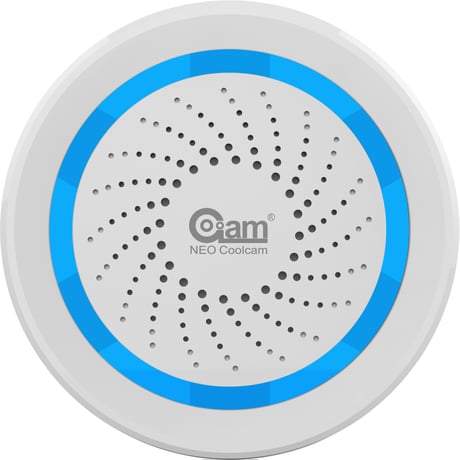
Product Picture


1 - Alarm Sound Volume
This parameter defines the output volume when siren plays door bell sound. Door Bell sound volume is divided into 3 stages, Low (Parameter is set to ‘1’), Middle (Parameter is set to ‘2’), High (Parameter is set to ‘3’). Default value is ‘3’.Size: 1 byte
Default: 3
Minimum: 0
Maximum: 0
Possible values
| From | To | Desription |
|---|---|---|
| 1 | 3 | Alarm Sound Volume |
2 - Alarm Sound Duration Time
This Parameter defines the alarm sound duration time when siren receive an alarm sensor notification report or an alarm command from controller. The duration time is divided into 5 stages: ◆ Siren is not on (Parameter is set to ‘0’), ◆ 30 second (Parameter is set to ‘1’), ◆ 1 minute (Parameter is set to ‘2’), ◆ 5 minute (Parameter is set to ‘3’) ◆ Siren is always on until battery is dead (Parameter is set to ‘0x7F’). Default value is ‘2’. The value for this parameter is unsigned value.Size: 1 byte
Default: 2
Minimum: 0
Maximum: 0
Possible values
| From | To | Desription |
|---|---|---|
| 0 | 3 | Alarm Sound Duration Time |
| 127 | 127 | Always alarm |
3 - Door Bell Sound Duration Time
This parameter defines the door bell sound duration time when siren receives a door/window sensor notification report or an alarm command (BASIC_SET = 0x02) from controller. The door bell sound will be played always if this parameter is set to ‘0x7F’. The door bell sound will not be played if this parameter is set to ‘0’. Other values are the door bell sound playing duration time. Unit: Time. The value for this parameter is unsigned value.Size: 1 byte
Default: 1
Minimum: 0
Maximum: 0
Possible values
| From | To | Desription |
|---|---|---|
| 0 | 127 | Door Bell Sound Duration Time |
4 - Door Bell Sound Volume
This parameter defines the output volume when siren plays alarm sound. Door Bell sound volume is divided into 3 stages: Low (Parameter is set to ‘1’), Middle (Parameter is set to ‘2’), High(Parameter is set to ‘3’). Default value is ‘1’.Size: 1 byte
Default: 1
Minimum: 0
Maximum: 0
Possible values
| From | To | Desription |
|---|---|---|
| 1 | 3 | Door Bell Sound Volume |
5 - Alarm Sound Index
This parameter defines the alarm sound index for siren play different sound when alarm occurs. There are 10 different sound for user selection.Size: 1 byte
Default: 10
Minimum: 0
Maximum: 0
Possible values
| From | To | Desription |
|---|---|---|
| 1 | 10 | Alarm Sound Index |
6 - Door Bell Sound Index
This parameter defines the door bell sound index for siren play different sound when alarm occurs. There are 10 different sound for user selection.Size: 1 byte
Default: 9
Minimum: 0
Maximum: 0
Possible values
| From | To | Desription |
|---|---|---|
| 1 | 10 | Door Bell Sound Index |
7 - Default Siren On Mode
This parameter defines the default sound index, volume and the duration time for siren on. This parameter can be selected between ALARM SOUND and DOOR BELL SOUND. The settings for ALARM SOUND MODE defines by Param #1, #2 and #5. The settings for DOOR BELL SOUND MODE defines by Param #3, #4 and #6. If parameter is set to ‘1’, siren will select ALARM SOUND MODE to play sound; If parameter is set to ‘2’, siren will select DOOR BELL SOUND MODE to play sound;Size: 1 byte
Default: 1
Minimum: 0
Maximum: 0
Possible values
| From | To | Desription |
|---|---|---|
| 1 | 2 | Default Siren On Mode |
8 - Alarm Led Enable
This parameter defines the default led enable status when siren is on for ALARM SOUND MODE. If parameter is set to ‘0’, led will be disable. If parameter is set t0 ‘1’, led will be enable. When siren is on, the led will blink.Size: 1 byte
Default: 1
Minimum: 0
Maximum: 0
Possible values
| From | To | Desription |
|---|---|---|
| 0 | 1 | Alarm mode switching |
9 - Door Bell Led Enable
This parameter defines the default led enable status when siren is on for DOOR BELL SOUND MODE. If parameter is set to ‘0’, led will be disable. If parameter is set t0 ‘1’, led will be enable. When siren is on, the led will blink.Size: 1 byte
Default: 0
Minimum: 0
Maximum: 0
Possible values
| From | To | Desription |
|---|---|---|
| 0 | 1 | Door Bell Led Enable |
1、 Power up the device. 2、 Set Z-Wave™ Controller into inclusion mode 3、 Press the button 3 times within 1.5s to enter inclusion mode. 4、 The device will be recognized and automatically included into Z-Wave™ Network.
1、 Power up the device. 2、 Set Z-Wave™ Controller into exclusion mode 3、 Press the button 3 times within 1.5s to enter exclusion mode
The device will enter Smart Start if the device is not included in network after power up. And if device is not included successfully during 10 second, it will enter sleep mode. And then 2nd Smart Start time delay approximately 16s 3rd Smart Start time delay approximately 32s 4th Smart Start time delay approximately 64s 5th Smart Start time delay approximately 128s 6th Smart Start time delay approximately 256s 7th Smart Start time delay approximately 512s Afterwards, the Smart start mode will be auto running with 512 second interval until device is included successfully or battery run down.
1、 Power up the device. 2、 Press and hold the button for 10s until led lights is on, then release the button. Please use this procedure only when the network primary controller is missing or otherwise inoperable
Product Test Mode 1、 Press and hold the button. 2、 Power on the device, device will enter factory product test mode
| Type | Value(s) |
|---|
| Group | Type |
|---|---|
| Home Security | (Refer to parameters): State idle |
| Siren |
|
| Sensor type |
|---|
| General Purpose |