Baldwin
Soho AC Z-Wave Deadbolt
8285.0
Door Lock - Keypad
HW: 2 FW: 4.10:56.12
ZM5101
6.51.08
0x0090 (144)
0x0009 (9)
0x0238 (568)
ZC10-18096236
2018-09-19 02:44:31.575991
N/A
Enhanced 232 Slave
Listening Sleeping Slave
Yes
Soho AC Z-Wave Deadbolt Touchpad Electronic Deadbolt. KEYLESS ENTRY Solo deadbolt with Z-Wave.
Baldwin®, the leader in residential security, introduces the Soho AC Electronic Deadbolt with Z-Wave. Backlit keypad with One touch locking 30 user codes BHMA grade 2 certified Full 128-bit encryption security Drill and pick resistant backup keyway SmartKey: Re-key the lock in seconds
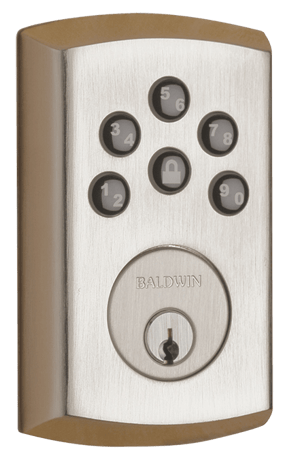
Product Picture


1 - User Code Type for User Code 1
This configuration parameter is used to get or set the type of user for their corresponding user code. By default, all user codes are set to the Owner type unless otherwise specified. The parameter type is associated with the user code location 1. Caution must be used when setting these values. Guests and Workers will require schedules attached to them in order for those types to be assigned.Size: 1 byte
Default: 1
Minimum: 0
Maximum: 0
Possible values
| From | To | Desription |
|---|---|---|
| 1 | 1 | Owner |
| 3 | 3 | Guest |
| 4 | 4 | Worker |
2 - User Code Type for User Code 2
This configuration parameter is used to get or set the type of user for their corresponding user code. By default, all user codes are set to the Owner type unless otherwise specified. The parameter type is associated with the user code location 2. Caution must be used when setting these values. Guests and Workers will require schedules attached to them in order for those types to be assigned.Size: 1 byte
Default: 1
Minimum: 0
Maximum: 0
Possible values
| From | To | Desription |
|---|---|---|
| 1 | 1 | Owner |
| 3 | 3 | Guest |
| 4 | 4 | Worker |
3 - User Code Type for User Code 3
This configuration parameter is used to get or set the type of user for their corresponding user code. By default, all user codes are set to the Owner type unless otherwise specified. The parameter type is associated with the user code location 3. Caution must be used when setting these values. Guests and Workers will require schedules attached to them in order for those types to be assigned.Size: 1 byte
Default: 1
Minimum: 0
Maximum: 0
Possible values
| From | To | Desription |
|---|---|---|
| 1 | 1 | Owner |
| 3 | 3 | Guest |
| 4 | 4 | Worker |
4 - User Code Type for User Code 4
This configuration parameter is used to get or set the type of user for their corresponding user code. By default, all user codes are set to the Owner type unless otherwise specified. The parameter type is associated with the user code location 4. Caution must be used when setting these values. Guests and Workers will require schedules attached to them in order for those types to be assigned.Size: 1 byte
Default: 1
Minimum: 0
Maximum: 0
Possible values
| From | To | Desription |
|---|---|---|
| 1 | 1 | Owner |
| 3 | 3 | Guest |
| 4 | 4 | Worker |
5 - User Code Type for User Code 5
This configuration parameter is used to get or set the type of user for their corresponding user code. By default, all user codes are set to the Owner type unless otherwise specified. The parameter type is associated with the user code location 5. Caution must be used when setting these values. Guests and Workers will require schedules attached to them in order for those types to be assigned.Size: 1 byte
Default: 1
Minimum: 0
Maximum: 0
Possible values
| From | To | Desription |
|---|---|---|
| 1 | 1 | Owner |
| 3 | 3 | Guest |
| 4 | 4 | Worker |
6 - User Code Type for User Code 6
This configuration parameter is used to get or set the type of user for their corresponding user code. By default, all user codes are set to the Owner type unless otherwise specified. The parameter type is associated with the user code location 6. Caution must be used when setting these values. Guests and Workers will require schedules attached to them in order for those types to be assigned.Size: 1 byte
Default: 1
Minimum: 0
Maximum: 0
Possible values
| From | To | Desription |
|---|---|---|
| 1 | 1 | Owner |
| 3 | 3 | Guest |
| 4 | 4 | Worker |
7 - User Code Type for User Code 7
This configuration parameter is used to get or set the type of user for their corresponding user code. By default, all user codes are set to the Owner type unless otherwise specified. The parameter type is associated with the user code location 7. Caution must be used when setting these values. Guests and Workers will require schedules attached to them in order for those types to be assigned.Size: 1 byte
Default: 1
Minimum: 0
Maximum: 0
Possible values
| From | To | Desription |
|---|---|---|
| 1 | 1 | Owner |
| 3 | 3 | Guest |
| 4 | 4 | Worker |
8 - User Code Type for User Code 8
This configuration parameter is used to get or set the type of user for their corresponding user code. By default, all user codes are set to the Owner type unless otherwise specified. The parameter type is associated with the user code location 8. Caution must be used when setting these values. Guests and Workers will require schedules attached to them in order for those types to be assigned.Size: 1 byte
Default: 1
Minimum: 0
Maximum: 0
Possible values
| From | To | Desription |
|---|---|---|
| 1 | 1 | Owner |
| 3 | 3 | Guest |
| 4 | 4 | Worker |
9 - User Code Type for User Code 9
This configuration parameter is used to get or set the type of user for their corresponding user code. By default, all user codes are set to the Owner type unless otherwise specified. The parameter type is associated with the user code location 9. Caution must be used when setting these values. Guests and Workers will require schedules attached to them in order for those types to be assigned.Size: 1 byte
Default: 1
Minimum: 0
Maximum: 0
Possible values
| From | To | Desription |
|---|---|---|
| 1 | 1 | Owner |
| 3 | 3 | Guest |
| 4 | 4 | Worker |
10 - User Code Type for User Code 10
This configuration parameter is used to get or set the type of user for their corresponding user code. By default, all user codes are set to the Owner type unless otherwise specified. The parameter type is associated with the user code location 10. Caution must be used when setting these values. Guests and Workers will require schedules attached to them in order for those types to be assigned.Size: 1 byte
Default: 1
Minimum: 0
Maximum: 0
Possible values
| From | To | Desription |
|---|---|---|
| 1 | 1 | Owner |
| 3 | 3 | Guest |
| 4 | 4 | Worker |
11 - User Code Type for User Code 11
This configuration parameter is used to get or set the type of user for their corresponding user code. By default, all user codes are set to the Owner type unless otherwise specified. The parameter type is associated with the user code location 11. Caution must be used when setting these values. Guests and Workers will require schedules attached to them in order for those types to be assigned.Size: 1 byte
Default: 1
Minimum: 0
Maximum: 0
Possible values
| From | To | Desription |
|---|---|---|
| 1 | 1 | Owner |
| 3 | 3 | Guest |
| 4 | 4 | Worker |
12 - User Code Type for User Code 12
This configuration parameter is used to get or set the type of user for their corresponding user code. By default, all user codes are set to the Owner type unless otherwise specified. The parameter type is associated with the user code location 12. Caution must be used when setting these values. Guests and Workers will require schedules attached to them in order for those types to be assigned.Size: 1 byte
Default: 1
Minimum: 0
Maximum: 0
Possible values
| From | To | Desription |
|---|---|---|
| 1 | 1 | Owner |
| 3 | 3 | Guest |
| 4 | 4 | Worker |
13 - User Code Type for User Code 13
This configuration parameter is used to get or set the type of user for their corresponding user code. By default, all user codes are set to the Owner type unless otherwise specified. The parameter type is associated with the user code location 13. Caution must be used when setting these values. Guests and Workers will require schedules attached to them in order for those types to be assigned.Size: 1 byte
Default: 1
Minimum: 0
Maximum: 0
Possible values
| From | To | Desription |
|---|---|---|
| 1 | 1 | Owner |
| 3 | 3 | Guest |
| 4 | 4 | Worker |
14 - User Code Type for User Code 14
This configuration parameter is used to get or set the type of user for their corresponding user code. By default, all user codes are set to the Owner type unless otherwise specified. The parameter type is associated with the user code location 14. Caution must be used when setting these values. Guests and Workers will require schedules attached to them in order for those types to be assigned.Size: 1 byte
Default: 1
Minimum: 0
Maximum: 0
Possible values
| From | To | Desription |
|---|---|---|
| 1 | 1 | Owner |
| 3 | 3 | Guest |
| 4 | 4 | Worker |
15 - User Code Type for User Code 15
This configuration parameter is used to get or set the type of user for their corresponding user code. By default, all user codes are set to the Owner type unless otherwise specified. The parameter type is associated with the user code location 15. Caution must be used when setting these values. Guests and Workers will require schedules attached to them in order for those types to be assigned.Size: 1 byte
Default: 1
Minimum: 0
Maximum: 0
Possible values
| From | To | Desription |
|---|---|---|
| 1 | 1 | Owner |
| 3 | 3 | Guest |
| 4 | 4 | Worker |
16 - User Code Type for User Code 16
This configuration parameter is used to get or set the type of user for their corresponding user code. By default, all user codes are set to the Owner type unless otherwise specified. The parameter type is associated with the user code location 16. Caution must be used when setting these values. Guests and Workers will require schedules attached to them in order for those types to be assigned.Size: 1 byte
Default: 1
Minimum: 0
Maximum: 0
Possible values
| From | To | Desription |
|---|---|---|
| 1 | 1 | Owner |
| 3 | 3 | Guest |
| 4 | 4 | Worker |
17 - User Code Type for User Code 17
This configuration parameter is used to get or set the type of user for their corresponding user code. By default, all user codes are set to the Owner type unless otherwise specified. The parameter type is associated with the user code location 17. Caution must be used when setting these values. Guests and Workers will require schedules attached to them in order for those types to be assigned.Size: 1 byte
Default: 1
Minimum: 0
Maximum: 0
Possible values
| From | To | Desription |
|---|---|---|
| 1 | 1 | Owner |
| 3 | 3 | Guest |
| 4 | 4 | Worker |
18 - User Code Type for User Code 18
This configuration parameter is used to get or set the type of user for their corresponding user code. By default, all user codes are set to the Owner type unless otherwise specified. The parameter type is associated with the user code location 18. Caution must be used when setting these values. Guests and Workers will require schedules attached to them in order for those types to be assigned.Size: 1 byte
Default: 1
Minimum: 0
Maximum: 0
Possible values
| From | To | Desription |
|---|---|---|
| 1 | 1 | Owner |
| 3 | 3 | Guest |
| 4 | 4 | Worker |
19 - User Code Type for User Code 19
This configuration parameter is used to get or set the type of user for their corresponding user code. By default, all user codes are set to the Owner type unless otherwise specified. The parameter type is associated with the user code location 19. Caution must be used when setting these values. Guests and Workers will require schedules attached to them in order for those types to be assigned.Size: 1 byte
Default: 1
Minimum: 0
Maximum: 0
Possible values
| From | To | Desription |
|---|---|---|
| 1 | 1 | Owner |
| 3 | 3 | Guest |
| 4 | 4 | Worker |
20 - User Code Type for User Code 20
This configuration parameter is used to get or set the type of user for their corresponding user code. By default, all user codes are set to the Owner type unless otherwise specified. The parameter type is associated with the user code location 20. Caution must be used when setting these values. Guests and Workers will require schedules attached to them in order for those types to be assigned.Size: 1 byte
Default: 1
Minimum: 0
Maximum: 0
Possible values
| From | To | Desription |
|---|---|---|
| 1 | 1 | Owner |
| 3 | 3 | Guest |
| 4 | 4 | Worker |
21 - User Code Type for User Code 21
This configuration parameter is used to get or set the type of user for their corresponding user code. By default, all user codes are set to the Owner type unless otherwise specified. The parameter type is associated with the user code location 21. Caution must be used when setting these values. Guests and Workers will require schedules attached to them in order for those types to be assigned.Size: 1 byte
Default: 1
Minimum: 0
Maximum: 0
Possible values
| From | To | Desription |
|---|---|---|
| 1 | 1 | Owner |
| 3 | 3 | Guest |
| 4 | 4 | Worker |
22 - User Code Type for User Code 22
This configuration parameter is used to get or set the type of user for their corresponding user code. By default, all user codes are set to the Owner type unless otherwise specified. The parameter type is associated with the user code location 22. Caution must be used when setting these values. Guests and Workers will require schedules attached to them in order for those types to be assigned.Size: 1 byte
Default: 1
Minimum: 0
Maximum: 0
Possible values
| From | To | Desription |
|---|---|---|
| 1 | 1 | Owner |
| 3 | 3 | Guest |
| 4 | 4 | Worker |
23 - User Code Type for User Code 23
This configuration parameter is used to get or set the type of user for their corresponding user code. By default, all user codes are set to the Owner type unless otherwise specified. The parameter type is associated with the user code location 23. Caution must be used when setting these values. Guests and Workers will require schedules attached to them in order for those types to be assigned.Size: 1 byte
Default: 1
Minimum: 0
Maximum: 0
Possible values
| From | To | Desription |
|---|---|---|
| 1 | 1 | Owner |
| 3 | 3 | Guest |
| 4 | 4 | Worker |
24 - User Code Type for User Code 24
This configuration parameter is used to get or set the type of user for their corresponding user code. By default, all user codes are set to the Owner type unless otherwise specified. The parameter type is associated with the user code location 24. Caution must be used when setting these values. Guests and Workers will require schedules attached to them in order for those types to be assigned.Size: 1 byte
Default: 1
Minimum: 0
Maximum: 0
Possible values
| From | To | Desription |
|---|---|---|
| 1 | 1 | Owner |
| 3 | 3 | Guest |
| 4 | 4 | Worker |
25 - User Code Type for User Code 25
This configuration parameter is used to get or set the type of user for their corresponding user code. By default, all user codes are set to the Owner type unless otherwise specified. The parameter type is associated with the user code location 25. Caution must be used when setting these values. Guests and Workers will require schedules attached to them in order for those types to be assigned.Size: 1 byte
Default: 1
Minimum: 0
Maximum: 0
Possible values
| From | To | Desription |
|---|---|---|
| 1 | 1 | Owner |
| 3 | 3 | Guest |
| 4 | 4 | Worker |
26 - User Code Type for User Code 26
This configuration parameter is used to get or set the type of user for their corresponding user code. By default, all user codes are set to the Owner type unless otherwise specified. The parameter type is associated with the user code location 26. Caution must be used when setting these values. Guests and Workers will require schedules attached to them in order for those types to be assigned.Size: 1 byte
Default: 1
Minimum: 0
Maximum: 0
Possible values
| From | To | Desription |
|---|---|---|
| 1 | 1 | Owner |
| 3 | 3 | Guest |
| 4 | 4 | Worker |
27 - User Code Type for User Code 27
This configuration parameter is used to get or set the type of user for their corresponding user code. By default, all user codes are set to the Owner type unless otherwise specified. The parameter type is associated with the user code location 27. Caution must be used when setting these values. Guests and Workers will require schedules attached to them in order for those types to be assigned.Size: 1 byte
Default: 1
Minimum: 0
Maximum: 0
Possible values
| From | To | Desription |
|---|---|---|
| 1 | 1 | Owner |
| 3 | 3 | Guest |
| 4 | 4 | Worker |
28 - User Code Type for User Code 28
This configuration parameter is used to get or set the type of user for their corresponding user code. By default, all user codes are set to the Owner type unless otherwise specified. The parameter type is associated with the user code location 28. Caution must be used when setting these values. Guests and Workers will require schedules attached to them in order for those types to be assigned.Size: 1 byte
Default: 1
Minimum: 0
Maximum: 0
Possible values
| From | To | Desription |
|---|---|---|
| 1 | 1 | Owner |
| 3 | 3 | Guest |
| 4 | 4 | Worker |
29 - User Code Type for User Code 29
This configuration parameter is used to get or set the type of user for their corresponding user code. By default, all user codes are set to the Owner type unless otherwise specified. The parameter type is associated with the user code location 29. Caution must be used when setting these values. Guests and Workers will require schedules attached to them in order for those types to be assigned.Size: 1 byte
Default: 1
Minimum: 0
Maximum: 0
Possible values
| From | To | Desription |
|---|---|---|
| 1 | 1 | Owner |
| 3 | 3 | Guest |
| 4 | 4 | Worker |
30 - User Code Type for User Code 30
This configuration parameter is used to get or set the type of user for their corresponding user code. By default, all user codes are set to the Owner type unless otherwise specified. The parameter type is associated with the user code location 30. Caution must be used when setting these values. Guests and Workers will require schedules attached to them in order for those types to be assigned.Size: 1 byte
Default: 1
Minimum: 0
Maximum: 0
Possible values
| From | To | Desription |
|---|---|---|
| 1 | 1 | Owner |
| 3 | 3 | Guest |
| 4 | 4 | Worker |
31 - Dipswitch settings
This is a one byte read only bit mask that returns the state of the user accessible dipswitches on the rear panel of the door lock. 0x01: Lock Status LED (1: enabled, 0: disabled) 0x02: Autolock setting (1: enabled, 0: disabled) 0x04: Buzzer (1: enabled, 0: disabled)Size: 1 byte
Default: 5
Minimum: 0
Maximum: 0
Possible values
| From | To | Desription |
|---|---|---|
| 0 | 0 | All features disabled |
| 1 | 1 | Lock Status LED enabled |
| 2 | 2 | Autolock enabled |
| 3 | 3 | Autolock & Lock status LED enabled |
| 4 | 4 | Internal Buzzer enabled |
| 5 | 5 | Internal buzzer & Lock status LED enabled |
| 7 | 7 | All features enabled |
33 - SKU number, 1st 4 bytes
This configuration parameter provides the first 4 bytes of the SKU number that has been programmed into the lock. Each byte allows all printable characters from 32 to 126.Size: 4 bytes
Default: 32
Minimum: 0
Maximum: 0
Possible values
| From | To | Desription |
|---|---|---|
| 32 | 126 | All printable characters |
34 - SKU number, last 4 bytes
This configuration parameter provides the second and last 4 bytes of the SKU number that has been programmed into the lock. Each byte allows all printable characters from 32 to 126.Size: 4 bytes
Default: 32
Minimum: 0
Maximum: 0
Possible values
| From | To | Desription |
|---|---|---|
| 32 | 126 | All printable characters |
40 - Reset to Default
This configuration parameter allows the smart home controller to force a factory reset of the lock. After receiving this request, the lock will send a Device Reset Locally message back to the lifeline controller.Size: 1 byte
Default: 0
Minimum: 0
Maximum: 0
Possible values
| From | To | Desription |
|---|---|---|
| 0 | 0 | No action taken |
| 1 | 1 | Force Factory Reset |
Initiate the process to add the lock to your system at your smart home controller. When prompted by your smart home system to add the lock, press button “A” on the lock interior one time. The red LED will illuminate when the lock enters Add Mode. Please allow time for the controller to add the lock to your system.
Follow your smart home system’s instructions to remove the lock from the network. When prompted by the system, press button A” on the lock interior once. The red LED will illuminate when the lock enters Remove mode.
A factory reset will delete all user codes associated with the lock and will remove itself from your smart home system. Please only perform a factory reset when the primary controller is missing or inoperable. To perform a factory reset, please perform the following: 1. Remove the battery pack 2. Press and HOLD the Program button while reinserting the battery pack. 3. Keep holding the button for 30 seconds until the lock beeps and the status LED flashes red. 4. Press the Program button once more. The status LED will flash green and red several times. 5. After a few seconds, the lock will initiate the door handing process.
| Type | Value(s) |
|---|
| Group | Type |
|---|---|
| Access Control | (Refer to parameters): State idle |
| Home Security | (Refer to parameters): State idle |
| Power Management | (Refer to parameters): State idle |