Delaney Hardware
Smartlock
ZW300
Door Lock - Keypad
HW: 1 FW: 1.02:01.00
ZM5101
6.71.01
0x040D (1037)
0x0003 (3)
0x0001 (1)
ZC10-18096229
2018-09-06 23:21:12.355663
N/A
Enhanced 232 Slave
Listening Sleeping Slave
Yes
Delaney Hardware’s ZW300 Touchscreen Smartlock offers convenience and security for residential entry doors. Entry is made via touchscreen code, mobile app, or mechanical key.
Delaney Hardware’s ZW300 Touchscreen Smartlock offers convenience and security for residential entry doors. Entry is made via touchscreen code, mobile app, or mechanical key. With Delaney’s smart home control app, a homeowner can manage who is entering their home from anywhere. • ANSI Grade 3 lock with motor-driven deadbolt • Keypad accommodates thirty user codes of four to eight digits, and a single-use code, with code-probing prevention and disablement after five attempts (warned with beeps and LED and then 45-seconds downtime) • Delaney app utilizes Z-Wave Plus via 128-bit AES encryption, mesh networking technology, and history log. It integrates with other Z-Wave devices such as doorbells with cameras, door and window sensors, outlet controls, heat and smoke sensors, thermostats, and water leak sensors via a security-enabled Z-Wave hub, which conveniently connects through your home WiFi, or plugs into your modem. • Configurable auto-locking (from 10-99 seconds) • Vacation mode with time-configurable deactivation during which all user codes are disabled such that only the mechanical key. • ANSI A156.25 compliance (water, dust, corrosion resistance) • Easy installation in standard doors with just a screwdriver (no hard wiring)
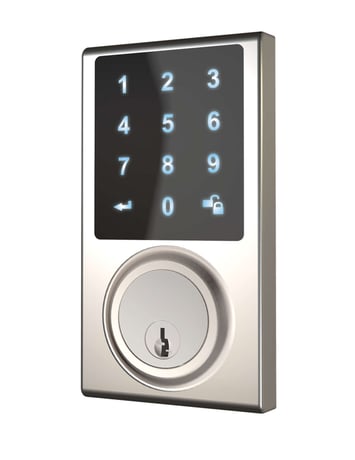
Product Picture
Tap ""add device"" on your app, then tap enter to lock. Enter programming code -> confirm -> Enter 9 -> confirm If you hear 2 long beeps from your lock the programming was successful. If you hear short 3 beeps from your lock you must start over again.
Tap ""remove device"" on your app, then tap enter to lock. Enter programming code -> confirm -> Enter 9 -> confirm If you hear 2 long beeps from your lock the programming was successful. If you hear short 3 beeps from your lock you must start over again.
Touch the touchscreen
Press the R button for more than 5 seconds; the programming is reset back to the original factory codes once you hear 3 long beeps. Please use this procedure only when the network primary controller is missing or otherwise inoperable.
| Type | Value(s) |
|---|