LEEDARSON
Multi-Sensor
7A-SS-AABC-H0-02
Notification Sensor
HW: 3 FW: 2.01
ZM5101
6.81.00
0x0300 (768)
0x0200 (512)
0x0009 (9)
ZC10-18106256
2018-09-28 19:49:29.650642
N/A
Enhanced Slave
Reporting Sleeping Slave
Yes
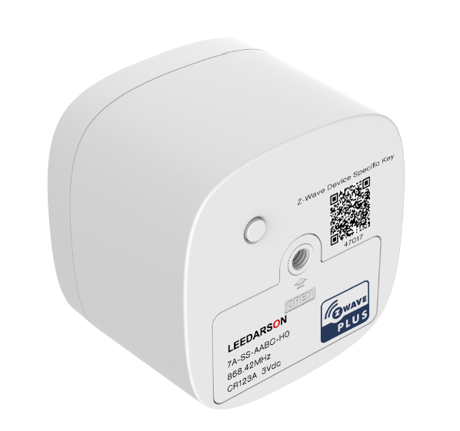
The Multi sensor is designed for use with scenes in home automation systems, integrate motion, light, temperature and humidity sensors, powered by CR123A battery or USB cable.
The Multi sensor is designed for use with scenes in home automation systems, integrate motion, light, temperature and humidity sensors, powered by CR123A battery or USB cable. The Motion Sensor lets you know when movement is detected in a certain area and can trigger different actions in response to that movement (or lack of movement). It also lets you know the ambient temperature and humidity to trigger different actions to make you more comfort.


10 - Low Battery Power Level
Low Battery Power Level of alarm threshold values: the value range are 10~50 for percentage, so the Battery Low Power level can setting 10%~50%.Size: 1 byte
Default: 10
Minimum: 0
Maximum: 0
Possible values
| From | To | Desription |
|---|---|---|
| 10 | 50 | Low Battery Power Level of alarm threshold values |
12 - Turn on/off PIR
Turn on/off PIR 0x0A indicates the highest sensitivity, 0x00 means off PIR detection function.Size: 1 byte
Default: 10
Minimum: 0
Maximum: 0
Possible values
| From | To | Desription |
|---|---|---|
| 0 | 10 | 0x0A indicates the highest sensitivity, 0x00 means off PIR detection function. |
13 - PIR triggers the waiting time value
PIR triggers the waiting time valueSize: 2 bytes
Default: 30
Minimum: 0
Maximum: 0
Possible values
| From | To | Desription |
|---|---|---|
| 5 | 15300 | the waiting time of the PIR triggering |
14 - Whether the BASIC SET command is sent after the PIR is triggered
Whether the BASIC SET command is sent after the PIR is triggeredSize: 1 byte
Default: 0
Minimum: 0
Maximum: 0
Possible values
| From | To | Desription |
|---|---|---|
| 0 | 0 | Unable |
| 1 | 1 | Enable |
15 - PIR triggers the correspondence between the value of the Basic set and the PIR state
PIR triggers the correspondence between the value of the Basic set and the PIR state, When value is 0x00 PIR triggers Send the basic set command 0xff PIR alarm release send the basic set command 0x00, otherwise PIR triggers send the basic set command 0x00 PIR alarm release send the basic set command 0xff.Size: 1 byte
Default: 0
Minimum: 0
Maximum: 0
Possible values
| From | To | Desription |
|---|---|---|
| 0 | 0 | PIR triggers Send the basic set command 0xff PIR alarm release send the basic set command 0x00 |
| 1 | 1 | PIR triggers send the basic set command 0x00 PIR alarm release send the basic set command 0xff. |
100 - Set 101 ~ 104 to default.
Set 101 ~ 104 to default.Size: 1 byte
Default: 0
Minimum: 0
Maximum: 0
Possible values
| From | To | Desription |
|---|---|---|
| 0 | 0 | Set 101 ~ 104 to default. |
101 - The interval time of sending the temperature reporting
The interval time of sending the temperature reporting. if setting to 0 then the temperature reporting is disabled 1. Valid values: 0x00-0x28DE80 2. The minimum interval time is 1 minutes. For example, if the value is set to be more than 1 and less than 60, the interval time is 1 minutes, if the value is set to be more than 60 and less than 120, the interval time is 2 minutes.Size: 4 bytes
Default: 7200
Minimum: 0
Maximum: 0
Possible values
| From | To | Desription |
|---|---|---|
| 0 | 0 | the temperature reporting is disabled |
| 1 | 2678400 | The interval time of sending the temperature reporting is 31 days(2678400 seconds) |
102 - The interval time of sending the humidity reporting.
The interval time of sending the humidity reporting. if setting to 0 then the humidity reporting is disabled 1. Valid values: 0x00-0x28DE80 2. The minimum interval time is 1 minutes. For example, if the value is set to be more than 1 and less than 60, the interval time is 1 minutes, if the value is set to be more than 60 and less than 120, the interval time is 2 minutes.Size: 4 bytes
Default: 7200
Minimum: 0
Maximum: 0
Possible values
| From | To | Desription |
|---|---|---|
| 0 | 0 | the humidity reporting is disabled |
| 1 | 2678400 | The interval time of sending the humidity reporting is 31 days(2678400 seconds) |
103 - The interval time of sending the luminance reporting.
The interval time of sending the luminance reporting. if setting to 0 then the luminance reporting is disabled 1. Valid values: 0x00-0x28DE80 2. The minimum interval time is 1 minutes. For example, if the value is set to be more than 1 and less than 60, the interval time is 1 minutes, if the value is set to be more than 60 and less than 120, the interval time is 2 minutes.Size: 4 bytes
Default: 7200
Minimum: 0
Maximum: 0
Possible values
| From | To | Desription |
|---|---|---|
| 0 | 0 | the luminance reporting is disabled |
| 1 | 2678400 | The interval time of sending the luminance reporting is 31 days(2678400 seconds) |
104 - The interval time of sending the battery level reporting.
The interval time of sending the battery level reporting. if setting to 0 then the battery level reporting is disabled 1. Valid values: 0x00-0x28DE80 2. The minimum interval time is 1 minutes. For example, if the value is set to be more than 1 and less than 60, the interval time is 1 minutes, if the value is set to be more than 60 and less than 120, the interval time is 2 minutes.Size: 4 bytes
Default: 86400
Minimum: 0
Maximum: 0
Possible values
| From | To | Desription |
|---|---|---|
| 0 | 0 | the battery level reporting is disabled |
| 1 | 2678400 | The interval time of sending the battery level reporting is 31 days(2678400 seconds) |
110 - Enable 111 ~ 114 temperature/humidity/luminance/ battery level change reporting.
Enable 111 ~ 114 temperature/humidity/luminance/ battery level change reporting. 0 = Unable 1 = EnableSize: 1 byte
Default: 0
Minimum: 0
Maximum: 0
Possible values
| From | To | Desription |
|---|---|---|
| 0 | 0 | Unable |
| 1 | 1 | Enable |
111 - Configuration temperature change threshold.
Configuration temperature change threshold. Valid values: 1-500(unit 0.1℃)Size: 2 bytes
Default: 10
Minimum: 0
Maximum: 0
Possible values
| From | To | Desription |
|---|---|---|
| 1 | 500 | the temperature change threshold value(unit 0.1℃) |
112 - Configuration humidity change threshold.
Configuration humidity change threshold. Valid values: 1-32(unit %)Size: 1 byte
Default: 5
Minimum: 0
Maximum: 0
Possible values
| From | To | Desription |
|---|---|---|
| 1 | 32 | humidity change threshold value(unit %) |
113 - Configuration luminance change threshold.
Configuration luminance change threshold. Valid values: 1-65528(unit lx)Size: 2 bytes
Default: 150
Minimum: 0
Maximum: 0
Possible values
| From | To | Desription |
|---|---|---|
| -32767 | -1 | luminance change threshold is 32767 to 65528 |
| 0 | 32766 | luminance change threshold is 0 to 32766 |
114 - Configuration battery level change threshold.
Configuration battery level change threshold. Valid values: 1-100(unit %)Size: 1 byte
Default: 10
Minimum: 0
Maximum: 0
Possible values
| From | To | Desription |
|---|---|---|
| 1 | 100 | battery level change threshold value(unit)% |
Add Multi-Sensor into a Z-Wave network: a. Let the primary controller go into inclusion mode (If you don’t know how to do this, refer to its manual). b. Short Press one time this Z-Button. c. The Multi-Sensor LED will blink, If the inclusion is successful, then LED will keep on 2 seconds. Otherwise, the LED will blink until timeout, in which case you need to repeat the process from step b.
Remove Multi-Sensor from a Z-Wave network: a. Let the primary controller go into exclusion mode (If you don’t know how to do this, refer to its manual). b. Short Press one time this Z-Button. c. The Multi-Sensor LED will keep on, If the remove is successful, then LED will blink 2 seconds. Otherwise, the LED will keep on until timeout, in which case you need to repeat the process from step b. Note: The Multi-Sensor will send “Explorer Auto inclusion” frame to start Smart Start inclusion, When it is removed from a Z-Wave network. Power On event Please refer to ""Power On"" event.
Reset Multi-Sensor to factory Default: 1. Press and hold the Z-Button for 5seconds. 2. If holding time is more than 5seconds, the LED will blink fast at acceleration. If reset success Multi-Sensor LED will turn off. When the Z-Button is released, it will send “Device Reset Locally Command”. Otherwise please repeat step 2. Note: 1, This procedure should only be used when the primary controller is inoperable. 2, Reset Multi-Sensor to factory default settings. It will set the Multi-Sensor to not in Z-Wave network state; delete the Association setting and restore the Configuration setting to the default.
| Type | Value(s) |
|---|
| Group | Type |
|---|---|
| Light sensor |
|
| Sensor type |
|---|
| Air Temperature |
| General Purpose |
| Illuminance |
| Humidity |