ADT
Home Automation and Control Unit
PGZNG1-2ADNAS
Gateway
HW: 5 FW: 5.34:03.00
ZM5202
6.71.01
0x0133 (307)
0x0001 (1)
0x0001 (1)
ZC10-19036403
2019-01-08 17:54:55.722332
N/A
Static Controller
Central Static Controller
The Home Automation and Control Unit is a Security Gateway providing connectivity to WiFI and ZWave Plus devices.
The Home Security Gateway is an innovative services gateway providing connectivity to security systems, Wi-Fi devices (including cameras and touch screens) and Z-Wave® devices (including sensors, lighting controls, thermostats, door locks, etc.).
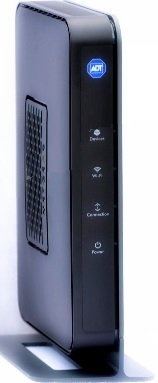
Product Picture
To reset the device, press and hold the reset button on the back of the unit for about 15 seconds. The unit will then restart.
Whether you can add devices to your site depends on the type of system and service you have as well as whether you are the site owner. If you are authorized to add devices, a Manage Devices button appears on the Web Portal's System tab. If the Manage Devices button does appear on the System tab, use the following procedure to add devices. To add a device to the site: Log in to the Web Portal. Click the System tab, if it is not already displayed. Click Manage Devices. Click the type of device you want to install and follow the on-screen instructions.
If you are authorized to reset a Z-Wave device, a Manage Devices button appears on the System tab. (Resetting or deleting a Z-Wave device both result in removing the Z-Wave device from the site.) To delete or reset a Z-Wave device: Click the System tab, if it is not already displayed. Click Manage Devices. The Manage Devices page appears. Click Switches, Doors, Thermostats, Others. The Z-Wave Devices page appears. Click Reset. The Reset Z-Wave Devices page appears. Quickly press the ""include"" button on the device that you want to reset. A message informs you that the device was successfully reset, and, in addition, the Z-Wave device is removed from the site. Once reset, you can add the Z-Wave device again to the same site or add it to another site.
| Type | Value(s) |
|---|