Hogar Controls
Hogar Pebble
HC-TB-ZW
Wall Controller
HW: 1 FW: 1.03
ZM5202
6.71.03
0x0293 (659)
0x0003 (3)
0x0113 (275)
ZC10-18106271
2018-10-16 17:22:43.610939
N/A
Routing Slave
Reporting Sleeping Slave
Yes
The pebble is a tiny and convenient touch button that can activate 9 scenes with different gestures like touch, tap, and swipe.
The Pebble from Hogar Controls is a wireless touch button that combines elegant design and functionality into a simple, personalized device to control everything in your home. Enabled with a smart touch interface, this suave, compact device can do much more than your run-of-the-mill remote control ever could. Easily attach the Pebble on any glass, wooden or metal surface, or carry around in your pocket to control smart lighting, music, shades, thermostats and much more in your smart home or office. It is a compact, battery-powered, Z-wave Plus compatible device that allows you to control various devices through the Z-wave network. As it is based on Z-Wave communication technology, the device can be controlled remotely from anywhere using the internet. When paired with the HC Pro, our smart home controller, the Pebble lets you design, set and activate up to 9 personalized scenes with different gestures like touch, tap, double tap, press, press and hold, swipe left, swipe right, swipe up, swipe down, swipe clockwise, swipe anticlockwise. Set the ambiance for date night, wake up to your own personal mix of actions, or have the house locked and secured before you go to bed. Imagine your home at your fingertips because, with Pebble, it is just a matter of touch-and-go.
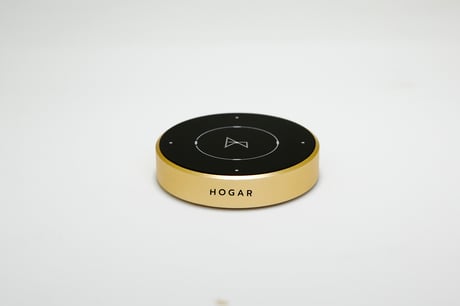
Product Picture
1. Put the controller into INCLUSION mode. Follow the instructions provided by the controller manufacturer. 2. Press and hold the config button for more than 2 seconds. ALL indicator lights will blink 3 times. At this point release the config button, the device will start the inclusion process.
1. Put the controller into EXCLUSION mode. Follow the instructions provided by the controller manufacturer. 2. Press and hold the config button for more than 2 seconds. ALL indicator lights will blink. At this point release the config button, the device will start the exclusion process.
1) Touch the center of the touch area, all indicator LEDs will blink ON then OFF, after all LEDs are OFF, the device will wake up. 2) Then touch on the touch area 3 times, the device will send Wakeup Notification.
Please use this procedure only when the network primary controller is missing or otherwise inoperable. To reset the device, use stick press and hold Config button till all LEDs are ON (about 5 seconds). The device is successfully removed from the network and reset.
| Type | Value(s) |
|---|