Hogar Controls
10 Touch Panel Switch
HTP-10S0
On/Off Power Switch
HW: 2 FW: 2.05
ZM5202
6.81.01
0x0293 (659)
0x0003 (3)
0x441A (17434)
ZC10-18116304
2018-11-13 07:28:16.027081
N/A
Enhanced 232 Slave
Always On Slave
The ten-touch panels feature a stunning glass face with advanced capacitive touch sensors that allow users to turn ten devices on/off with a touch.
A Smart Home deserves something much better than an ordinary switch. Hogar touch panels are a one-of-a-kind collection of switches, dimmers, and scene controllers that will transform walls from boring to absolutely, breath-taking. Hogar Touch Panels are a fine amalgamation of beauty, style, convenience and functionality. The smooth, gleaming, glossy and glass effect Touch Panels challenge common perceptions of a light switch, electrical socket or dimmer and add a touch of elegance to your smart home. The Hogar Controls ten-touch panels feature a stunning glass face with advanced capacitive touch sensors. It allows users to turn the devices on/off with a touch. The red/blue illumination clearly indicates its working state. A one of a kind solution for all your smart home needs, the mechanical structure of the ten-touch panel provides you with the flexibility of suiting any gang box size of US standard electrical boxes. It is simple to install and easy to use with its innovative assembly, plug-and-play feature and completely retrofit design. These Touch Panels are designed for a wide range of purposes where every button can be programmed to work either in switch or scene mode. Combine switches, fan dimmers, light dimmers and scene controllers at the comfort of your conventional gang boxes. The innovative design and chic styling coupled with advanced functionalities make it a delight for users.
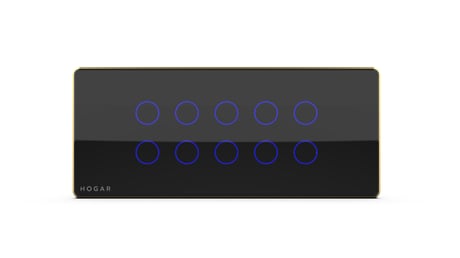
Product Picture
1. Put the controller into ADD device mode. Follow the instructions provided by the controller manufacturer. 2. Touch and hold any key on the panel for more than 5 seconds. All indication lights will blink in blue color. At this point release the key, the touch panel will start the inclusion process.
1. Put the controller into REMOVE device mode. Follow the instructions provided by the controller manufacturer. 2. Touch and hold any key on the panel for more than 5 seconds. All indication lights will blink in blue color. At this point release the key, the touch panel will start the exclusion process.
Using a screwdriver press the config button 5 times. All indication lights will blink in red color. Touch panel will start local reset. Touch panel switch will erase network inclusion state after local reset. Please use this procedure only when the network primary controller is missing or otherwise inoperable.
| Type | Value(s) |
|---|