Good Way Technology, Co., Ltd
Panic Button
TR1B120Z1
Notification Sensor
HW: 1 FW: 1.00
ZM5101
6.81.01
0x0068 (104)
0x0003 (3)
0x0016 (22)
ZC10-18116296
2018-11-01 20:05:16.799362
N/A
Enhanced 232 Slave
Reporting Sleeping Slave
Yes
The Panic Button is a wireless switch designed to control the Panic or Scene status of other associated devices through the Z-Wave controller.
The Panic Button is a wireless switch designed to control the Panic or Scene status of other associated devices through the Z-Wave controller. After receiving the signals emitted by the Panic Button, the Z-Wave controller can then give commands or operate according to its own settings. Its great compatibility with Z-Wave products makes it suitable for smart home cloud based gateway.
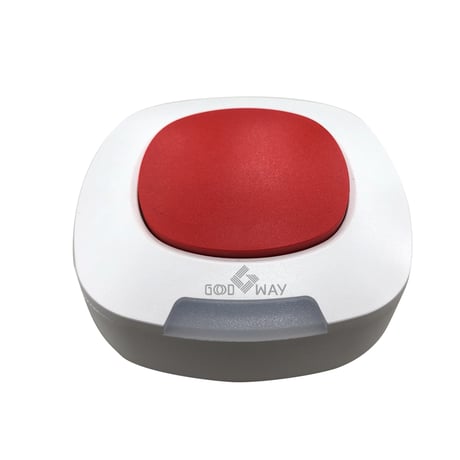
Product Picture


1 - LED Light up Time
1~100:LED light up 1 ~ 100 Seconds. 127:always onSize: 1 byte
Default: 127
Minimum: 0
Maximum: 0
Possible values
| From | To | Desription |
|---|---|---|
| 1 | 100 | LED light up |
| 127 | 127 | always on |
2 - Buzzer beep times
0 : Disable 1~100: Sound 1~100 beeps (0.5s on, 0.5s off) 127: Continue beep till cancel triggerSize: 1 byte
Default: 127
Minimum: 0
Maximum: 0
Possible values
| From | To | Desription |
|---|---|---|
| 0 | 0 | Buzzer Disable |
| 1 | 100 | Sound beep delay time |
| 127 | 127 | Continue beep till cancel trigger |
Push the button three times in 1.5 seconds. When inclusion successful, the LED will be RED blink three times.
Push the button three times in 1.5 seconds. When exclusion successful, the LED will be RED blink three times. And the LED will be red blinking for 30 seconds at one blink per two seconds. The device is now waiting to inclusion.
The Z-Wave Panic Button wakes up by wake up timer or presses the physical button once, it will send Wakeup Notification Command to the node ID that requires to be reported and stay awake for 10 seconds, if no WAKE_UP_NO_MORE_INFORMATION command is received.
Push the button three times in 1.5 seconds and hold the third push for 10 seconds till the LED is red blinking. When reset is successful, the device is set to factory default and now waiting to inclusion Please use this procedure only when the network primary controller is missing or otherwise inoperable.
| Type | Value(s) |
|---|
| Group | Type |
|---|---|
| Home Security | (Refer to parameters): State idle |