Everspring
Mini plug with metering
AN184-1
On/Off Power Switch
HW: 1 FW: 1.00:00.04
SD3502
6.71.03
0x0060 (96)
0x0004 (4)
0x000B (11)
ZC10-18106278
2018-10-25 17:54:29.705741
N/A
Enhanced 232 Slave
Always On Slave
The Metering Plug is designed to turn on/off the appliances in your house. Its metering function can measure electricity usage in KW/hr and supports individual measurements of wattage, voltage, current and Power Factor.
The AN184 is a miniature size on/off and metering plug to control lighting and appliances. It is possible to turn on/off home devices and check the status directly from a smartphone. Compact in design, yet certified for safety by makes it suitable for plugging into any power outlet. The metering plug can support wattage, voltage, ampere, and measurement. The unit can also detect overload upon which the unit will switch off relay and keep LED flashing until power is off and re-applied.
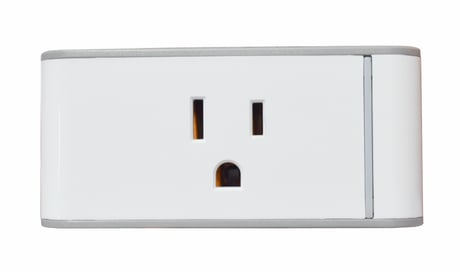
Product Picture


1 - Set Basic Set Command value
Value can be set 0~99, 255Size: 2 bytes
Default: 255
Minimum: 0
Maximum: 0
Possible values
| From | To | Desription |
|---|---|---|
| 0 | 99 | Basic Set Command value |
| 255 | 255 | 0xFF |
2 - Set the delaying time to report to Group 1
Value can be set 3~25 secondsSize: 1 byte
Default: 3
Minimum: 0
Maximum: 0
Possible values
| From | To | Desription |
|---|---|---|
| 3 | 25 | Delaying time to report to Group 1 |
3 - Set whether to remember the last status
Value can be set 1 or 0Size: 1 byte
Default: 1
Minimum: 0
Maximum: 0
Possible values
| From | To | Desription |
|---|---|---|
| 0 | 1 | Remember or not remember the last status |
4 - Set the interval for wattage auto report
Value can be set 1~32767 minutesSize: 2 bytes
Default: 1
Minimum: 0
Maximum: 0
Possible values
| From | To | Desription |
|---|---|---|
| 1 | 32767 | The interval for wattage auto report |
5 - Set the interval for kW*h auto report
Value can be set 1~32767 minutesSize: 2 bytes
Default: 60
Minimum: 0
Maximum: 0
Possible values
| From | To | Desription |
|---|---|---|
| 1 | 32767 | The interval for kW*h auto report |
6 - Auto report when load surpasses the set value of wattage
Value can be set 0~3500WSize: 2 bytes
Default: 0
Minimum: 0
Maximum: 0
Possible values
| From | To | Desription |
|---|---|---|
| 0 | 3500 | 0: does not report automatically |
7 - Auto report when the change of wattage surpasses the set percentage
Value can be set 0~100%Size: 1 byte
Default: 0
Minimum: 0
Maximum: 0
Possible values
| From | To | Desription |
|---|---|---|
| 0 | 100 | 0: does not report automatically |
1. Put the Z-Wave Controller into inclusion mode. 2. Press the link key three times within 1.5 seconds to put the unit into inclusion mode.
1. Put the Z-Wave Controller into exclusion mode. 2. Press the link key three times within 1.5 seconds to put the unit into exclusion mode.
1. Press the link key three times within 1.5 seconds to put the unit into exclusion mode. 2. Within 1 second of step 1, press link key again and hold it until LED is off (about 5 seconds). 3. Node ID is excluded. The device reverts to factory default state and will be in auto-inclusion mode for 25 secs. (Use this procedure only in the event that the network primary controller is missing, or otherwise inoperable.)
| Type | Value(s) |
|---|
| Group | Type |
|---|---|
| Power Management | (Refer to parameters): State idle |
| Meter type |
|---|
| Electric Meter Consumption |