Zooz
Z-Wave Plus Double Plug
ZW47
On/Off Power Switch
HW: 255 FW: 1.00
ZM5202
6.71.03
0x0312 (786)
0xA000 (40960)
0xA003 (40963)
ZC10-18116324
2018-11-01 19:40:11.708313
N/A
Enhanced 232 Slave
Always On Slave
It is smart plug type device controlled by Z-Wave controller and can be configured in Z-Wave sensor network, if Z-Wave certified controller features remote access.
It is smart plug type device controlled by Z-Wave controller and can be configured in Z-Wave sensor network, if Z-Wave certified controller features remote access, you can dim lights at home from your mobile phone separately, and manual dim light by push button .
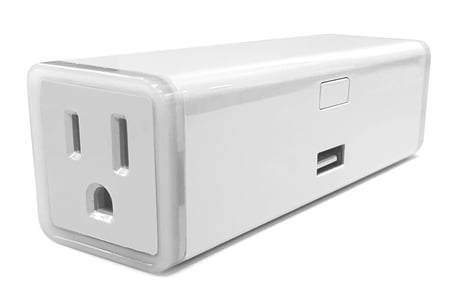
Product Picture


1 - Restores state after power failure
Restores state after power failureSize: 1 byte
Default: 0
Minimum: 0
Maximum: 0
Possible values
| From | To | Desription |
|---|---|---|
| 0 | 0 | The state before a power outage. |
| 1 | 1 | outlet on |
| 2 | 2 | outlet off |
2 - Power Wattage Report Value Threshold(Wattage)
Power Wattage Report Value Threshold(Wattage)Size: 4 bytes
Default: 10
Minimum: 0
Maximum: 0
Possible values
| From | To | Desription |
|---|---|---|
| 0 | 10 | Power Wattage Report Value Threshold(Wattage) |
4 - Energy (kWh) Report Frequency (Timer)
Energy (kWh) Report Frequency (Timer)Size: 4 bytes
Default: 300
Minimum: 0
Maximum: 0
Possible values
| From | To | Desription |
|---|---|---|
| 30 | 2678400 | Energy (kWh) Report Frequency (Timer) |
5 - Voltage (V) Report Frequency (Timer)
Voltage (V) Report Frequency (Timer)Size: 4 bytes
Default: 300
Minimum: 0
Maximum: 0
Possible values
| From | To | Desription |
|---|---|---|
| 30 | 2678400 | Voltage (V) Report Frequency (Timer) |
6 - Electricity (A) Report Frequency (Timer)
Electricity (A) Report Frequency (Timer)Size: 4 bytes
Default: 300
Minimum: 0
Maximum: 0
Possible values
| From | To | Desription |
|---|---|---|
| 0 | 30 | Power Wattage Report Value Threshold(Wattage) |
| 30 | 2678400 | Electricity (A) Report Frequency (Timer) |
7 - Overload Protection (Current)
Overload Protection (Current)Size: 1 byte
Default: 13
Minimum: 0
Maximum: 0
Possible values
| From | To | Desription |
|---|---|---|
| 1 | 16 | Overload Protection (Current) |
8 - Endpoint1 Enable Auto Turn-OFF Timer
Endpoint1 Enable Auto Turn-OFF TimerSize: 1 byte
Default: 0
Minimum: 0
Maximum: 0
Possible values
| From | To | Desription |
|---|---|---|
| 0 | 0 | EP1 Auto Turn-OFF Timer Disabled |
| 1 | 1 | EP1 Auto Turn-OFF Timer Enabled |
9 - Endpoint1 Count Down Configuration(Turn off the output by time)
Endpoint1 Count Down Configuration(Turn off the output by time)Size: 4 bytes
Default: 60
Minimum: 0
Maximum: 0
Possible values
| From | To | Desription |
|---|---|---|
| 1 | 65535 | Endpoint1 Count Down Configuration(Turn off the output by time) |
10 - Endpoint1 Enable Auto Turn-ON Timer
Endpoint1 Enable Auto Turn-ON TimerSize: 1 byte
Default: 0
Minimum: 0
Maximum: 0
Possible values
| From | To | Desription |
|---|---|---|
| 0 | 0 | EP1 Auto Turn-ON Timer Disabled |
| 1 | 1 | EP1 Auto Turn-ON Timer Enabled |
11 - Endpoint1 Count Down Configuration(Turn on the output by time)
Endpoint1 Count Down Configuration(Turn on the output by time)Size: 4 bytes
Default: 60
Minimum: 0
Maximum: 0
Possible values
| From | To | Desription |
|---|---|---|
| 1 | 65535 | Endpoint1 Count Down Configuration(Turn on the output by time) |
12 - Endpoint2 Enable Auto Turn-OFF Timer
Endpoint2 Enable Auto Turn-OFF TimerSize: 1 byte
Default: 0
Minimum: 0
Maximum: 0
Possible values
| From | To | Desription |
|---|---|---|
| 0 | 0 | EP2 Auto Turn-OFF Timer Disabled |
| 1 | 1 | EP2 Auto Turn-OFF Timer Enabled |
13 - Endpoint2 Count Down Configuration(Turn off the output by time)
Endpoint2 Count Down Configuration(Turn off the output by time)Size: 4 bytes
Default: 60
Minimum: 0
Maximum: 0
Possible values
| From | To | Desription |
|---|---|---|
| 1 | 65535 | Endpoint2 Count Down Configuration(Turn off the output by time) |
14 - Endpoint2 Enable Auto Turn-ON Timer
`Endpoint2 Enable Auto Turn-ON TimerSize: 1 byte
Default: 0
Minimum: 0
Maximum: 0
Possible values
| From | To | Desription |
|---|---|---|
| 0 | 0 | EP2 Auto Turn-ON Timer Disabled |
| 1 | 1 | EP2 Auto Turn-ON Timer Enabled |
15 - Endpoint2 Count Down Configuration(Turn on the output by time)
Endpoint2 Count Down Configuration(Turn on the output by time)Size: 4 bytes
Default: 60
Minimum: 0
Maximum: 0
Possible values
| From | To | Desription |
|---|---|---|
| 1 | 65535 | Endpoint2 Count Down Configuration(Turn on the output by time) |
16 - Manual Control
Manual ControlSize: 1 byte
Default: 1
Minimum: 0
Maximum: 0
Possible values
| From | To | Desription |
|---|---|---|
| 0 | 0 | Manual Control Disabled |
| 1 | 1 | Manual Control Enabled |
17 - Status LED Configuration
Status LED ConfigurationSize: 1 byte
Default: 1
Minimum: 0
Maximum: 0
Possible values
| From | To | Desription |
|---|---|---|
| 0 | 0 | LED indicator will display power consumption whenever the device is plugged in |
| 1 | 1 | LED indicator will display power consumption whenever the device is ON in and will turn off when the plug is OFF |
| 2 | 2 | LED indicator will display the level of power consumption for 5 seconds only whenever the device is turned on or off |
| 3 | 3 | Always OFF |
Inclusion the ZW47 from the existing Z-Wave home control network with your primary controller. ---Refer to your primary controller instructions to process the inclusion / exclusion setup procedure. ---When prompted by your primary controller, click the PROG button Three times in one second.
Exclusion the ZW47 from the existing Z-Wave home control network with your primary controller. ---Refer to your primary controller instructions to process the inclusion / exclusion setup procedure. ---When prompted by your primary controller, click the PROG button Three times in one second.
Press the button twice quickly and then press and hold the button 10S.device will reset Please use this procedure only when the network primary controller is missing or otherwise inoperable
| Type | Value(s) |
|---|
| Group | Type |
|---|---|
| Power Management | (Refer to parameters): State idle |
| Meter type |
|---|
| Electric Meter Consumption |