Philio Technology
Smart Dimmer Plug
PAD09
Light Dimmer Switch
HW: 1 FW: 1.01
SD3502
6.81.01
0x013C (316)
0x0005 (5)
0x0060 (96)
ZC10-18116306
2018-11-13 07:00:33.127096
N/A
Enhanced 232 Slave
Always On Slave
The Dimmer Plug is a Z-WaveTM enabled device which is fully compatible with any Z-WaveTM enabled network.
The Dimmer Plug is designed to control the on/off status of lighting in your house. The unit also provides dimmer function which is only applicable to light bulbs. At 220-240V voltage, this Dimmer Plug can support connected load of Max. 200W. To manually switch on the light, press and release the On/Off dimmer button when the light is off. The light will dim from off to the level which was set before switch off. To manually switch off the light, press and release the On/Off button shortly when the light is on. To adjust the dim level, press and hold the On/Off button until the desired dim level is achieved, then release.
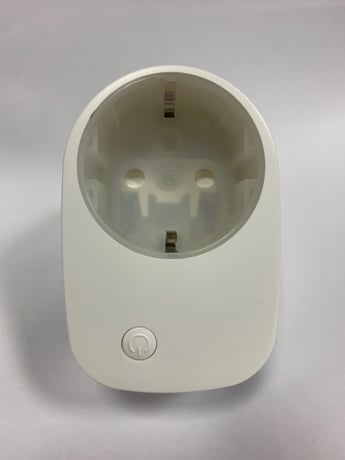
Product Picture


1 - Dimmer Level Report mode
Whenever dimmer on/off state changes, it will send MULTILEVEL_SWITCH_REPORT to the nodes of group1. The default setting is Enable the function.Size: 1 byte
Default: 1
Minimum: 0
Maximum: 0
Possible values
| From | To | Desription |
|---|---|---|
| 0 | 1 | 0 : Disable 1 : Enable |
2 - LED indication mode
Show dimmer State:When dimmer is on, LED is on. When dimmer is off, LED is off. The default setting is Show dimmer State. Show Night mode:When dimmer is on, LED is off. When dimmer is off, LED is on. One flash mode:When dimmer on/off state changes, LED will light on one second and then off.Size: 1 byte
Default: 1
Minimum: 0
Maximum: 0
Possible values
| From | To | Desription |
|---|---|---|
| 1 | 3 | 1: Show dimmer state 2 : Show night mode 3: One flash mode |
4 - Restore dimmer state
Whenever the AC power return from lost, PAD09 will restore the switch state which could be Dimmer off、Last dimmer state、Dimmer on. The default setting is Last dimmer state.Size: 1 byte
Default: 1
Minimum: 0
Maximum: 0
Possible values
| From | To | Desription |
|---|---|---|
| 0 | 2 | 0 : Dimmer off 1 : Last dimmer state 2 : Dimmer on |
1.check Z-WaveTM Controller entered inclusion mode. 2.Pressing Include button of PAD09 three times within 2 seconds will enter inclusion mode.
1.check Z-WaveTM Controller entered exclusion mode. 2.Pressing Include button of PAD09 three times within 2 seconds will enter exclusion mode.
1. Pressing Include button of PAD09 three times within 2 seconds will enter inclusion mode. 2. Within 1 second, press Include button of PAD09 again for 5 seconds. 3. IDs are excluded. note : Please use this procedure only when the network primary controller is missing or otherwise inoperable.
The Switch can be set to send reports to associated Z-Wave devices. It supportsOne association group with five nodes support for grouping. Grouping 1 Lifeline(Maximum 5 nodes):When “on” or “off ” state has been changed, it will send Multilevel Switch Report to the nodes of Grouping 1. Grouping 2 Control_Key1 : (Maximum 5 nodes):When the On/Off status changes or the dim level is achieved manually, it will send BASIC_SET command to group 2 nodes to make them unanimous. When PAD09 detects the Overload, it will send Notification Report to Group 1 nodes. After detecting overload state and sending this Notification report, PAD09 will turn off the dimmer automatically and lockout the On/Off button. The only thing to do is unplug PAD09 and reduce the load. Then re-power on PAD09 and it will work again. The content of Notification Report Notification report command: [Command_Class_Notification, Notification_Report, Notification Status= 0xFF, Notification Type = 0x08, Event = 0x08]
| Type | Value(s) |
|---|
| Group | Type |
|---|---|
| Power Management | (Refer to parameters): State idle |