QUBINO
Smart Plug 16A
ZMNHYD1
On/Off Power Switch
HW: 2 FW: 3.00
ZM5101
6.71.03
0x0159 (345)
0x0002 (2)
0x0054 (84)
ZC10-18116325
2018-11-27 22:14:33.332481
N/A
Enhanced 232 Slave
Always On Slave
The Qubino Smart Plug 16A is ideal for remotely controlling electrical devices and measuring the energy consumption.
The Smart Plug 16A controls on/off function for the connected device. It also measures power consumption of the connected device according to the principle of fast sampling of voltage and current signals. A built-in microprocessor calculates energy and power from the measured signals.
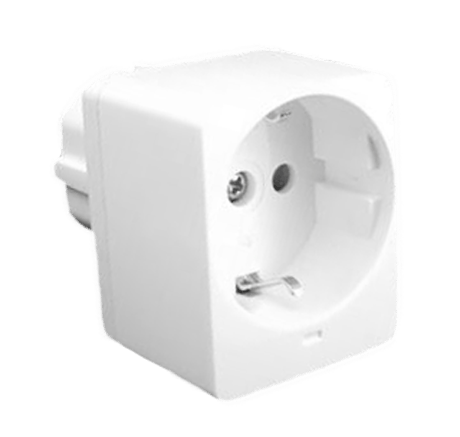
Product Picture


11 - Parameter no. 11 - Turn Smart plug 16A Off Automatically with Timer
Parameter no. 11 - Turn Smart plug 16A Off Automatically with Timer If Smart plug 16A is ON, you can schedule it to turn OFF automatically after a period defined in this parameter. The timer is reset to zero each time the device receives an ON command, either remotely (from the gateway (hub) or associated device) or locally from the switch. Values (size is 2 byte dec): • default value 0 • 0 - Auto OFF Disabled 1 - 32535 = 1 - 32535 seconds. Auto OFF timer enabled for a given number of seconds.Size: 2 bytes
Default: 0
Minimum: 0
Maximum: 0
Possible values
| From | To | Desription |
|---|---|---|
| 0 | 0 | Auto OFF Disabled |
| 1 | 32535 | 1 - 32535 seconds. Auto OFF timer enabled for a given number of seconds. |
12 - Parameter no. 12 - Turn Smart plug 16A On Automatically with Timer
If Smart plug 16A is OFF, you can schedule it to turn ON automatically after a period of time defined in this parameter. The timer is reset to zero each time the device receives an OFF command, either remotely (from the gateway (hub) or associated device) or locally from the switch. Values (size is 2 byte dec): • default value 0 • 0 - Auto ON Disabled 1 - 32535 = 1 - 32535 seconds. Auto ON timer enabled- for a given amount of seconds.Size: 2 bytes
Default: 0
Minimum: 0
Maximum: 0
Possible values
| From | To | Desription |
|---|---|---|
| 0 | 0 | Auto ON Disabled |
| 1 | 32535 | 1 - 32535 seconds. Auto ON timer enabled- for a given amount of seconds. |
30 - Parameter no. 30 - Restore on/off status for Smart plug 16A after power failure
This parameter determines if on/off status is saved and restored for the Smart plug 16A after power failure. Values (size is 1 byte dec): • default value 0 • 0 - Device saves last on/off status and restores it after a power failure. • 1 - Device does not save on/off status and does not restore it after a power failure, it remains off.Size: 1 byte
Default: 0
Minimum: 0
Maximum: 0
Possible values
| From | To | Desription |
|---|---|---|
| 0 | 0 | Device saves last on/off status and restores it after a power failure. |
| 1 | 0 | Device does not save on/off status and does not restore it after a power failure, it remains off. |
40 - Parameter no. 40 – Watt Power Consumption Reporting Threshold for Smart plug 16A
Choose by how much power consumption needs to increase or decrease to be reported. Values correspond to percentages, so if 20 is set (by default), the device will report any power consumption changes of 20% or more compared to the last reading. Values (size is 1 byte dec): • default value 20 • 0 - Power consumption reporting disabled • 1 - 100 = 1% - 100% Power consumption reporting enabled. New value is reported only when Wattage in real time changes by more than the percentage value set in this parameter compared to the previous Wattage reading, starting at 1% (the lowest value possible). Power consumption needs to increase or decrease by at least 1 Watt to be reported, REGARDLESS of percentage set in this parameter. NOTE: When reporting Watts, module will automatically report also [V] (Voltage) and [A] (Amperes)Size: 1 byte
Default: 20
Minimum: 0
Maximum: 0
Possible values
| From | To | Desription |
|---|---|---|
| 0 | 0 | Power consumption reporting disabled |
| 1 | 100 | 1% - 100% Power consumption reporting enabled. New value is reported only when Wattage in real time changes by more than the percentage value set in this parameter compared to the previous Wattage reading, starting at 1% (the lowest value possible). |
42 - Parameter no. 42 – Watt Power Consumption Reporting Time Threshold for Smart plug 16A Load
Set value refers to the time interval with which power consumption in Watts is reported (30 – 32535 seconds). Values (size is 2 byte dec): • default value 0 • 0 - Power consumption reporting on time interval disabled • 30 - 32535 = 30 - 32535 seconds. Power consumption reporting enabled. Report is sent according to time interval (value) set here. The device is reporting the following values (if there was a change): W, V and A. NOTE: The energy consumption (kWh) is reported regardless of the values, set in the parameters 40 and 42. The energy consumption will be reported, when it increases for at least 0,1 kWh.Size: 2 bytes
Default: 0
Minimum: 0
Maximum: 0
Possible values
| From | To | Desription |
|---|---|---|
| 0 | 0 | Power consumption reporting on time interval disabled |
| 30 | 32535 | 30 - 32535 seconds. Power consumption reporting enabled. Report is sent according to time interval (value) set here. |
50 - Parameter no. 50 – Down value
Lower power threshold used in parameter no. 52. Values (size is 2 byte dec): • default value 30 = 30 W • 0 – 4000 = 0W – 4000 W Down value cannot be higher or equal to the value specified in parameter no. 51. If the set value is higher or equal to the value in parameter 51, the set command is ignored. NOTE: if parameter no. 50 value is 100W, if measured power is lower than 100W, the association is sent. Power threshold step is 1WSize: 2 bytes
Default: 30
Minimum: 0
Maximum: 0
Possible values
| From | To | Desription |
|---|---|---|
| 0 | 4000 | 0W – 4000 W power threshold |
51 - Parameter no. 51 – Up value
Upper power threshold used in parameter no. 52 Values (size is 2 byte dec): • default value 50 = 50 W • 0 – 4000 = 0 W – 4000W Up value cannot be lower or equal to the value specified in the parameter no. 50. If the set value is lower or equal to the value in parameter 50, the set command is ignored. NOTE: If parameter no. 51 value is 200W. If measured power is higher than 200W the association is sent. Power threshold step is 1W.Size: 2 bytes
Default: 50
Minimum: 0
Maximum: 0
Possible values
| From | To | Desription |
|---|---|---|
| 0 | 4000 | 0 W – 4000 W power threshold |
52 - Parameter no. 52 - Action in case of exceeding defined power values (parameters 50 and 51)
Parameter defines the way 3rd association group devices are controlled, depending on the current power load Values (size is 1 byte dec): • default value 6 • 0 – function inactive • 1 – turn the associated devices on, once the power drops below Down value (parameter no. 50) • 2 – turn the associated devices off, once the power drops below Down value (parameter no. 50) • 3 – turn the associated devices on, once the power rises above Up value (parameter no. 51) • 4 – turn the associated devices off, once the power rises above Up value (parameter no. 51) • 5 – 1 and 4 combined. Turn the associated devices on, once the power drops below Down value (parameter no. 50). Turn the associated devices off, once the power rises above Up value (parameter no. 51). • 6 – 2 and 3 combined. Turn the associated devices off, once the power drops below Down value (parameter 50). Turn the associated devices on, once the power rises above Up value (parameter no. 51).Size: 1 byte
Default: 6
Minimum: 0
Maximum: 0
Possible values
| From | To | Desription |
|---|---|---|
| 0 | 0 | function inactive |
| 1 | 0 | turn the associated devices on, once the power drops below Down value (parameter no. 50) |
| 2 | 0 | turn the associated devices off, once the power drops below Down value (parameter no. 50) |
| 3 | 0 | turn the associated devices on, once the power rises above Up value (parameter no. 51) |
| 4 | 0 | turn the associated devices off, once the power rises above Up value (parameter no. 51) |
| 5 | 0 | 1 and 4 combined. Turn the associated devices on, once the power drops below Down value (parameter no. 50). Turn the associated devices off, once the power rises above Up value (parameter no. 51). |
| 6 | 0 | 2 and 3 combined. Turn the associated devices off, once the power drops below Down value (parameter 50). Turn the associated devices on, once the power rises above Up value (parameter no. 51). |
70 - Parameter no. 70 - Overload safety switch
The function allows for turning off the controlled device in case of exceeding the defined power for more than 3 seconds. Controlled device can be turned back on by S-button or sending a control frame. By default this function is inactive. Values (size is 2 byte dec): • default value 0 • 1 – 4000 = 1 W – 4000W • 0 = function not active NOTE: This functionality is not an overload safety protection, please check installation note for details. In case of overload the following message will be send towards the controller: • COMMAND_CLASS_NOTIFICATION_V5 • The Alarm V1 type field set to 0x00 • Notification Type 0x08 and 0x08 (Overload detected) NOTE: Regardless of the value set in this parameter the overcurrent protection is always active and can not be disabled.Size: 2 bytes
Default: 0
Minimum: 0
Maximum: 0
Possible values
| From | To | Desription |
|---|---|---|
| 1 | 4000 | 1 W – 4000W |
| 0 | 0 | function not active |
71 - Parameter no. 71 – Power threshold
This functions allows setting the power threshold for triggering the Program started notification. When the threshold will be reached the notification will let the user know that the device connected to the smart plug started working. Values (size is 2 byte dec): • default value 0 • 1 – 4000 = 1 W – 4000W • 0 = function not active When the threshold is reached the following message will be send towards the controller: • COMMAND_CLASS_NOTIFICATION_V5 • The Alarm V1 type field set to 0x00 • Notification Type 0x0C and 0x01 (Program started)Size: 2 bytes
Default: 0
Minimum: 0
Maximum: 0
Possible values
| From | To | Desription |
|---|---|---|
| 0 | 0 | function not active |
| 1 | 4000 | 1 W – 4000W |
72 - Parameter no. 72 – Time interval
This function allows setting the time interval for triggering the Program completed notification. When the active power will fall below the power threshold set in parameter 71, the time interval will start and when it will expire the notification will let the user know that the device connected to the smart plug finished working. The time interval is useful for the devices that have pause intervals during operations. Values (size is 1 byte dec): • default value 1 • 0 – 125 = 0 – 125 minutes • 0 = immediate sending of notification when active power drops bellow threshold set in parameter 71 When the the time interval expires the following message will be send towards the controller: • COMMAND_CLASS_NOTIFICATION_V5 • The Alarm V1 type field set to 0x00 • Notification Type 0x0C and 0x03 (Program completed)Size: 1 byte
Default: 1
Minimum: 0
Maximum: 0
Possible values
| From | To | Desription |
|---|---|---|
| 0 | 0 | immediate sending of notification when active power drops bellow threshold set in parameter 71 |
| 0 | 125 | 0 – 125 minutes |
73 - Parameter no. 73 – Turn Smart Plug OFF
This function allows turning the Smart Plug output to OFF once the time interval is expired and the Program completed notification is sent to the controller. Values (size is 1 byte dec): • default value 0 • 0 – function disabled • 1 – turn OFF relay once the notification Program completed is sentSize: 1 byte
Default: 1
Minimum: 0
Maximum: 0
Possible values
| From | To | Desription |
|---|---|---|
| 0 | 0 | function disabled |
| 1 | 0 | turn OFF relay once the notification Program completed is sent |
74 - Parameter no. 74 – Enable/disable LED
This function allows enabling or disabling the Smart Plug LED. In case the user doesn’t want the LED indicator he can turn it OFF with this parameter. NOTE: if an overload or overcurrent occurs the red LED will still turn ON regardless of the value set in this parameter. Values (size is 1 byte dec): • default value 1 • 0 – LED is disabled • 1 – LED is enabledSize: 1 byte
Default: 1
Minimum: 0
Maximum: 0
Possible values
| From | To | Desription |
|---|---|---|
| 0 | 0 | LED is disabled |
| 1 | 0 | LED is enabled |
AUTOMATICALLY ADDING THE DEVICE TO A Z-WAVE NETWORK (AUTO INCLUSION) 1. Enable add/remove mode on your Z-Wave gateway (hub) 2. Automatic selection of secure/unsecure inclusion 3. The device can be automatically added to a Z-Wave network during the first 2 minutes 4. Connect the device to the power supply 5. Auto-inclusion will be initiated within 5 seconds of connection to the power supply and the device will automatically enrol in your network (when the device is excluded and connected to the power supply it automatically enters the INCLUSION MODE state.)
REMOVAL FROM A Z-WAVE NETWORK (Z-WAVE EXCLUSION) 1. Connect the device to the power supply 2. Make sure the device is within direct range of your Z-Wave gateway (hub) or use a hand-held Z-Wave remote to perform exclusion 3. Enable add/remove mode on your Z-Wave gateway (hub) 4. Press and hold the Service button S from 2 to 6 seconds (with holding the S button for the interval between 2 and 6 seconds you put the device in EXCLUSION MODE) 5. The device will be removed from your network, but any custom configuration parameters will not be erased
FACTORY RESET • The reset is only possible the first minute after the power on • Press and hold the service button S more than 6 seconds • The device will be removed from your network and the led will start blinking. The device is now in its factory default state. • When the S button is held more than 6 seconds after the first minute is passed, the relay should not react! By resetting the device, all custom parameters previously set on the device will return to their default values, and the owner ID will be deleted. Use this reset procedure only when the main gateway (hub) is missing or otherwise inoperable.
1. Qubino Smart Plug 16A supports S2 Authenticated security. 2. Smart Plug 16A can automatically turn devices/lights on or off after a set period of time. Independent of other scenes and gateway (hub) commands.
| Type | Value(s) |
|---|
| Group | Type |
|---|---|
| Power Management | (Refer to parameters): State idle |
| Meter type |
|---|
| Electric Meter Consumption |