Ring
Ring Smoke/CO Listener
4SS1S80EN0
Notification Sensor
HW: 1 FW: 10.01
ZM5101
6.81.00
0x0346 (838)
0x0601 (1537)
0x0101 (257)
ZC10-19016343
2019-01-05 06:25:20.751499
N/A
Enhanced 232 Slave
Reporting Sleeping Slave
Yes
Ring Smoke/CO Listener is a smart sound sensor for Ring Alarm. This sensor listens for the alarm sound of a smoke and/or CO detector.
Ring Smoke/CO Listener is a smart sound sensor for Ring Alarm. This sensor listens for the alarm sound of a smoke and/or CO detector. It does not sense smoke or CO directly. Instead, it adds smart functionality to your existing smoke or CO alarm (or smoke/CO combo). When your smoke or CO alarm begins to sound, the Smoke/CO Listener activates and Ring Alarm notifies you of the issue, wherever you are. If your system is professionally monitored, our monitoring center is also notified.
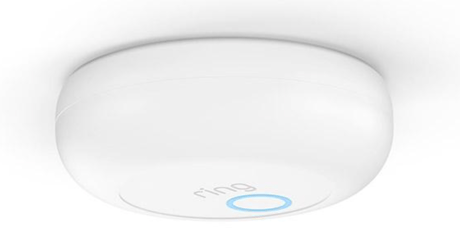
Product Picture


1 - Unsolicited Battery Report
255 to 4200 seconds in 255 second increments that the sensor should wait between sending unsolicited battery reports.Size: 2 bytes
Default: 4200
Minimum: 0
Maximum: 0
Possible values
| From | To | Desription |
|---|---|---|
| 255 | 4200 | 255 to 4200 seconds in 255 second increments that the sensor should wait between sending unsolicited battery reports. |
2 - “hear” CO Detectors
1: Smoke Detector Siren 2: Smoke+CO Detector SirenSize: 1 byte
Default: 1
Minimum: 0
Maximum: 0
Possible values
| From | To | Desription |
|---|---|---|
| 1 | 2 | 1: Smoke Detector Siren 2: Smoke+CO Detector Siren |
3 - Installation Test
0: Cancel Installation Test Mode 1: Start Installation Test ModeSize: 1 byte
Default: 0
Minimum: 0
Maximum: 0
Possible values
| From | To | Desription |
|---|---|---|
| 0 | 1 | 0: Cancel Installation Test Mode 1: Start Installation Test Mode |
Inclusion Instructions - Begin the setup process near your Ring Alarm Base Station. In the Ring app, tap Set Up a Device. Choose Security Devices, then Sensors, then Ring Smoke/CO Listener, then tap Add Device. To complete the setup process, follow the in-app instructions. When prompted, scan the QR Code or enter the PIN. This begins the pairing process. The QR Code and PIN are on the back of your Listener and in the product packaging. When prompted, pull out the clear tab. This turns the Listener on. Your Alarm Base Station then finds it automatically. As the Listener pairs to your Alarm Base Station, its LED ring blinks slowly, then quickly. Once it pairs, the LED glows blue for three seconds.
Exclusion Instructions - to remove Ring Smoke/CO Listener from your system: Open the side menu in the Ring app and tap Devices, then Base Station. Next, select your Listener and tap the gear- shaped icon. Then tap Remove Device. When prompted, open the Listener and remove and reinstall the battery to complete the removal.
The sensor will wake up every so often and when the case is closed to send a Wake-Up Notification to allow the life line master node controller that the sensor is now available for any queued messages that the controller may have for the sensor. The time between Wake-Up Notifications can be configured with the Wake-Up Notification command class to be between 1 and 24 hours with interval steps of 1 minute.
Reset Instructions - To factory reset, press and hold the Setup button for 10 seconds. When the LED ring stops blinking, your Listener has reset. This process disconnects the Listener from Ring Alarm. To begin using the Listener again, repeat the setup process in the Ring app. Note: Please use this procedure only when the network primary controller is missing or otherwise inoperable.
| Type | Value(s) |
|---|
| Group | Type |
|---|---|
| Smoke Alarm | State Idle |
| CO Alarm | (Refer to parameters): State idle |