RouteZ
Rocket Bulb
JZB01DIM
Light Dimmer Switch
HW: 1 FW: 2.07
ZM5101
6.81.03
0x039F (927)
0x060A (1546)
0x0022 (34)
ZC10-19016345
2018-12-10 23:52:02.725472
N/A
Enhanced 232 Slave
Always On Slave
The Rocket Bulb is based on Z-Wave protocol, realizing basic function of on/of/dim. The DIM Retrofit produces beautiful high quality light that you can tune, dim, and control from your smartphone or tablet
1. Voltage: 110V 2.Standard form factor and appearance of the light bulb with 806 lm output 4.Possible to be included in groups, scenes, or schedules 5.Suitable for indoor lighting: Corridors, Bedroom, Living Room, etc.
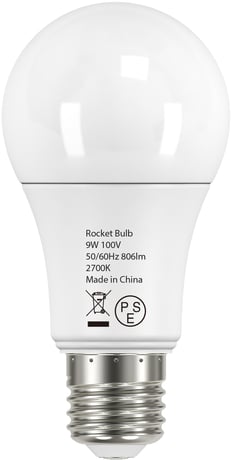
Product Picture


2 - Enable/Disable save the lamp state.
Enable/Disable save the lamp state. 0 = Enable save the lamp status 1 =The lamp’s status is forced to open 2 = The lamp’s status is forced to closeSize: 1 byte
Default: 0
Minimum: 0
Maximum: 0
Possible values
| From | To | Desription |
|---|---|---|
| 0 | 2 | Enable/Disable save the lamp state. |
80 - Enable to send notifications to associated devices (Group 1)
Enable to send notifications to associated devices (Group 1) when the state of LED Bulb is changed. 0 = Nothing. 1= Switch Multilevel Report.Size: 1 byte
Default: 1
Minimum: 0
Maximum: 0
Possible values
| From | To | Desription |
|---|---|---|
| 0 | 1 | Enable to send notifications to associated devices (Group 1) |
SmartStart Inclusion: Trigger OFF->ON 1. The LED light will flash twice. 2. Add for inclusion(SmartStart Inclusion): Add the led bulb DSK into the primary controller Smart Start Provisioning List (If your controller does not support SmartStart inclusion, please refer to the manual for your controller for non-SmartStart inclusion.) a) Power cycle once for led bulb. b) The led bulb will send “Explorer Auto inclusion” frame to start Smart Start Inclusion. c) Wait a moment, the led bulb should be added to the controller.Then the led bulb will flash once when it has been included into the network. Note: The led bulb will start SmartStart Inclusion when it is removed from a Z-Wave network. Normal Inclusion: Trigger OFF->ON->OFF->ON-->OFF->ON 1. The LED light will flash twice, and send node info frame. 2. Add for inclusion(Normal Inclusion): a) Set the Z-Wave network main controller into learning mode. b) Power cycle once for led bulb. c) Wait a moment, the led bulb should be added to the controller.Then the led bulb will flash once when it has been included into the network.
Remove for exclusion: Trigger OFF->ON->OFF->ON->OFF->ON 1. LED Bulb will light up with previously saved state and send node info frame. 2. Remove for exclusion: a) Assuming led bulb was added to controller and was power on. b) Set the Z-Wave network main controller into removing mode. c) Power cycle triple for led bulb (OFF->ON->OFF->ON->OFF->ON). d) Wait a moment, the led bulb should be removed from the controller.Then the led bulb will flash once and dim to 5%.
Reset the device : Trigger:OFF->ON-> OFF->ON->OFF->ON->OFF->ON->OFF->ON->OFF->ON Led bulb re-power 6 times (between 0.5-2 seconds each time); If the 6th power on, the led bulb flashes twice, which means that the resetting is successful. it will send “Device Reset Locally Command”. Please use this procedure only when the network primary controller is missing or otherwise inoperable.
| Type | Value(s) |
|---|