ABUS
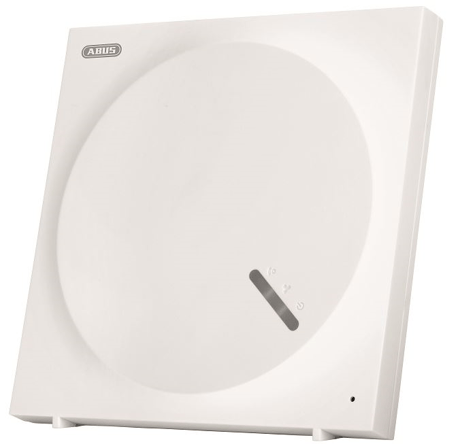
ABUS Z-Wave Gateway
SHGW10000
Central Controller
HW: 0 FW: 6.01:04.00:00.00:34.00
ZM5304
6.81.01
0x0403 (1027)
0x0001 (1)
0x0001 (1)
ZC10-19016352
2019-01-16 19:08:25.685296
N/A
Static Controller
Central Static Controller
The ABUS Z-Wave Gateway is a compact smart home control unit in Family Home Design using the Z-Wave radio standard.
The ABUS Z-Wave Gateway is a compact smart home control unit in Family Home Design using the Z-Wave radio standard. It can control up to 120 Z-Wave Radio components and is also compatible to the ABUS Smartvest Wireless Alarm System. The System can be controlled from any location via the free App ABUS Z-Wave ONE (for IOS and Android) that allows to configure up to 60 scenes (if - then - when).
Open the App ABUS Z-WAVE ONE and go to ""Home Settings"" > ""Gateway settings"" > ""Admin"" > ""Z-Wave administration"" page, click ""Z-Wave Learn Mode"" will put the Gateway into learn mode
Open the App ABUS Z-Wave ONE and go to ""Home Settings"" > ""Gateway settings"" > ""Admin"" > ""Z-Wave administrator"" page, click ""Z-Wave Reset"" will reset the Z-Wave Settings of the Gateway. If this controller is the primary controller for your network, resetting it will result in the nodes in your network being orphaned and it will be necessary after the reset to exclude and re-include all of the nodes in the network. If this controller is being used as a secondary controller in the network, use this procedure to reset this controller only in the event that the network primary controller is missing or otherwise inoperable.
Open the App ABUS Z-WAVE ONE and press the ""+"" button under the ""Device"" menu, the Gateway will go into inclusion mode. User can now trigger the Z-Wave device into its inclusion mode and add it to the Gateways Z-Wave network.
Open the App ABUS Z-WAVE ONE and press the ""-"" button under the ""Device"" menu, the Gateway will go into exclusion mode. User can now trigger the Z-Wave device into its exclusion mode and remove it from the Gateways Z-Wave network.
| Type | Value(s) |
|---|