Eaton
Plug-In Module - ON/OFF
RF96APM
On/Off Power Switch
HW: 1 FW: 1.01:00.01
SD3502
6.71.01
0x001A (26)
0x0053 (83)
0x0050 (80)
ZC10-18126336
2018-12-14 23:17:34.070474
N/A
Enhanced 232 Slave
Always On Slave
Eaton’s Z-Wave Plus On/OFF Plug-in module to provide local and remote wireless ON/OFF control of a single outlet while leaving the other outlet always ON.
Eaton’s Z-Wave Plus Wireless ON/OFF Plug-in module can be used to provide local and remote wireless ON/OFF control of a single outlet. Controlled outlet can be manually and remotely controlled by commands sent from your compatible Z-Wave certified controller leaving the other outlet always ON. • Provides wireless control of one outlet leaving the other outlet always ON • Rated for up to 12A plug loads and up to 300W of LEDs • Can be associated with up to 4 other devices • Supports Z-Wave Plus functionality with S2 security certification • Voice and app based control when used with compatible Z-Wave controller or Eaton’s home automation hub
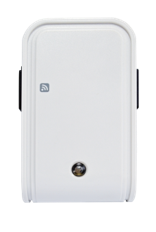
Product Picture


13 - Remember the last status
1: remember (0: do not remember)Size: 1 byte
Default: 1
Minimum: 0
Maximum: 0
Possible values
| From | To | Desription |
|---|---|---|
| 0 | 0 | Do not remember last status |
| 1 | 1 | Remember last status |
This ON/OFF plug supports Auto Inclusion feature where it will automatically enter Inclusion mode when first powered up after a factory reset. 1. There is an ON/OFF button on the front of the device which is used to carry out inclusion, exclusion or association. 2. Put your Z-Wave Controller into inclusion/exclusion mode. 3. Plug this ON/OFF Plug-in module into a wall outlet near the load to be controlled. 4. The Inclusion process should be completed when the LED stops blinking. Note: If Auto Inclusion fails, refer to the Troubleshooting section regarding Manual Inclusion If auto inclusion fails: 1. Put the Z-Wave Controller into Inclusion mode 2. Press the ON/OFF button 3 times within 1.5 seconds to put the unit into Inclusion mode
1. Put the Z-Wave Controller into Exclusion mode 2. Press the ON/OFF button 3 times within 1.5 seconds to put the unit into Exclusion mode
Please use this procedure only when the network primary controller is missing or otherwise inoperable 1. Press the ON/OFF button 3 times within 1.5 seconds to put the unit into exclusion mode 2. Within 1 second of step 1, press and hold the button for 5 seconds 3. Node ID is deleted. The device reverts to factory default state
| Type | Value(s) |
|---|
| Group | Type |
|---|---|
| Appliance | (Refer to parameters): State idle |