Eaton
Motion Sensor
RF96PIRBMS
Notification Sensor
HW: 1 FW: 1.00:00.05
SD3502
6.71.01
0x001A (26)
0x0042 (66)
0x0053 (83)
ZC10-18126337
2018-12-14 23:17:49.179536
N/A
Enhanced 232 Slave
Reporting Sleeping Slave
Yes
Eaton's Z-Wave Plus battery operated motion sensor is a versatile motion detector that can be triggered by movement or changes in light level when paired with your Home automation or a Security system.
Eaton's Z-Wave Plus battery operated motion sensor is a versatile motion detector that can be triggered by movement or changes in light level when paired with your Home automation or a Security system. • Detects motion in a space with in-built Passive Infra-red and Light Sensor • When used with a compatible Smart Hub, get alerted on your smart phone or Tablet, trigger scenes or have lights come ON automatically • CR123A Lithium Battery included with the product ~ expected battery life of 2 years • Can be mounted using included screws or double sided tape • 120° field of view with 1032 sq. ft coverage for Major motion • Supports Z-Wave Plus functionality with S2 security certification
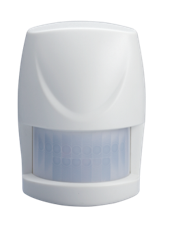
Product Picture


1 - Basic Set Level
The Basic Set Level determines the value that will be sent from the Basic Set command for devices associated with Group 2. For a Binary Switch Device (e.g., receptacle or appliance module), it will be a simple ON command. For a Multilevel Switch Device (e.g., a dimmer), it will be set to the level set by this parameter.Size: 1 byte
Default: 99
Minimum: 0
Maximum: 0
Possible values
| From | To | Desription |
|---|---|---|
| 1 | 99 | Basic Set Level |
3 - Sensitivity level
In order to provide the best efficiency of the sensor, it is recommended to test the sensor with movements from the farthest end of the coverage area at first time of use. If movements cannot be detected consistently, simply adjust the sensitivity level with Configuration Parameter #3. This parameter can be configured with the value of 1 through 10, where 1 means low sensitivity and 10 means high sensitivity.Size: 1 byte
Default: 6
Minimum: 0
Maximum: 0
Possible values
| From | To | Desription |
|---|---|---|
| 1 | 10 | Sensitivity level low (1) to high (10) |
4 - Re-trigger Interval
The Re-trigger Interval Setting determines the amount of time between when the sensor will retrigger a signal that motion has been detected. During this time, the sensor will not report motion even though motion may be detected. The time interval can be set between 5 secs to 3600 secs.Size: 1 byte
Default: 180
Minimum: 0
Maximum: 0
Possible values
| From | To | Desription |
|---|---|---|
| 5 | 3600 | Time in seconds |
5 - Lux Level
The user can set a lux level percentage which determines when the light sensor will be activated. If the lux level of ambient illumination falls below this percentage, and motion is detected, the sensor will emit a Z-Wave ON Command to the controller. Percentage can be set between 1% to 100%.Size: 1 byte
Default: 20
Minimum: 0
Maximum: 0
Possible values
| From | To | Desription |
|---|---|---|
| 1 | 100 | In percentages |
6 - On - Off duration
The function of on-off duration setting will be useful if the detector is connected with a module or lighting. The duration determines how long the module/lighting should stay ON. For instance, Lamp Module turns OFF 100 secs after it has been turned ON. This parameter can be configured with the value of 5 through 3600, where 5 means 5 second delay and 3600 means 3600 seconds of delay.Size: 2 bytes
Default: 15
Minimum: 0
Maximum: 0
Possible values
| From | To | Desription |
|---|---|---|
| 5 | 3600 | In seconds |
The sensor supports Auto Inclusion feature where it will automatically enter Inclusion mode when first powered up after a factory reset. 1. Use a screwdriver to detach the rear cover. 2. Put a Z-Wave Controller into inclusion mode. 3. Insert 1 CR123 3V battery to the battery compartment with the correct polarity. The LED on the device should turn ON. 4. The Inclusion process should be completed when the LED stops blinking. 5. Do not refit the rear cover yet and proceed to the Testing section before mounting. Note: If Auto Inclusion fails, refer to the Troubleshooting section regarding Manual Inclusion. 1. Put the Z-Wave Controller into Inclusion mode 2. Press the tamper switch 3 times within 1.5 seconds to put the unit into inclusion mode
1. Put the Z-Wave Controller into Exclusion mode 2. Press the tamper switch 3 times within 1.5 seconds to put the unit into exclusion mode
After it has been included into a Z-Wave network, the sensor will go to sleep but will send a Wakeup Notification Command periodically at preset interval to the controller. The Motion sensor will stay awake for at least 10 seconds and then go back to sleep to conserve battery life. The time interval between Wakeup Notification Commands can be set in the Wakeup Command Class based on the range values below: Minimum Wake Up Interval: 600s (10 minutes) Maximum Wake Up Interval: 86400s (1 day) Default Wake Up Interval: 14400s (4 hours) Wake Up Interval Step Seconds: 600s (10 minutes)
This procedure should only be used when the controller is inoperable: 1. Press the tamper switch 3 times within 1.5 seconds to put the unit into exclusion mode 2. Within 1 second of step 1, press the tamper switch again and hold until LED is off (about 5 seconds) 3. Node ID is excluded. The device reverts to factory default state and will be in auto-inclusion mode for 4 minutes
The sensor reports battery level. Following are the values: 20 - 100 will be displayed as battery % 0xFF indicates low battery
| Type | Value(s) |
|---|
| Group | Type |
|---|---|
| Light sensor |
|
| Sensor type |
|---|
| General Purpose |
| Illuminance |