keyWe
KeyWe Rim Lock
GKW-1000Z
Door Lock - Keypad
HW: 1 FW: 1.00:01.00
ZM5101
6.71.03
0x037B (891)
0x0003 (3)
0x0001 (1)
ZC10-19026373
2018-12-13 20:04:13.077866
N/A
Enhanced 232 Slave
Listening Sleeping Slave
Yes
Smart lock that can be used conveniently with Z-Wave and Bluetooth.
The GKW-1000Z is a smart lock that can be conveniently used with Z-Wave and Bluetooth. You can control the door lock directly from the phone via the Bluetooth function in close range. You can also check the status of the door lock on the outside by connecting to the Z-Wave hub. You can also control door locks and check status via AI Speaker.
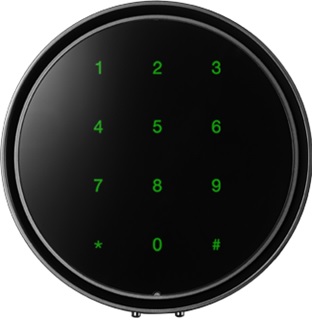
Product Picture
Please proceed with the door lock open. 1. Set the controller in inclusion mode. 2. Open the battery cover of the indoor body and press the [REG] button. 3. Press the Master Pin [1][2][3][4] (Default value) button after pressing the [#] button. 4. Press the [8][8] button after pressing the [*] button.
Please proceed with the door lock open. 1. Set the controller in exclusion mode. 2. Open the battery cover of the indoor body and press the [REG] button. 3. Press the Master Pin [1][2][3][4] (Default value) button after pressing the [#] button. 4. Press the [9][9] button after pressing the [*] button.
Please proceed with the door lock open. Please use this procedure only when the primary controller is missing or otherwise inoperable. 1. Open the battery cover of the indoor body and press the [REG] button. 2. Press the Master Pin [1][2][3][4] (Default value) button after pressing the [#] button. 3. Press the [5] button after pressing the [*] button. 4. Press the [5] button after pressing the [*] button. 5. Press the Master Pin [1][2][3][4] (Default value) button after pressing the [#] button *Master pins can change user settings.
| Type | Value(s) |
|---|
| Group | Type |
|---|---|
| Access Control | (Refer to parameters): State idle |