Climax Technology
Shutter Control
SCM-2ZW
Window Covering - Pos/End Aware
HW: 255 FW: 4.01
ZM5202
6.81.01
0x018E (398)
0x0004 (4)
0x0005 (5)
ZC10-19036397
2019-03-16 01:03:47.856705
N/A
Enhanced 232 Slave
Always On Slave
The SCM-2ZW is a Z-Wave roller shutter control that provides remote operation of roller shutters for home automation and security purposes.
The SCM-2ZW is a Z-Wave roller shutter control that provides remote operation of roller shutters for home automation and security purposes. Automatically or remotely roll up, down or stop mid-way, the SCM-2ZW is directly connected to and controls motorized window treatments, interior and exterior shades and blinds, projection screen, and garage door or driveway gate of your home. With SCM-2ZW, all roller shutters in the house can be configured to automatically open or close according to preset schedules and scenarios.
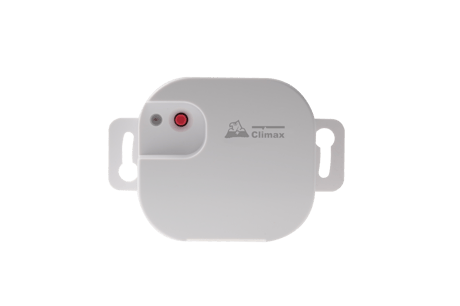
Product Picture


1 - Up Time Setting
For parameter 1, users can set the open time (from down to up) to a value that ranges from 0 to 255 seconds.Size: 2 bytes
Default: 240
Minimum: 0
Maximum: 0
Possible values
| From | To | Desription |
|---|---|---|
| 0 | 255 | The ranges from 0 to 255 seconds. |
2 - Close Time Setting
For parameter 2, users can set the close time (from up to down) time to a value that ranges from 0 to 255 seconds.Size: 2 bytes
Default: 240
Minimum: 0
Maximum: 0
Possible values
| From | To | Desription |
|---|---|---|
| 0 | 255 | The ranges from 0 to 255 seconds. |
3 - Current Position
For parameter 3, users can set the current position to a value that ranges from 0% to 99%.Size: 2 bytes
Default: 99
Minimum: 0
Maximum: 0
Possible values
| From | To | Desription |
|---|---|---|
| 0 | 99 | The ranges from 0% to 99%. |
This product can be included and operated in any Z-Wave network with other Z-Wave certified devices from other manufactures and/or other applications. All non-battery operated nodes within the network will act as repeaters regardless of vendor to increase reliability of the network. 1. Connect the power to Shutter Control (see manual’s Installation). 2. Put the Z-Wave gateway or control panel into Inclusion mode (please refer to the Z-Wave gateway or control panel manual). 3. Within 1.5 seconds, press the Function Button 3 times. 4. Refer to the operation manual of the Z-Wave gateway or control panel to complete the adding process. 5. If the device has already been added (included) into another Z-Wave Gateway/Control Panel, or if the device is unable to be added into the current Z-Wave Gateway/Control Panel, try removing it first (see Removing Device).
The device must be removed from existing Z-Wave network before being added into another. 1. Put the Z-Wave gateway or control panel into Exclusion mode (please refer to the Z-Wave gateway or control panel manual). 2. Within 1.5 seconds, press the Function Button 3 times and the device will be removed from the Z-Wave network.
(Only use factory reset when network Control Panel/Gateway is missing or inoperable). Factory resetting the device will restore it to factory default settings (i.e. excluded from Z-Wave network). Please use the reset procedure only when the primary controller is missing or inoperable. Press and hold the Function Button of the device for 10 seconds to factory reset.
| Type | Value(s) |
|---|