myTEM SmartHome
Radio Socket
MTSOC-100-WL
On/Off Power Switch
HW: 1 FW: 1.00
ZM5101
6.71.03
0x034E (846)
0x0001 (1)
0x0004 (4)
ZC10-19056472
2019-03-20 01:52:48.439565
N/A
Enhanced 232 Slave
Always On Slave
The myTEM Radio Socket is a universal Z-Wave compatible adapter for loads up to 3'600 watts.
The myTEM Radio Socket is a universal, Z-Wave compatible switch/adapter for loads up to 3'600 watts (type F, EU). The power and energy consumption of the connected device is measured. In addition, a temperature and humidity sensor is integrated. These values are reported to the central controller and can be used to control other functions.
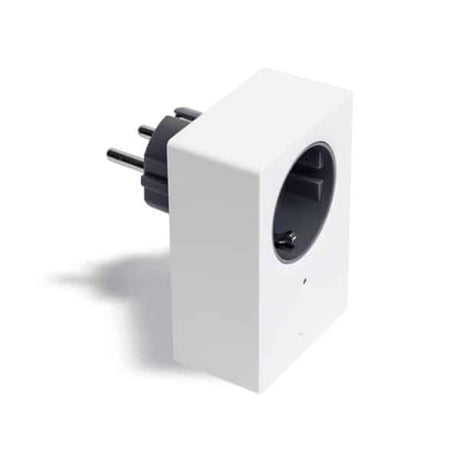
Product Picture


1 - Heartbeat Rate
If the Notification System Heartbeat is on, a Notification Report System Heartbeat is sent periodically every 60 minutes (default value).Size: 2 bytes
Default: 60
Minimum: 1
Maximum: 1440
Possible values
| From | To | Desription |
|---|---|---|
| 1 | 1440 | Heartbeat rate [min] |
2 - Main Voltage
The Main Voltage is used - together with the Phase Shift parameter and the messured current - to calculate the actual power of the output and the cumulated energy.Size: 2 bytes
Default: 230
Minimum: 80
Maximum: 280
Possible values
| From | To | Desription |
|---|---|---|
| 80 | 280 | Main voltage [V] |
3 - Phase Shift - Cosines (Phi)
The Phase Shift is used - together with the Main Voltage parameter and the messured current - to calculate the actual power of the output and the cumulated energy.Size: 2 bytes
Default: 100
Minimum: 0
Maximum: 100
Possible values
| From | To | Desription |
|---|---|---|
| 0 | 100 | Phase shift [0.01%] |
4 - Send Interval Power
If the power value of the output does not change, the Meter Report for the actual power is sent after the Send Interval Power.Size: 2 bytes
Default: 5
Minimum: 1
Maximum: 120
Possible values
| From | To | Desription |
|---|---|---|
| 1 | 120 | Send interval power [min] |
5 - Minimum Delta Power Send
Whenever the calculated power has changed by the Minimum Delta Power Send value since the last value sent, the actual power is sent by a Meter Report.Size: 2 bytes
Default: 5
Minimum: 1
Maximum: 100
Possible values
| From | To | Desription |
|---|---|---|
| 1 | 100 | Minimum delta power [%] |
6 - Send Interval Energy
If the cumulated energy value does not change, the Meter Report for the cumulated energy is sent after the Send Interval Energy.Size: 2 bytes
Default: 5
Minimum: 1
Maximum: 120
Possible values
| From | To | Desription |
|---|---|---|
| 1 | 120 | Send interval energy [min] |
7 - Minimum delta energy send
Whenever the cumulated energy has changed by the Minimum Delta Energy send value since the last value sent, the cumulated energy is sent by a Meter Report.Size: 2 bytes
Default: 2000
Minimum: 1
Maximum: 50000
Possible values
| From | To | Desription |
|---|---|---|
| 1 | 50000 | Minimum delta energy [0.001 kWh] |
8 - Send Interval Temperature
If the temperature value does not change, the Multilevel Sensor Report with the actual temperature is sent after the Send Interval TemperatureSize: 2 bytes
Default: 5
Minimum: 1
Maximum: 120
Possible values
| From | To | Desription |
|---|---|---|
| 1 | 120 | Send interval temperature [min] |
9 - Minimum Delta Temperature Send
Whenever the measured temperature has changed by the Minimum Delta Temperature Send value since the last value sent, the actual temperature is sent by Multilevel Sensor Report.Size: 2 bytes
Default: 5
Minimum: 1
Maximum: 100
Possible values
| From | To | Desription |
|---|---|---|
| 1 | 100 | Minimum delta temperature [0.1 K] |
10 - Send Interval Humidity
If the humidity value does not change, the Multilevel Sensor Report with the actual humidity is sent after the Send Interval Humidity.Size: 2 bytes
Default: 5
Minimum: 1
Maximum: 120
Possible values
| From | To | Desription |
|---|---|---|
| 1 | 120 | Send interval humidity [min] |
11 - Minimum Delta Humidity Send
Whenever the measured humidity has changed by the Minimum Delta Humidity Send value since the last value sent, the actual humidity is sent by a Multilevel Sensor Report.Size: 2 bytes
Default: 50
Minimum: 10
Maximum: 1000
Possible values
| From | To | Desription |
|---|---|---|
| 10 | 1000 | Minimum delta humidity [0.1 %] |
Inclusion (Add) To include (Add) the device to a Z-Wave network, press the button four times in quick succession. When the device is in Add mode, the LED flashes green. When finished, the new status is: Add: The LED lights up briefly in green Remove: The LED lights up briefly in red
Exclusion (Remove) To exclude (Remove) the device from a Z-Wave network, press the button four times in quick succession. When the device is in Add mode, the LED flashes green. When finished, the new status is: Add: The LED lights up briefly in green Remove: The LED lights up briefly in red
Remark: It is recommended to use the primary controller of the previous network unless it is no longer available or damaged. To start the Remove process press the button four times in quick succession. The LED flashes red and then the new status is: Add: The LED lights up briefly in green Remove: The LED lights up briefly in red
| Type | Value(s) |
|---|
| Group | Type |
|---|---|
| Power Management | (Refer to parameters): State idle |
| System | (Refer to parameters): State idle |
| Sensor type |
|---|
| Air Temperature |
| Humidity |
| Meter type |
|---|
| Electric Meter Consumption |