Heatit controls
Heatit Z-Dim
Z-Dim
Light Dimmer Switch
HW: 1 FW: 1.00
ZM5101
6.71.03
0x019B (411)
0x0003 (3)
0x2200 (8704)
ZC10-19106778
2019-10-21 16:59:07.607676
N/A
Enhanced 232 Slave
Always On Slave
Heatit Z-Dim is a Z-Wave rotary dimmer for many different types of light sources. Heatit Z-Dim can dim to a lower level than traditional dimmers, only 1VA. This dimmer makes you able to set the mood in any room of your choosing. It also functions as a scene controller, which enables you to use the dimmer for a large number of tasks.
Heatit Z-Dim is a Z-Wave rotary dimmer for many different types of light sources. The Heatit Z-Dim works on low loads without causing the lights to flicker. It dims LED-bulbs from 1-200VA, 230V halogen and incandescent bulbs, dimable LED-drivers and electronic transformers. The dimmer is not affected by startup inrush currents. L+N leads must be connected. The dimmer is equipped with a multiway switching option. This allows you to light and dim a light source from one dimmer, and later turn it off with another one. Very practical for stairwells, long hallways etc. The dimmer fits into standard Gira System 55 frame systems.
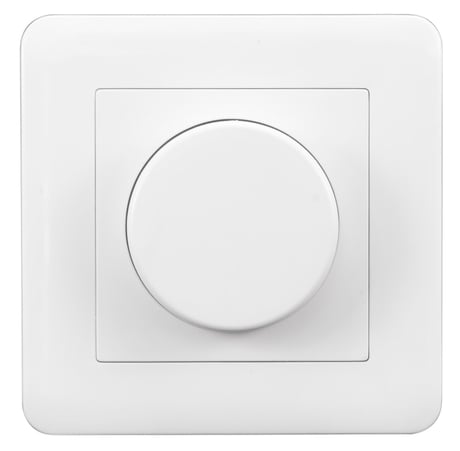
Product Image
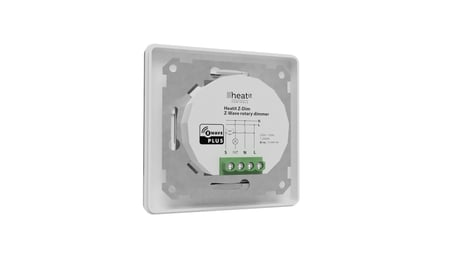
Heatit Z-Dim mounting
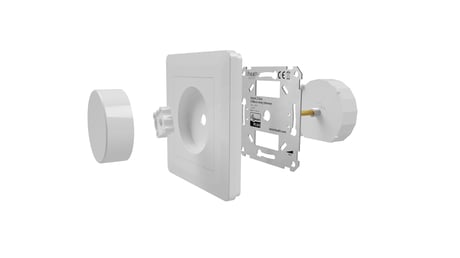
Heatit Z-Dim packshot
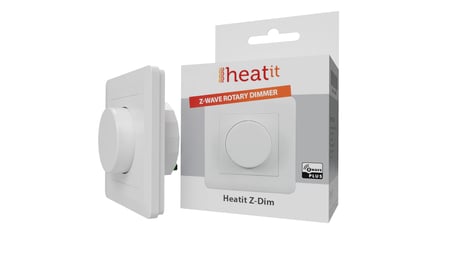
Heatit Z-Dim


1 - Connected Load.
The parameter defines the value of connected load. Refer to Paragraph 8 ”Power Metering”.Size: 1 byte
Default: 0
Minimum: 0
Maximum: 200
Possible values
| From | To | Desription |
|---|---|---|
| 0 | 0 | Not configured (Default) |
| 1 | 200 | 1-200 Watts connected load |
2 - Minimum Dim level.
The parameter defines the lowest dimming level of the dimmer. The value must be lower than parameter 3 ”Maximum Dim Level”.Size: 1 byte
Default: 20
Minimum: 1
Maximum: 98
Possible values
| From | To | Desription |
|---|---|---|
| 1 | 98 | 1% - 98% Default is 20 (20%) |
3 - Maximum Dim level.
The parameter defines the highest dimming level of the dimmer. The value must be higher than parameter 2 ”Minimum Dim Level”.Size: 1 byte
Default: 85
Minimum: 2
Maximum: 99
Possible values
| From | To | Desription |
|---|---|---|
| 2 | 99 | 2% - 99% Default is 85 (85%) |
4 - Total steps.
The parameter defines how many steps it should take to dim from minimum to maximum dim level. (One round = 20 steps)Size: 1 byte
Default: 15
Minimum: 5
Maximum: 255
Possible values
| From | To | Desription |
|---|---|---|
| 5 | 255 | 5-255 steps. Default is 15 (3/4 round) |
5 - Double press function.
The parameter defines the double press functionality.Size: 1 byte
Default: 0
Minimum: 0
Maximum: 1
Possible values
| From | To | Desription |
|---|---|---|
| 0 | 0 | Central Scene notification (Default) |
| 1 | 1 | Dim to highest level |
6 - Scene controller.
The parameter enables scene controller.Size: 1 byte
Default: 1
Minimum: 0
Maximum: 1
Possible values
| From | To | Desription |
|---|---|---|
| 0 | 0 | Disabled |
| 1 | 1 | Active (Default) |
7 - Switch ON level.
The parameter defines the dimming level when restored from the OFF state by push button.Size: 1 byte
Default: 0
Minimum: 0
Maximum: 99
Possible values
| From | To | Desription |
|---|---|---|
| 0 | 0 | Restores last dim level (Default) |
| 1 | 99 | 1% - 99% |
8 - Dimming Duration.
The parameter defines how long it takes to dim to the desired level. Note! Only Multilevel Switch Command Class is affected by this parameter.Size: 1 byte
Default: 1
Minimum: 0
Maximum: 255
Possible values
| From | To | Desription |
|---|---|---|
| 0 | 0 | Disabled |
| 1 | 127 | Duration in seconds (1 - 127 seconds. Default is 1) |
| 128 | 255 | Duration in minutes (1 - 127 minutes) |
9 - Meter Report Interval.
The parameter defines the report interval for Power Metering.Size: 2 bytes
Default: 60
Minimum: 0
Maximum: 32767
Possible values
| From | To | Desription |
|---|---|---|
| 0 | 0 | Disabled |
| 30 | 32767 | Duration in seconds (30 - 32 767. Default is 60) |
10 - Power restore level.
The parameter defines initial dimming level after power loss.Size: 1 byte
Default: 50
Minimum: 1
Maximum: 99
Possible values
| From | To | Desription |
|---|---|---|
| 1 | 99 | 1% - 99% Default is 50 (50%) |
Add Please refer to your primary controller manual on how to enter add mode. The device can only be added to the network if the primary controller is in add mode. When the primary controller is set to add modus press the main button on the dimmer 6 times in a rapid sequence. If the device already belongs to a network, follow the removing process before adding it in your network. Otherwise, the adding of this device will fail.
Remove Please refer to your primary controller manual on how to enter remove mode. The device can only be removed from the network if the primary controller is in remove mode. When the primary controller is set to remove modus press the main button on the dimmer 6 times in a rapid sequence. When the device is removed from the network, the device will revert to factory default settings.
By pressing and holding the main button for 20 seconds, the dimmer will perform a complete factory reset. The connected light source will blink once and go in the ”OFF” state if successfully reset. NB! Please use this procedure only when the primary controller/gateway is missing or otherwise inoperable.
Paragraph 8 "Power Metering" configuration guide.
The Z-Wave DSK can be found in the QR-Code and is located in 3 locations; 1. Box of the product. 2. On physical product, placed on the metal frame. 3. On the PCB.
Add Please refer to your primary controller manual on how to enter add mode. The device can only be added to the network if the primary controller is in add mode. When the primary controller is set to add modus press the main button on the dimmer 6 times in a rapid sequence. If the device already belongs to a network, follow the removing process before adding it in your network. Otherwise, the adding of this device will fail.
Remove Please refer to your primary controller manual on how to enter remove mode. The device can only be removed from the network if the primary controller is in remove mode. When the primary controller is set to remove modus press the main button on the dimmer 6 times in a rapid sequence. When the device is removed from the network, the device will revert to factory default settings.
| Type | Value(s) |
|---|
| Meter type |
|---|
| Electric Meter Consumption |