Aeotec
Heavy Duty Smart Switch Gen5
ZW078-F
On/Off Power Switch
HW: 78 FW: 3.28
ZM5202
6.51.10
0x0086 (134)
0x0903 (2307)
0x004E (78)
ZC10-19036399
2019-03-16 01:09:26.708438
N/A
Enhanced 232 Slave
Always On Slave
Aeotec Heavy Duty Smart Switch Gen5 is an on/off switch module that also provides energy metering.
Aeotec Heavy Duty Smart Switch Gen5 is a Z-Wave switch controller that can also report the wattage energy usage and KWH usage of the device wired in to it. As part of its switching functionality, Heavy Duty Smart Switch Gen5 can be controlled by other Z-Wave devices to turn loads on or off. It can bear up to 40 amps current of resister loads. It also act as a repeater, forwarding Z-Wave command messages to destination nodes if the originating controller is out of range from the destination node. By taking advantage of the Z-Wave mesh network, commands can be routed to their destination via intermediary Z-Wave products. Products that are Z-Wave certified can be used and communicate with other Z-Wave certified device. The Switch is also a security Z-wave device and supports Over The Air (OTA) feature for the products firmware upgrade.
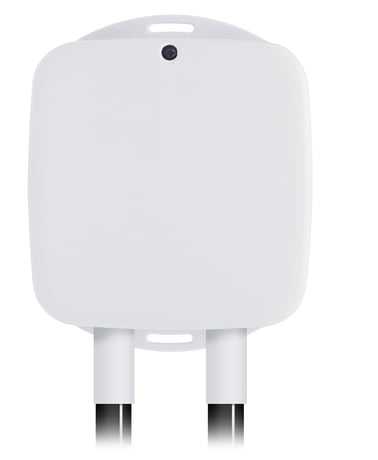
Product Picture


3 - Current Overload Protection.
Current Overload Protection. Output load will be closed after 2 minutes if the current overruns (US: 16.5A, AU: 10.5A, EU: 14A).Size: 1 byte
Default: 0
Minimum: 0
Maximum: 0
Possible values
| From | To | Desription |
|---|---|---|
| 0 | 0 | Disabled |
| 1 | 1 | Enabled |
20 - Configure the output load status after re-power on
Configure the output load status after re-power onSize: 1 byte
Default: 0
Minimum: 0
Maximum: 0
Possible values
| From | To | Desription |
|---|---|---|
| 0 | 0 | The last status before the power outage. |
| 1 | 1 | Always on |
| 2 | 2 | Always off |
80 - To set which notification would be sent to the associated nodes in association group 1
To set which notification would be sent to the associated nodes in association group 1 when the state of output load is changed.Size: 1 byte
Default: 0
Minimum: 0
Maximum: 0
Possible values
| From | To | Desription |
|---|---|---|
| 0 | 0 | Nothing |
| 1 | 1 | Hail CC |
| 2 | 2 | Basic Report CC |
90 - Enable/disable the parameter 91 and 92
Enable/disable the parameter 91 and 92.Size: 1 byte
Default: 1
Minimum: 0
Maximum: 0
Possible values
| From | To | Desription |
|---|---|---|
| 0 | 0 | Disable |
| 1 | 1 | Enable |
91 - Induce an automatic report
The value here represents minimum change in wattage (in terms of wattage) to induce a Meter ReportSize: 2 bytes
Default: 50
Minimum: 0
Maximum: 0
Possible values
| From | To | Desription |
|---|---|---|
| 0 | 32767 | The threshold can be set from 0 to 32767 watt. |
92 - Induce an automatic report
The value here represents minimum change in wattage percent (in terms of percentage) to induce a Meter ReportSize: 1 byte
Default: 10
Minimum: 0
Maximum: 0
Possible values
| From | To | Desription |
|---|---|---|
| 0 | 100 | The threshold can be set from 0 to 100%. |
100 - Reset the parameters 101-103
Reset the parameters 101-103.Size: 1 byte
Default: 0
Minimum: 0
Maximum: 0
Possible values
| From | To | Desription |
|---|---|---|
| 0 | 0 | Reset the parameters 101-103. |
101 - To set which report would be sent in Report group 1
To set which report would be sent in Report group 1Size: 4 bytes
Default: 4
Minimum: 0
Maximum: 0
Possible values
| From | To | Desription |
|---|---|---|
| 1 | 1 | Send Meter Report of Voltage |
| 2 | 2 | Send Meter Report of Current |
| 4 | 4 | Send Meter Report of Watt |
| 8 | 8 | Send Meter Report of kWh |
102 - To set which report would be sent in Report group 2
To set which report would be sent in Report group 2Size: 4 bytes
Default: 8
Minimum: 0
Maximum: 0
Possible values
| From | To | Desription |
|---|---|---|
| 1 | 1 | Send Meter Report of Voltage |
| 2 | 2 | Send Meter Report of Current |
| 4 | 4 | Send Meter Report of Watt |
| 8 | 8 | Send Meter Report of kWh |
103 - To set which report would be sent in Report group 3
To set which report would be sent in Report group 3Size: 4 bytes
Default: 0
Minimum: 0
Maximum: 0
Possible values
| From | To | Desription |
|---|---|---|
| 1 | 1 | Send Meter Report of Voltage |
| 2 | 2 | Send Meter Report of Current |
| 4 | 4 | Send Meter Report of Watt |
| 8 | 8 | Send Meter Report of kWh |
110 - Reset the parameters 111-113
Reset the parameters 111-113 to default values.Size: 1 byte
Default: 0
Minimum: 0
Maximum: 0
Possible values
| From | To | Desription |
|---|---|---|
| 0 | 0 | Reset the parameters 111-113 to default values. |
111 - Set the time interval of sending Report
Set the time interval of sending ReportSize: 4 bytes
Default: 5
Minimum: 0
Maximum: 0
Possible values
| From | To | Desription |
|---|---|---|
| 1 | 2147483647 | Interval Seconds |
112 - Set the time interval of sending Report
Set the time interval of sending ReportSize: 4 bytes
Default: 120
Minimum: 0
Maximum: 0
Possible values
| From | To | Desription |
|---|---|---|
| 1 | 2147483647 | Interval Seconds |
113 - Set the time interval of sending Report
Set the time interval of sending ReportSize: 4 bytes
Default: 120
Minimum: 0
Maximum: 0
Possible values
| From | To | Desription |
|---|---|---|
| 1 | 2147483647 | Interval Seconds |
200 - Partner ID
Partner IDSize: 1 byte
Default: 0
Minimum: 0
Maximum: 0
Possible values
| From | To | Desription |
|---|---|---|
| 0 | 0 | Aeon Labs Standard Product |
| 1 | 127 | Others |
252 - Enable/disable Configuration Locked
Enable/disable Configuration LockedSize: 1 byte
Default: 0
Minimum: 0
Maximum: 0
Possible values
| From | To | Desription |
|---|---|---|
| 0 | 0 | Disable |
| 1 | 1 | Enable |
255 - Reset the Smart Switch 6
Reset the Smart Switch 6 to factory default.Size: 1 byte
Default: 0
Minimum: 0
Maximum: 0
Possible values
| From | To | Desription |
|---|---|---|
| 1 | 1 | Reset all configuration parameters to default. |
| 1431655765 | 1431655765 | Reset the Smart Switch to factory default |
Turn the primary controller of Z-Wave network into inclusion mode, short press the product’s Action button that you can find on the product's housing.
Turn the primary controller of Z-Wave network into exclusion mode, short press the product’s Action button that you can find on the product's housing.
Press and hold the Action button that you can find on the product's housing for 20 seconds and then release. This procedure should only be used when the primary controller is inoperable.
Support ""Over the Air Firmware Updating"" and “Z-Wave Security”.
| Type | Value(s) |
|---|
| Sensor type |
|---|
| Air Temperature |
| Meter type |
|---|
| Electric Meter Consumption |