LEEDARSON
Motion Sensor
7C-SS-VA-H0-01
Notification Sensor
HW: 1 FW: 1.05
ZM5101
6.81.04
0x0300 (768)
0x0301 (769)
0x0026 (38)
ZC10-19046442
2019-04-24 02:44:02.090738
N/A
Enhanced 232 Slave
Reporting Sleeping Slave
Yes
The Motion Sensor lets you know when movement is detected in a certain area and can trigger different actions in response to that movement (or lack of movement).
This motion sensor is a passive infrared sensor with pet immunity function. This sensor can effectively shield a certain weight of animals to prevent false triggering caused by animal passing. Motion Sensor can be included and operated in any Z-Wave network with other Z-Wave certified devices from other manufacturers. Motion Sensor is supports the Over-The-Air (OTA) feature for the product’s firmware upgrade.
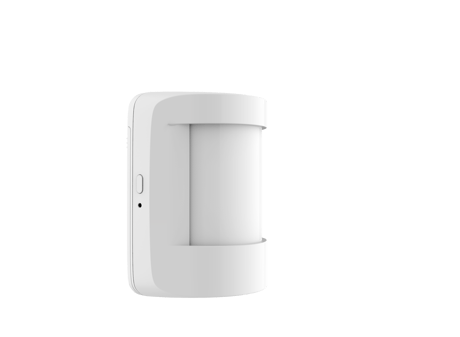
Product Picture


10 - Low Battery Power Level Low battery power level of alarm threshold values
Low battery power level of alarm threshold values: the value range are 0~50 for percentage, the battery low power level can setting 0%~50%.Size: 1 byte
Default: 10
Minimum: 0
Maximum: 0
Possible values
| From | To | Desription |
|---|---|---|
| 0 | 50 | Low battery power level of alarm threshold values |
13 - Setup the wait time of PIR for clear the motion.
Setup the wait time of PIR for clear the motion.Valid values: 5~15300 seconds.Size: 2 bytes
Default: 30
Minimum: 0
Maximum: 0
Possible values
| From | To | Desription |
|---|---|---|
| 5 | 15300 | Setup the wait time of PIR for clear the motion. |
14 - When the Motion Sensor is triggered, if this parameter is 0x01 then it will send Basic set command to group 1.
When the Motion Sensor is triggered, if this parameter is 0x01 then it will send Basic set command to group 1. 0 = Don't send. 1 = Send.Size: 1 byte
Default: 0
Minimum: 0
Maximum: 0
Possible values
| From | To | Desription |
|---|---|---|
| 0 | 1 | When the Motion Sensor is triggered, if this parameter is 0x01 then it will send Basic set command to group 1. |
15 - PIR triggers the correspondence between the value of the Basic set and the PIR state.
PIR triggers the correspondence between the value of the Basic set and the PIR state. -If this value is 0x00 :PIR triggers send the basic set with 0xFF, PIR alarm release send the basic set with 0x00. -If this value is 0x01 :PIR triggers send the basic set with 0x00, PIR alarm release send the basic set with 0xFF. Only support 0x00 and 0x01 values as valid value.Size: 1 byte
Default: 0
Minimum: 0
Maximum: 0
Possible values
| From | To | Desription |
|---|---|---|
| 0 | 0 | PIR triggers send the basic set with 0xFF, PIR alarm release send the basic set with 0x00. |
| 1 | 1 | PIR triggers send the basic set with 0x00, PIR alarm release send the basic set with 0xFF. |
16 - PIR triggers the correspondence between the value of the Basic set and the PIR stateMotion detection sensitivity level is a value between 1 and 10.
Motion detection sensitivity level is a value between 1 and 10. This value affects the amount of motion energy required to generate a motion event and also affects the detection range and angle. 1 = Lowest Motion SensitivitySize: 1 byte
Default: 9
Minimum: 0
Maximum: 0
Possible values
| From | To | Desription |
|---|---|---|
| 0 | 10 | Motion detection sensitivity level is a value between 1 and 10. 1 = Lowest Motion Sensitivity, 10 = Highest Motion Sensitivity |
17 - Enable/disable pet immunity mode.
Enable/disable pet immunity mode. This feature is lens dependent and detection range may be reduced when Pet Immunity is enabled. 0 = Disable the pet immunity mode 1 = Enable the pet immunity modeSize: 1 byte
Default: 1
Minimum: 0
Maximum: 0
Possible values
| From | To | Desription |
|---|---|---|
| 0 | 1 | Enable/disable pet immunity mode.0 = Disable the pet immunity mode,1 = Enable the pet immunity mode |
Add the Motion Sensor into the Z-Wave network: 1. Power on your Motion Sensor, and let your Z-Wave controller into add/inclusion mode. 2. Implement the button action, the Motion Sensor will send out a node info security CC in command class list (Security inclusion), the LED will be fast blink for 60 seconds. 3. If the inclusion is successful, the LED will be turn on within 2 seconds. If failed, LED will be turn off forever, and please repeat the steps in above.
Remove Motion Sensor from a Z-Wave network: 1. Power on your Motion Sensor, and let the Z-Wave primary controller into remove mode. 2. Press the button on the Motion Sensor, the LED will be turn on for 60 seconds. 3. If Motion Sensor has been successfully removed from your Z-Wave network, the LED will be fast blink 2 seconds. If failed, LED will be turn off forever, and please repeat the steps in above.
Reset Motion Sensor to factory default. NOTE: 1. Triggering this action, in 5 seconds LED will be fast blink. The LED will be turn on within 2 second until hold time is equal to 5 seconds. Motion Sensor will send “Device_Reset_Locally” to the main controller and exclude from the Z-Wave network when the button is released, this procedure will reset the sensor to factory default. 2. Please use this procedure only when the network primary controller is missing or otherwise inoperable. 3. When not in the network, ignore this operation.
| Type | Value(s) |
|---|
| Group | Type |
|---|---|
| Light sensor |
|
| Sensor type |
|---|
| General Purpose |
| Illuminance |