Simon
S100 Switch IO (China)
10003034-13X
On/Off Power Switch
HW: 1 FW: 4.24:72.15:65.15
ZM5202
6.51.07
0x0267 (615)
0x0001 (1)
0x0000 (0)
ZC10-19046455
2019-04-27 19:21:05.981105
N/A
Enhanced Slave
Always On Slave
Simon Electronic Switch
Simon Electronic Switch IO integrated by Electronic Switch that provides power Switch and Rocker that provides Z-Wave communication attributes.
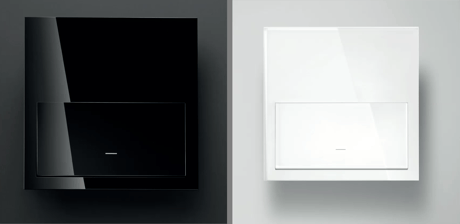
Product Picture


1 - Association LED
Allows to turn ON or OFF the central LEDSize: 1 byte
Default: 0
Minimum: 0
Maximum: 0
Possible values
| From | To | Desription |
|---|---|---|
| 0 | 0 | Turns the LED OFF |
| 255 | 255 | Turns the LED ON |
9 - Calibration
Performs a device calibrationSize: 1 byte
Default: 0
Minimum: 0
Maximum: 0
Possible values
| From | To | Desription |
|---|---|---|
| 1 | 1 | Device performs calibration using Trailing and leading Edge and decides which one is better |
| 2 | 2 | Device is calibrated using Trailing Edge. |
| 3 | 3 | Device is calibrated using Leading Edge |
10 - Delay ON
Sets the delay time to turn on the lightSize: 1 byte
Default: 0
Minimum: 0
Maximum: 0
Possible values
| From | To | Desription |
|---|---|---|
| 0 | 0 | Disables timing |
| 1 | 127 | 1 second (0x01) to 127 seconds (0x7F) in 1 second resolution |
| 128 | 254 | 1 minute (0x80) to 127 minutes (0xFE) in 1 minute resolution |
11 - Activation TIME
Sets the time the light stays onSize: 1 byte
Default: 0
Minimum: 0
Maximum: 0
Possible values
| From | To | Desription |
|---|---|---|
| 0 | 0 | Disables timing |
| 1 | 127 | 1 second (0x01) to 127 seconds (0x7F) in 1 second resolution |
| 128 | 254 | 1 minute (0x80) to 127 minutes (0xFE) in 1 minute resolution |
12 - Behaviour of LED in repose
Sets the central led ilumination when the key is in repose stateSize: 1 byte
Default: 0
Minimum: 0
Maximum: 0
Possible values
| From | To | Desription |
|---|---|---|
| 0 | 0 | LED OFF |
| 255 | 255 | LED on at 20 percent of maximum level |
13 - Lock Input
Locks or Unlocks the direct control of the loadSize: 1 byte
Default: 0
Minimum: 0
Maximum: 0
Possible values
| From | To | Desription |
|---|---|---|
| 0 | 0 | Unlock the direct control of load |
| 255 | 255 | Lock the direct control of load |
15 - Reset default
Resets groups, Z-Wave status, and some or all configurations depending on the configuration value (write only)Size: 2 bytes
Default: 0
Minimum: 0
Maximum: 0
Possible values
| From | To | Desription |
|---|---|---|
| 39015 | 39015 | Parameters, Groups, and Z-Wave status are restored to default value. |
| 17170 | 17170 | Parameters, except Lock long press are restored to default |
16 - Delay OFF
Sets the delay time to turn off the lightSize: 1 byte
Default: 0
Minimum: 0
Maximum: 0
Possible values
| From | To | Desription |
|---|---|---|
| 0 | 0 | Disables timing |
| 1 | 127 | 1 second (0x01) to 127 seconds (0x7F) in 1 second resolution |
| 128 | 254 | 1 minute (0x80) to 127 minutes (0xFE) in 1 minute resolution |
19 - Press action
Controls the behavior of the product when the key is pressedSize: 1 byte
Default: 0
Minimum: 0
Maximum: 0
Possible values
| From | To | Desription |
|---|---|---|
| 0 | 0 | When short press, device toggles the load |
| 1 | 1 | When short press, device turns ON the load |
| 2 | 2 | When short press, device turns OFF the load |
| 4 | 4 | When short press, device turns ON the load. When hold press from 2 seconds to 10 seconds device turns OFF the load. The Slider does not works.With this configuration, the device will not send the Node Info neither Show the LEDs feedback with this press action |
20 - Identify
Allows to identify a product using its central LED (write only)Size: 1 byte
Default: 0
Minimum: 0
Maximum: 0
Possible values
| From | To | Desription |
|---|---|---|
| 255 | 255 | the central LED blinks for 5 seconds in order to identify the device |
21 - State of charge
Reports the state of the charge (read only)Size: 1 byte
Default: 0
Minimum: 0
Maximum: 0
Possible values
| From | To | Desription |
|---|---|---|
| 45056 | 45056 | Load is OFF |
| 45057 | 45057 | Load is ON |
| 45312 | 45312 | Load is OFF |
| 45567 | 45567 | Load is ON |
23 - Calibration Required
Reports if calibration is required or not (read only)Size: 1 byte
Default: 0
Minimum: 0
Maximum: 0
Possible values
| From | To | Desription |
|---|---|---|
| 0 | 0 | Calibration is not required |
| 255 | 255 | It is necessary to calibrate the dimmer to work properly |
27 - Lock long press
Locks or unlocks the long press on the keySize: 1 byte
Default: 0
Minimum: 0
Maximum: 0
Possible values
| From | To | Desription |
|---|---|---|
| 0 | 0 | Long press works as described previously |
| 255 | 255 | Long press from 2 seconds to 20 seconds does not send a Node info. With a long press above 30 seconds, all parameters except Lock long press |
When the pushbutton is released after a press of (2sec<T<20sec) the device will send a NIF to include from Z-Wave network or perform an association with other Z-Wave device. Main LED will Blink with 0,3 sec period to inform that NIF can be send after release of pushbutton. This process does not perform a default reset of configurations. Main LED will Blink with 0,3 sec period to inform that NIF can be send after release of pushbutton.
When the pushbutton is released after a press of (2sec<T<20sec) the device will send a NIF to exclude from Z-Wave network or perform an association with other Z-Wave device. Main LED will Blink with 0,3 sec period to inform that NIF can be send after release of pushbutton. This process does not perform a default reset of configurations. Main LED will Blink with 0,3 sec period to inform that NIF can be send after release of pushbutton.
When the pushbutton is released after a press of (20sec<T) the device will perform a factory default values operation, excluding it from network and resetíng the configuration parameters. Main LED will perform 1 Blink with 5 sec. Please use this procedure only when the network primary controller is missing or otherwise inoperable.
Switch IO is ready to operate with Z-Wave controllers and configured to be managed by Simon100 IO APP using the HUB plug IO for getting a better user experience.
| Type | Value(s) |
|---|
| Meter type |
|---|
| Electric Meter Consumption |